⚡ World events
👤 For: Game Masters · 💳 Plan: All plans · 🔄 Updated 2026-10-17
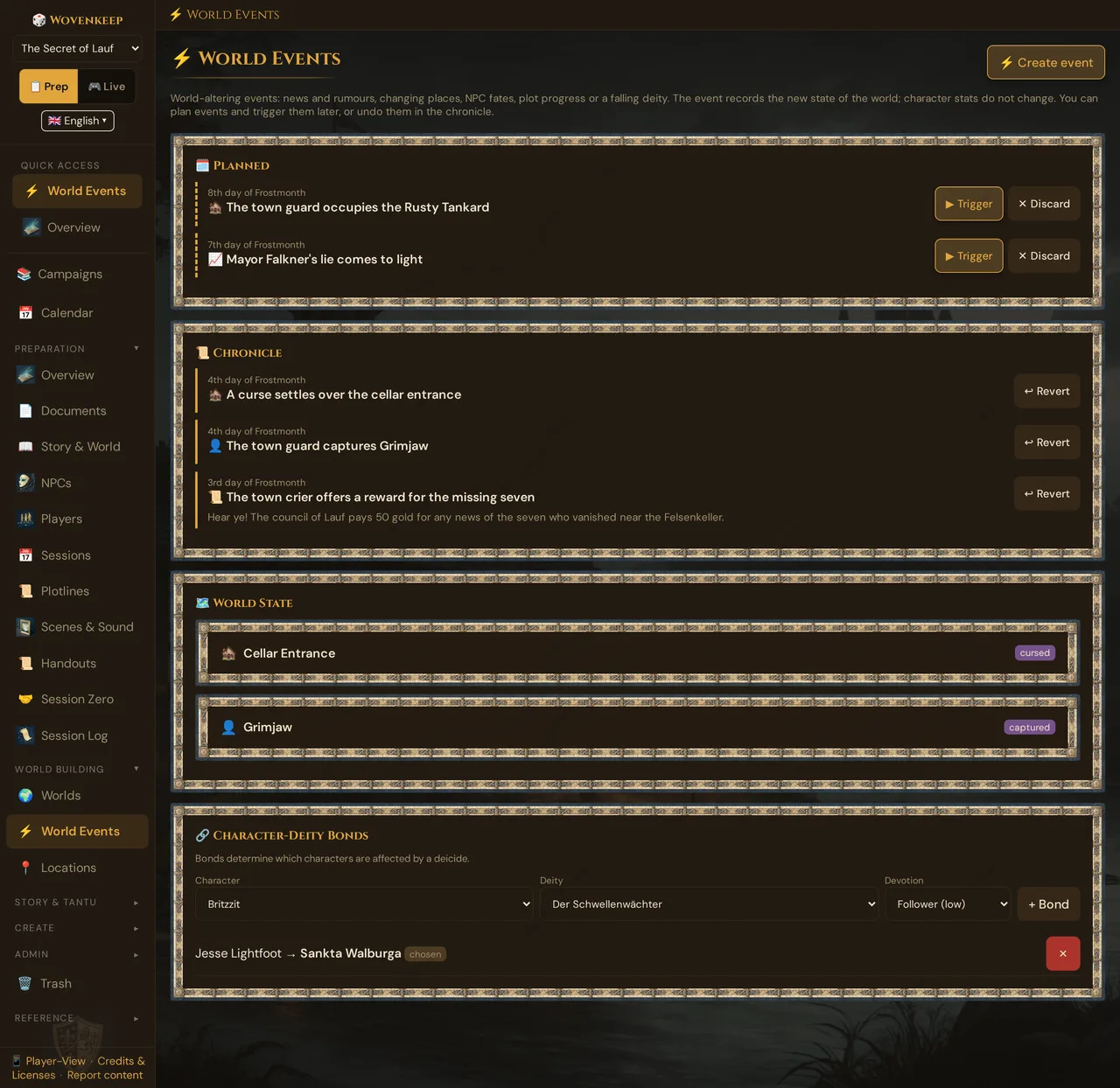
When something changes your world — news spreads, a place is cursed, an NPC is captured, the plot moves on, a god is slain — World Events records it. Each event lands in a chronicle and in the world state, and where it matters it also shows up in your NPC list, your locations and your plotlines. You can plan events ahead, trigger them at the right moment and undo them later. Character stats never change.
What it does
- Five kinds of event: 📜 news or rumour, 🏚️ a place changes, 👤 an NPC's fate, 📈 the plot moves on, 💀 a deity falls.
- Records the new state of the world — in the 📜 Chronicle and in the 🗺️ World State, and, depending on the kind, as a badge in your location list, as 💀 in the NPC list or as an activated plotline.
- Plan now, trigger later: prepared events wait on the 🗓️ Planned card until you trigger them — or discard them.
- Real undo: ↩︎ Revert restores the state before the event. Whatever a later event changed in the same place stays.
- No hidden mechanics: an event never changes hit points, ability scores or any other character stat.
When to use it
Reach for World Events when a moment changes the setting, not just one scene:
- a rumour or announcement spreads — a reward notice, the king's death, the closing of the city gates;
- a place changes — the inn is occupied, the temple cursed, the village abandoned or burned down;
- an NPC dies, disappears, is captured or comes back;
- a plotline that was only hinted at or paused becomes active, or one of its objectives is reached;
- the party kills a god (or a god dies off-screen) and the faithful should feel the loss.
Prepare the big turns before the session as planned events and trigger them with one click when the moment comes. For ordinary scene-to-scene play, use Scenes (prep) and the live Scene push instead.
Where to find it
Sidebar → World Building → ⚡ World Events. The section belongs to the campaign you have open; without one, it asks you to select or create a campaign.
From top to bottom it shows ⚡ Create event (top right), the 🗓️ Planned card, the 📜 Chronicle, the 🗺️ World State and the 🔗 Character-Deity Bonds.
The five kinds of event
⚡ Create event opens ⚡ What kind of event?:
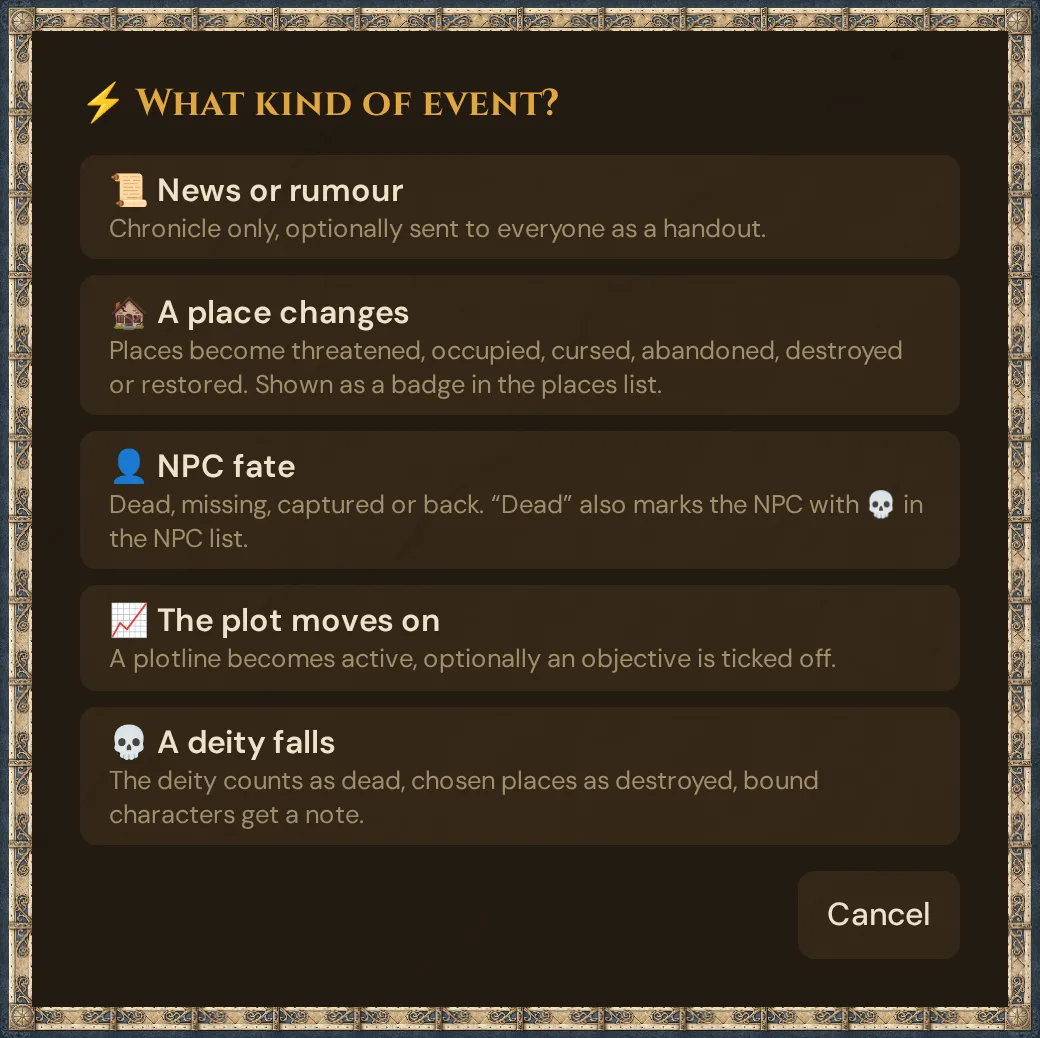
| Kind | You fill in | What the event changes |
|---|---|---|
| 📜 News or rumour | Text of the news (optional); during a running session also Send to everyone as a handout | Nothing in the world — only the chronicle entry, with your text |
| 🏚️ A place changes | Affected Places (multi-select) and a New state: threatened, occupied, cursed, abandoned, destroyed or restored (normal) | The places get that state — in the world state and as a badge in your location list. restored (normal) removes the badge |
| 👤 NPC fate | NPCs (multi-select) and a Fate: dead, missing, captured or back again | dead also marks the NPC as not alive: 💀 in the NPC list, and it disappears from the NPC choices in Live. back again makes the NPC alive again. missing and captured show only in the world state |
| 📈 The plot moves on | Plotline and Tick off objective (optional) — only open objectives are offered | A plotline that was foreshadowed or on hold becomes active; any other status stays. The chosen objective is ticked off |
| 💀 A deity falls | Its own dialog — see The Deicide | The deity counts as dead, chosen places as destroyed, bound characters get a note |
The first four kinds share one dialog: Headline * (required — it becomes the chronicle entry), the fields of the kind, Game Time (optional) (free text such as 3rd day of Frostmonth) and the box Plan only – takes effect when you trigger it under “Planned”. Create event saves the event right away — there is no extra confirmation. With Plan only ticked, the button reads Plan event.
Step by step
- Open ⚡ World Events and click ⚡ Create event.
- Pick the kind of event.
- Type a Headline — for example The town guard captures Grimjaw.
- Fill in the fields of the kind (places, NPCs, plotline …) and, if you like, a Game Time.
- Leave Plan only unticked to let the event take effect now, or tick it to prepare the event for later.
- Click Create event — with Plan only, the button reads Plan event. A short message confirms Event created. or Event planned. It takes effect when you trigger it under “Planned”.
💡 Tip: Prepare the turns of the next session as planned events. At the table, one click on ▶ Trigger is enough — and nothing changes before that.
Planned events
An event created with Plan only changes nothing yet. It waits on the 🗓️ Planned card — with its game time, icon and headline — and does not appear in the chronicle.
- ▶ Trigger asks Trigger the planned event now? Once you confirm, the event takes effect, moves into the chronicle and can be undone there.
- A planned deicide with Tantu's continuation shows ✨ with AI continuation and its price on the card. After your confirmation, the cost window ✨ Tantu helps you follows; Cancel there stops the trigger, and nothing changes. With Hide AI features switched on, the deicide takes effect without the continuation.
- A planned 📜 News or rumour that you trigger during a running session then asks Also send the message to everyone as a handout? — confirm, and headline and text arrive in every player's Documents tab (Sent to everyone as a handout.).
- ✕ Discard asks Discard the planned event? — The event is permanently deleted and never takes effect. — with Cancel and Confirm. Once you confirm, the event is gone (Planned event discarded.). It never took effect, so nothing needs to be undone.
For a planned deicide, the character–deity bonds are read when you trigger it, so bonds you add in between still count.
Undoing an event
Every event in the chronicle that is still in effect has ↩︎ Revert. It asks Revert event? — Restores the state before this event. Anything a later event changed in the same place stays.
- Wovenkeep resets every change the event made — the state of a place, NPC or deity, whether an NPC is alive, the status of a plotline, a ticked objective, a continued world description — to how it was before the event.
- A change is skipped if a later event that is still in effect changed the same thing, or if it was changed by hand in the meantime. Example: the inn was made threatened and later destroyed. Reverting the first event leaves it destroyed; reverting the second makes it threatened again. An NPC you brought back to life by hand stays alive.
- A message tells you what happened, for example Undone: 2 restored, 0 skipped (changed later or no longer present).
- The chronicle entry stays, struck through and marked reverted. It cannot be reverted a second time or deleted.
- A revert does not take back handouts that were already sent, nor the ⬆ advanced / ↪ carried marks that a plot event leaves on the plotline's latest session.
- Events from before this update have no undo data: reverting one only marks it in the chronicle, and the world state stays as it is (Old event without undo data …).
The chronicle
The 📜 Chronicle lists every event that took effect, newest first: the game time and the date and time it took effect (without a game time, just the date and time), the icon of the kind and the headline. The 🗓️ Planned card shows only the game time. Below it you find the text of a news event or the world description Tantu continued after a deicide. Reverted events stay visible, struck through.
Icons: 📜 news · 🏚️ place · 👤 NPC · 📈 plot · 💀 deicide · ⚡ other events (for example from older versions).
The world state
The 🗺️ World State lists everything that is no longer in its normal state — your cheat sheet at the table:
| Row | What it can show |
|---|---|
| ⚰️ Deity | dead |
| 🏚️ Place | threatened, occupied, cursed, abandoned, destroyed |
| 👤 NPC | dead, missing, captured |
| 🔗 Characters bound to … | the note Loss of divine blessing (…) |
| 🌍 World | Description opens the world text Tantu continued |
Red badges mark what is gone (dead, destroyed), amber what is under pressure (threatened, occupied, missing), purple cursed and captured, blue abandoned.
Your deities, locations and worlds keep their own entries — the state lives alongside them, so you always have the "before". Only an NPC's Alive? and a plotline's status and objectives are changed directly, as described above.
The Deicide
💀 A deity falls opens 💀 World Event: Deity Falls:
- Choose the Deity that falls — the gods of your campaign's world.
- Optionally select Affected Places (multi-select) — they count as destroyed.
- Optionally type a Game Time.
- Optionally tick Rewrite world description via AI — Tantu continues your world description (see below). The box shows its price, 4 🧵 (0 🧵 with your own AI key).
- Optionally tick Plan only … to prepare the deicide for later.
- Click Trigger Event — with Plan only, the button reads Plan event — and confirm. The confirmation Trigger deicide? spells out what happens: the deity counts as dead in the world, the chosen places as destroyed, and bound characters get the note Loss of divine blessing in the world state — their stats do not change. With Plan only, it asks Plan deicide? instead: nothing changes until you trigger it.
- If you ticked Rewrite world description via AI and trigger the deicide now, the cost window ✨ Tantu helps you follows, with the cost and your balance. Tantu helps goes ahead; Cancel stops everything — nothing is saved, and the deicide dialog stays open.
A message lists what was affected, for example Deicide triggered — 1 bond(s), 0 location(s) affected; · world text rewritten is added only when Tantu's text was actually saved.
Character–deity bonds
A bond says "this character follows this god" — a cleric's patron, a paladin's oath, a warlock's pact. In 🔗 Character-Deity Bonds, pick a Character, a Deity and a Devotion — Follower (low), Devoted (medium) or Chosen (high) — and click + Bond. The list shows the devotion with the same label. Each character–deity pair can exist only once; ✕ removes a bond after a confirmation.
When the deity falls, the world state shows Loss of divine blessing (deity) under Characters bound to …. Wovenkeep does not change the character sheet: the note is your prompt to play out the lost blessing at the table — the stronger the devotion, the harder it should hit.
💡 Tip: Add the bonds before the god dies — or before you trigger a planned deicide. Without a bond, the event is still recorded, but no character gets the note.
What players see
World events don't reach player phones by themselves. To bring a moment to the table:
- Create a 📜 News or rumour event during a running session and tick Send to everyone as a handout — headline and text arrive in every player's Documents tab. The box only appears if the session was already running when you opened the dialog. With Plan only, it is greyed out and unticked, with the note Whether the message goes out to everyone as a handout is asked when you trigger the event (only during a running session). — see Planned events.
- Push a scene describing the aftermath, whisper to a bonded character, or send a handout.
Continuation by Tantu & language
With Rewrite world description via AI, Tantu extends your world's description to fold in the deicide, consistent with the existing text and in your interface language. Tantu answers with the help of AI. For a planned deicide, this happens when you trigger it — after the cost window, and only if you agree. Reverting the event restores the previous world text. If Tantu is unavailable, the event is still recorded; only the paragraph is missing. See 🪶 Tantu: name & voice for how Tantu's voice is set.
Plan limits
World Events is free on all plans: creating, planning, triggering, discarding and reverting events, the chronicle, the world state and the bonds cost no Threads.
Only the optional continuation of the world description costs Threads like other optional AI help — your credit for optional extras: a long text, 4 🧵 per continuation; with your own AI key it is free. The box shows the price. The cost window appears before Tantu writes — right away for a deicide you trigger now, and after ▶ Trigger for a planned one. With Hide AI features switched on, the box doesn't appear, and a planned deicide takes effect without the continuation. See Threads & costs.
Troubleshooting
| Symptom | Cause | Fix |
|---|---|---|
| The section asks you to select a campaign | No campaign is open | Open or create a campaign first |
| ⚡ World Events is missing in the sidebar | The World Building group is collapsed, or you are in 🎮 Live | Switch to 📋 Prep and open World Building |
| The Deity list is empty | The campaign's world has no deities | Add a pantheon and deities under Worlds & Planes |
| (no places) in the place list | The campaign has no locations yet | Create them under Locations |
| 0 bond(s) after a deicide | No bond existed for that god | Add the bonds before you trigger the deicide |
| A planned event changed nothing | Planned events only take effect when triggered | Click ▶ Trigger on the 🗓️ Planned card |
| ↩︎ Revert reports skipped | A later event or a manual change touched the same thing | Revert the later event first, or change it by hand |
| No Send to everyone as a handout box | No session was running when you opened the dialog | Start the session in 🎮 Live, then open the dialog again |
| Send to everyone as a handout is greyed out | Plan only is ticked | Untick Plan only — or trigger the planned news during a running session: Wovenkeep then asks whether to send it as a handout |
| Players didn't see anything | World events don't reach phones by themselves | Use the handout box of a news event, or push a scene or handout |
| A planned event is gone | You confirmed ✕ Discard | Create it again |
Related articles
- 🌍 Worlds & Planes — define the deities a deicide acts on
- 📍 Locations — the state badge of a changed place
- 👤 NPCs — 💀 and Alive? after an NPC's fate
- 📜 Plotlines — plotlines and objectives a plot event moves on
- 📜 Handouts — bring news to the players' phones
- 🖼️ Scene push — show the aftermath live
- 🧵 Threads & costs — what the optional continuation costs