🏰 Lair, regional & legendary actions
👤 For: Game Masters · 💳 Plan: All plans · 🔄 Updated 2026-10-14
Big-bad bosses fight differently: their lair turns the battlefield against the party, their region warps the world around it, and their legendary actions let them act out of turn. Wovenkeep tracks all of this for you in the live combat tracker so you never miss a beat.
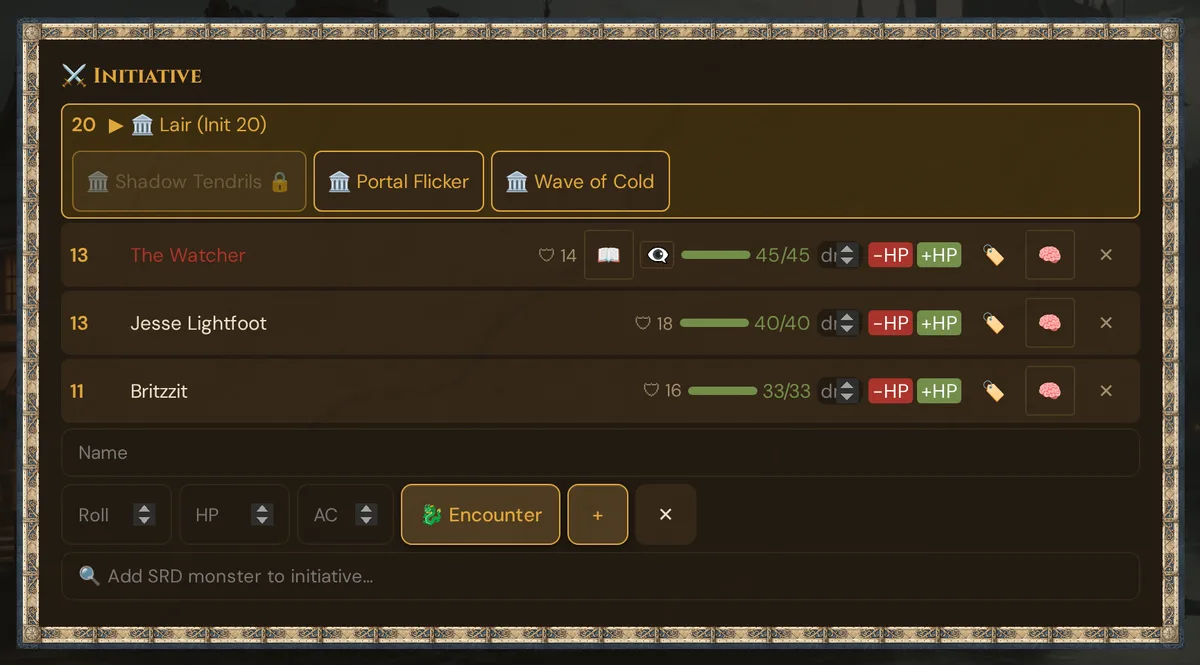
What it does
You design a boss once in the Custom Monster editor — its lair actions, regional effects, legendary actions, and legendary resistance. During a live session, when the active scene is bound to that boss as a Lair, the initiative tracker automatically:
- Inserts a Lair (Init 20) pseudo-combatant into the turn order (classic 2014 mode)
- Shows tappable Lair Action buttons when that slot is active
- Enforces the no-repeat rule — an option used last round is locked this round
- Tracks any timed effects and clears them when the round passes
The push to player phones is free, like everything else in the live session.
When to use it
Reach for this on set-piece boss fights — the dragon in its cavern, the lich in its phylactery vault, the hag in her swamp. Anywhere the place is part of the threat and you want the encounter to feel alive without juggling a separate notepad of "what does the lair do on initiative 20 again?".
Before the session: build the boss
Lair, regional, and legendary actions are defined in the monster editor during prep, not live. The full how-to lives on the Encounters & Custom Monsters page. In short:
- In the GM tool, open Custom Monsters and click + Manual.
- Tick 👑 Boss. This unlocks 🏰 Lair & Regional (Boss).
- Tick Hat ein Lair (Has a Lair) and add structured Lair Actions with the + Option button — each gets a name, description, optional Save, and optional damage.
- Optionally fill in Regional Effects and Legendary Actions, and set Legendary Resistance (uses per day).
- Leave Lair-Edition on Klassisch (2014) — the verified mode (see the caveat below).
- Save the monster.
💡 Tip: You can also click ✨ Ask Tantu in the monster editor and describe a boss concept — Tantu fills in a balanced lair-action set you can edit before saving.
Step by step (live)
- Add the boss to the fight from the Initiative card — via SRD search, manual entry, or encounter import. The combatant name must match the boss's name.
- Make sure the active scene is bound to the boss as its Lair (see Binding a lair to a scene below). When it is, the log shows 🏛️ Lair erkannt: {name} (Init 20).
- Run combat normally with Next turn ▶.
- When the turn pointer reaches the 🏛️ Lair (Init 20) row, its action buttons appear right below the row.
- Tap one Lair Action. It is logged, the effect resolves, and that option locks for the next round.
- Resolve legendary actions narratively between other creatures' turns, spending from the slots you defined in prep.
The Lair (Init 20) pseudo-combatant
In classic 2014 mode, Wovenkeep adds a virtual combatant to the turn order:
[d20]  ▶  Name
─────────────────────────────
  22    Ranger
  20    Ancient Dragon          200 / 200
  20    Goblin                    7 / 7
  20  ▶ 🏛️ Lair (Init 20)         ← inserted here, loses ties
              [🏛️ Grasping Roots] [🏛️ Tremor] [🏛️ Choking Fog]
  15    Cleric
- It sits on initiative 20, placed after all real Init-20 combatants — so it deliberately loses initiative ties, matching the 5e rule that lair actions resolve on count 20 "losing ties".
- It has no HP and cannot be damaged.
- It disappears automatically the moment the boss drops to 0 HP — lair actions end with the monster.
- It is GM-only. Players never see a "Lair" row in their initiative view.
The no-repeat rule
A lair action you use cannot be repeated on the very next round (the standard 5e restriction). Wovenkeep enforces this for you:
- The instant you tap an option, its button dims and shows 🔒 for the current round and the next one.
- On the round after that, the lock clears and the option is selectable again.
- Other options stay available the whole time — you just can't fire the same one twice in a row.
Timed effects
If a lair action's duration mentions rounds (e.g. "2 rounds"), Wovenkeep holds it as an active effect and shows it in a strip beneath the tracker:
Active effects: Grasping Roots (until R5)
When the round counter passes the effect's end, it is removed automatically. Instant-resolution actions leave no strip.
Binding a lair to a scene
The tracker only loads a boss's lair when the active scene is bound to that monster as its lair. The runner reads this binding the moment you push a scene. If you push a scene and no lair buttons appear even though your boss is in the fight, the scene–lair link is the most likely cause — see Troubleshooting.
⚠️ Self-service scene-to-lair binding from the prep UI is still limited. If your lair does not auto-detect, treat it as the known gap below rather than a broken boss.
A note on the 2024 edition mode
The editor offers a 2024 lair edition (extra legendary actions inside the lair, no Init-20 slot). Stick with the default Klassisch (2014) mode for live play. There is a known edition-label mismatch between the editor and the live tracker, so a boss saved in 2024 mode may not surface its actions reliably during a session. The classic 2014 path — the Init-20 pseudo-combatant with the no-repeat lock — is the verified, working mode and covers the vast majority of SRD bosses.
Plan limits
Lair, regional, and legendary actions are free — they are part of the GM tool and the live tracker on every plan, including Adventurer (the free tier). Pushing the scene that carries the lair to player phones is also free and unlimited.
Using the ✨ Ask Tantu button to draft a boss's lair actions costs 4 Threads (long text generation) — 0 🧵 with your own AI key. The button shows the cost badge, and a confirm dialog with your balance appears before anything is spent. See Threads & costs for how AI generation is metered.
Troubleshooting
| Symptom | Cause | Fix |
|---|---|---|
| No Lair (Init 20) row appears | Active scene is not bound to the boss as a Lair | Confirm the scene has a lair binding for this monster; the log should show 🏛️ Lair erkannt when it loads |
| Lair buttons never show | The Lair row is not the active turn yet | Advance turns with Next turn ▶ until the 🏛️ Lair (Init 20) row is highlighted |
| Lair row vanished mid-fight | The boss dropped to 0 HP | Expected — lair actions end when the monster dies; revive/heal the boss above 0 to restore them |
| A lair option is greyed out (🔒) | You used it last round (no-repeat rule) | Pick a different option this round; the locked one frees up the round after |
| 2024-mode boss shows no actions | Known edition-label mismatch | Re-save the boss in Klassisch (2014) mode |
| Buttons appear but the name didn't match | Combatant name differs from the saved monster name | A trailing " 1"/" 2" suffix is tolerated, but otherwise the names must match — rename the combatant to the boss's exact name |
Related articles
- ⚔️ Initiative & combat — the tracker these actions live in
- 👑 Encounters & Custom Monsters — where you build the boss and its lair
- 🖼️ Scene push — pushing the scene that carries the lair
- 📡 Running a live session — where boss fights fit in the flow
- 🧵 Threads & costs — what AI boss generation costs