📜 Plotlines
👤 For: Game Masters · 💳 Plan: All plans · 🔄 Updated 2026-10-16
Plotlines are the story threads running through your campaign — the main quest, side adventures, and the personal stories tied to individual characters. You can break each one into subquests, attach a checklist of objectives, track its state through its whole lifecycle, and push the player-facing version straight to phones during a session.
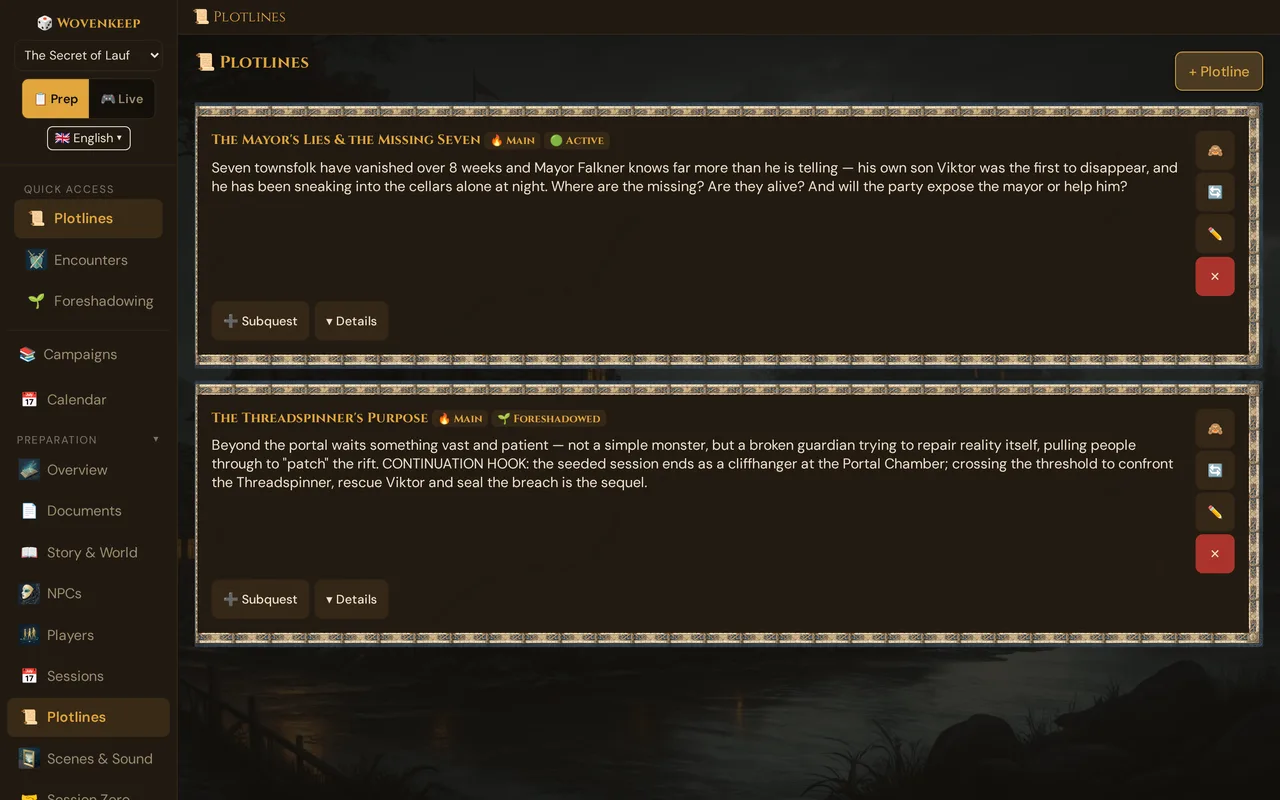
What it does
- Lists your quests as a tree — a main plot with nested subquests, indented under their parent.
- Tracks each quest through a lifecycle of five states (plus an amber pause), with a colour-coded card border.
- Gives every quest an objectives checklist you can tick off, hide from players, or delete.
- Lets you mark a quest visible to players and push it live to their phones as a quest log.
- Links each quest to NPCs, scenes, locations, characters, items, deities, world events — and to the sessions where it advanced.
When to use it
Use Plotlines when you want a place to keep "what is actually going on" — the threads you are weaving, which ones the players have picked up, and what still needs paying off. It is the difference between a campaign that feels like it's going somewhere and one that drifts.
Step by step
- In the sidebar, open 📜 Plotlines.
- Click + Plotline.
- Give it a Title (e.g. The Lost King) and a Description — what the thread is about. Only you see the description; players never do.
- Pick a Quest Type (🔥 Main, 📋 Side, or 🎭 Personal) and a starting Status.
- Tick 👁️ Visible to players if you want to be able to push this quest to phones later. Leave it off for secret threads.
- Click Create Plotline.
- On the new card, click ➕ Subquest to nest a child quest under it, or ▾ Details to add objectives and links.
💡 Tip: Keep the Description as your private seed for the thread, and put the player-facing beats into objectives. Only non-hidden objectives of a visible quest ever leave the server when you push — descriptions stay GM-only.
Quest types
| Type | When to use |
|---|---|
| 🔥 Main | The central story arc. Usually one per campaign. |
| 📋 Side | Optional adventures. Have as many as you like. |
| 🎭 Personal | Tied to a specific character's backstory. One per player is common. |
Status & the lifecycle
A plotline moves through a lifecycle. The card's left border colour tells you the state at a glance:
| Status | Border | Meaning |
|---|---|---|
| 🟢 Active | Green | Being pursued right now. |
| ⏸️ On Hold | Amber | Parked — the party knows but isn't acting on it. |
| ✅ Resolved | Blue | Done. The thread has paid off. |
| ❌ Abandoned | Red | Dropped — the party walked away or it fizzled out. |
| 🤝 Completed by Other | Purple | Resolved off-screen by someone other than the party. |
The 🔄 button on a card cycles through the states in order:
Active → On Hold → Resolved → Abandoned → Completed by Other → Active → …
This is the most common in-session action — when the players finally act on a parked thread, click 🔄 to move it forward. You can also set the status directly from the ✏️ Edit modal — or let a world event 📈 The plot moves on do it: it makes a foreshadowed or on-hold plotline active and can tick off one of its open objectives, planned ahead if you like.
Older campaigns: a legacy 🌱 Foreshadowed status exists only for campaigns created before the quest-system rework. It still shows up if it was already set, and cycling it moves the quest to Active. New plotlines can't be set to Foreshadowed — use the Foreshadowing panel to plant hints instead.
Subquests — the quest tree
Click ➕ Subquest on any card to create a child quest beneath it. Subquests render indented under their parent, with a ↳ marker, so you can read a multi-stage quest top to bottom. You can nest as deep as the story needs; the view indents up to three levels before flattening visually.
A typical shape:
🔥 The Order of the Black Sun        🟢 Active   🎯 1/3
  ↳ 📋 Find the stolen medallion     ✅ Resolved  🎯 2/2
  ↳ 📋 Track Captain Morr            🟢 Active   🎯 0/4
  ↳ 🎭 Lyra's revenge                ⏸️ On Hold
Objectives — the checklist
Open a card's ▾ Details to reveal its objectives. Each plotline carries a checklist of concrete goals.
- Type a goal into New objective… and click + Add.
- Tick the checkbox to mark an objective done — it gets struck through, and the card's 🎯 done/total badge updates.
- Click 👁️ / 🙈 on an objective to hide it from players (it shows in italics for you and never leaves the server on a push).
- Click ✕ to delete an objective.
- A world event 📈 The plot moves on can tick off an open objective, too — reverting the event unticks it again.
The 🎯 done/total badge on the card is your at-a-glance progress meter for that thread.
Linking a plotline
In a card's ▾ Details, the Links row connects a plotline to the rest of your campaign. Plotlines can link to:
- 👤 NPCs — the antagonists, allies, and witnesses in this thread
- 🎬 Scenes — set-piece moments belonging to the thread
- 📍 Locations — where it plays out
- 🧑 Characters — whose personal arc this touches
- 🎁 Items — custom or SRD items the thread revolves around
- 🐉 Monsters — custom or SRD creatures tied to it
- ⚡ Deities and 🌍 World Events — the cosmic forces behind it
Why link?
- Visualization — the Story Web auto-draws edges between plotlines and everything they touch.
- Cleanup hint — at the end of a campaign you can quickly spot threads that were never resolved (sometimes a feature, sometimes a mistake).
- Context for Story Coach (AI) — when Story Coach analyses the campaign, it sees which threads are active and which NPCs, scenes, and events advance them.
Plotlines and sessions
A plotline's ▾ Details has an In Sessions block where you link the sessions that advanced it. The other direction matters too: in the Sessions tab, each session lists its linked plotlines with a status snapshot and two handy controls:
- 📤 Push — sends the visible quest to players' phones (only enabled when the quest is marked 👁️ visible; see below).
- ↪ Carry forward — at the start of a new session, pull every still-open (Active or On Hold) plotline from the previous session into this one in one click. This is the Lazy-DM habit of "what's still hanging?" made automatic.
Pushing a quest to players
When you mark a plotline 👁️ Visible to players, you can push it to phones during a live session as a quest log card.
- Start a live session from the Live tab.
- In the Sessions tab (or session plotline list), click 📤 on a visible plotline.
Players' phones buzz and a quest card appears:
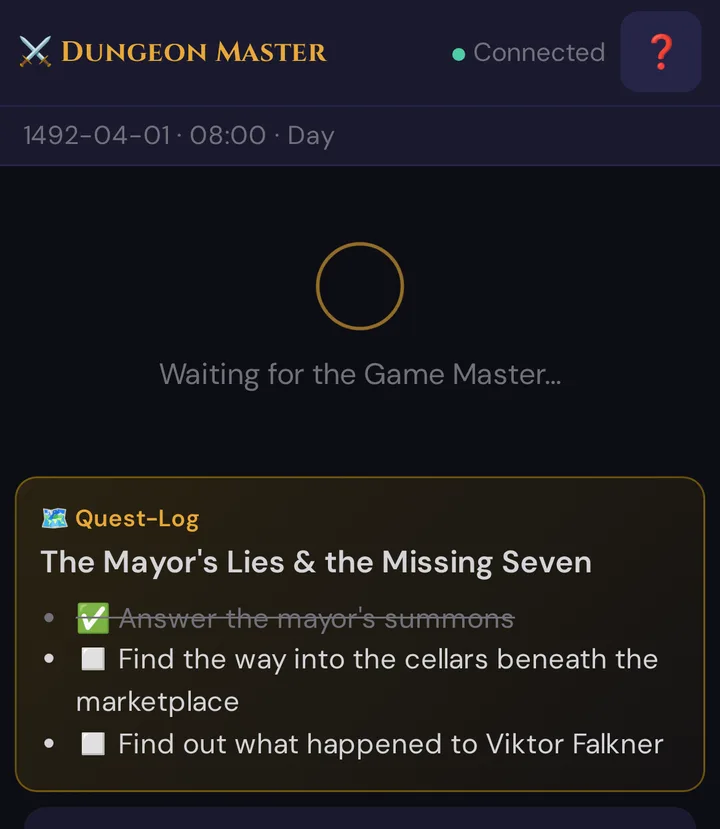
Tapping the card closes it.
Players only ever see the title and the non-hidden objectives — never your description, and never an objective you've marked 🙈. The push is blocked on the server too: a quest that isn't marked visible sends nothing, even if you try.
Editing a plotline
Click ✏️ on a card to open the edit modal. Title, description, quest type, status, and player visibility all autosave as you change them — there's no separate Save button. Click Close when done.
Plotline counts and complexity
The Overview dashboard shows your Active Plotlines and rolls plotline count into the campaign Complexity score, weighted at ×1.5 — the heaviest of any entity, because plotlines are the most cognitively expensive thing to track.
A rule of thumb (the dashboard's own tip):
- 2–3 active plotlines is comfortable. Players can hold them in mind; you can balance focus.
- 4–5 active starts feeling busy — lean on the Story Web to keep them straight.
- 6+ active is usually too many. Resolve some, park a few as On Hold, or fold them into subquests.
Resolved, Abandoned, and Completed-by-Other plotlines stay in the list for retrospection but don't count toward "active" complexity.
Troubleshooting
| Symptom | Cause | Fix |
|---|---|---|
| 📤 button is greyed out | The plotline isn't marked 👁️ Visible to players. | Click the 👁️ / 🙈 toggle on the card, or tick Visible to players in the edit modal. |
| Clicking 📤 does nothing / says "Start a live session" | No live session is running — quests can only be pushed in play. | Open the Live tab and start the session, then push. |
| Players see nothing after a push | The quest had no non-hidden objectives, or every objective is marked 🙈. | Add at least one visible objective; the title still pushes on its own. |
| Players saw a secret objective | The objective wasn't hidden. | Click 🙈 on that objective in the card's Details — hidden objectives never leave the server. |
| A subquest shows at the top level instead of nested | Its parent plotline was deleted. | Re-create the parent, or edit the orphan; orphaned children fall back to the root. |
| An old quest shows 🌱 Foreshadowed | Legacy status from a pre-rework campaign. | Click 🔄 once to move it into the current lifecycle (it becomes Active). |
Related articles
- 📊 GM Dashboard — see plotline complexity at a glance
- 📅 Sessions — link, snapshot, push and carry forward plotlines
- 🌱 Foreshadowing — plant hints before a thread goes active
- 🕸️ Story Web — visualize plotline ↔ NPC ↔ scene links
- 📖 Story Coach — analysis of your campaign, including plotline pacing (AI)
- 📈 Tension Arc — see when plotlines resolve over the campaign