🎲 Death saves & tap-to-roll
👤 For: Players · 💳 Plan: All plans · 🔄 Updated 2026-10-14
Your character sheet on the phone is fully playable: tap any check, save, skill, or attack to roll it, and when you drop to 0 HP the sheet shows a death-saves card so you can track the moment you fight to stay alive.
What it does
- Tap-to-roll — every rollable number on your sheet (Initiative, ability checks, saving throws, skills, attacks) is a button. Tap it, pick 🎲 Roll in app or enter the result of a real die, and the roll lands instantly in the GM's roll log.
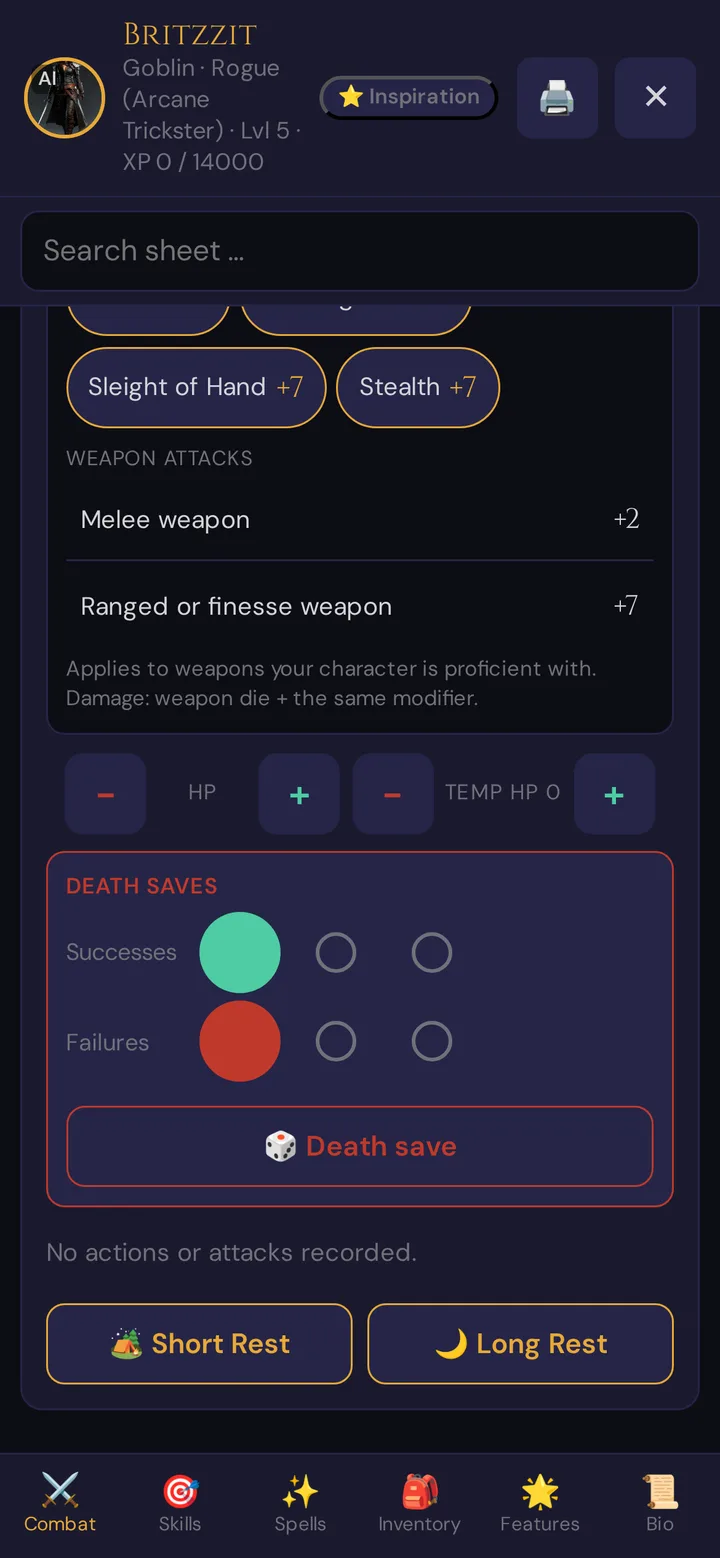
- Death saves — when your current HP hits 0, the Combat tab grows a Death Saves card with three success pips and three failure pips, plus a dedicated death-save roll button.
- Live and synced — changes apply on your screen immediately, then save to the server. Healing back above 0 HP clears your death saves automatically.
When to use it
You are a player at the table with your phone open. The GM calls for a Perception check, your fighter swings an axe, or your wizard just dropped to 0 — you want to roll and track all of it from the same screen without shouting numbers across the table.
Step by step
Rolling a check, save, skill, or attack
- Open your character sheet (the link or QR your GM shared).
- Go to the Combat or Skills tab.
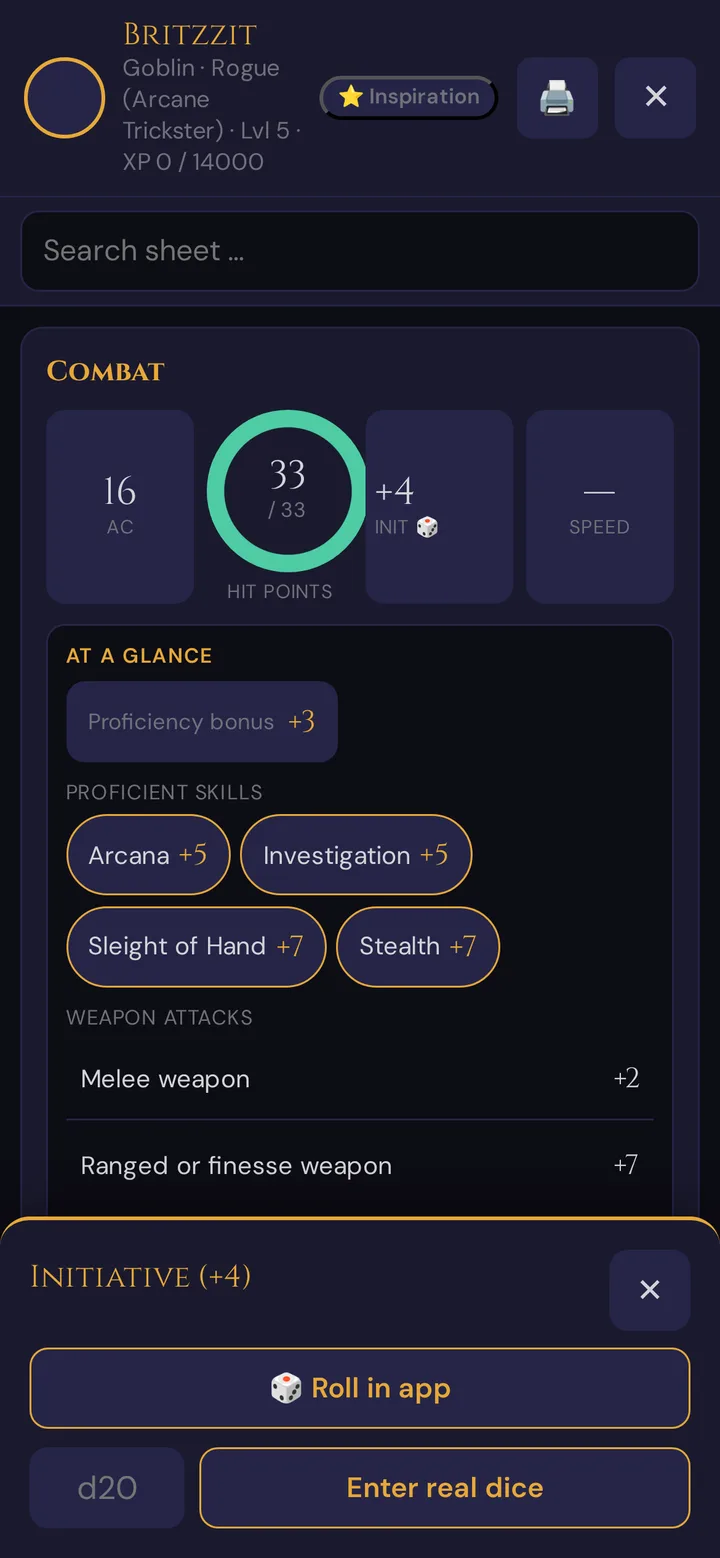
- Tap the value you want to roll — e.g. the Init 🎲 stat, a skill row, a saving throw, or the 🎲 button next to an attack.
- Choose 🎲 Roll in app to let the app roll a d20, or type the number you rolled on a real d20 into the field and tap Enter real dice.
- The result shows on your phone and appears in the GM's roll log at the same time.
Rolling with advantage or disadvantage
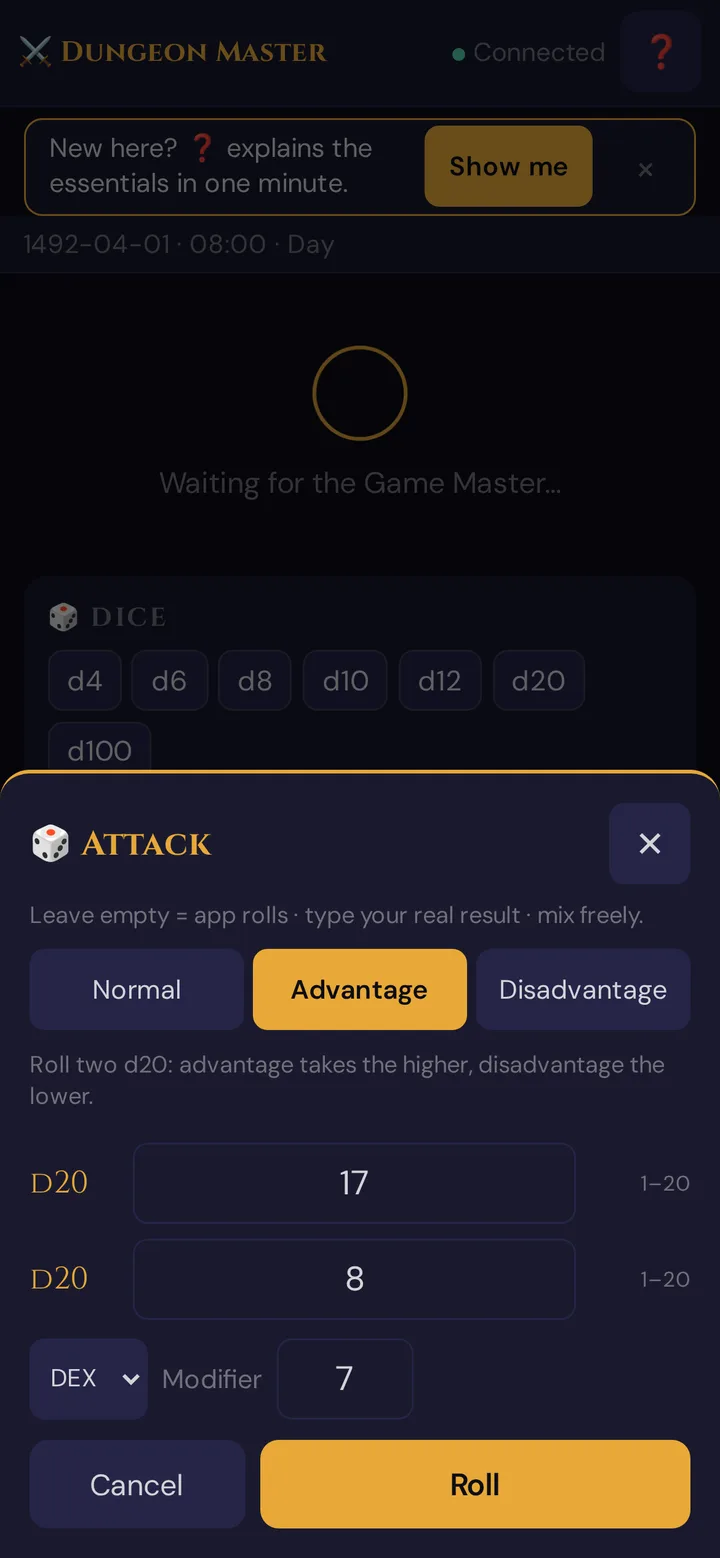
For attacks, saving throws and ability checks you can roll with advantage or disadvantage — with the app or with your own dice.
- In the player view, open the 🎲 Dice area and tap Attack, Save or Check.
- Pick Normal, Advantage or Disadvantage. With advantage or disadvantage you get two d20 fields.
- Leave a field empty and the app rolls that die. Type a number and it counts as your real roll. You can mix both.
- Check the ability and Modifier, then tap Roll.
With advantage the higher d20 counts, with disadvantage the lower one — Wovenkeep picks it for you.
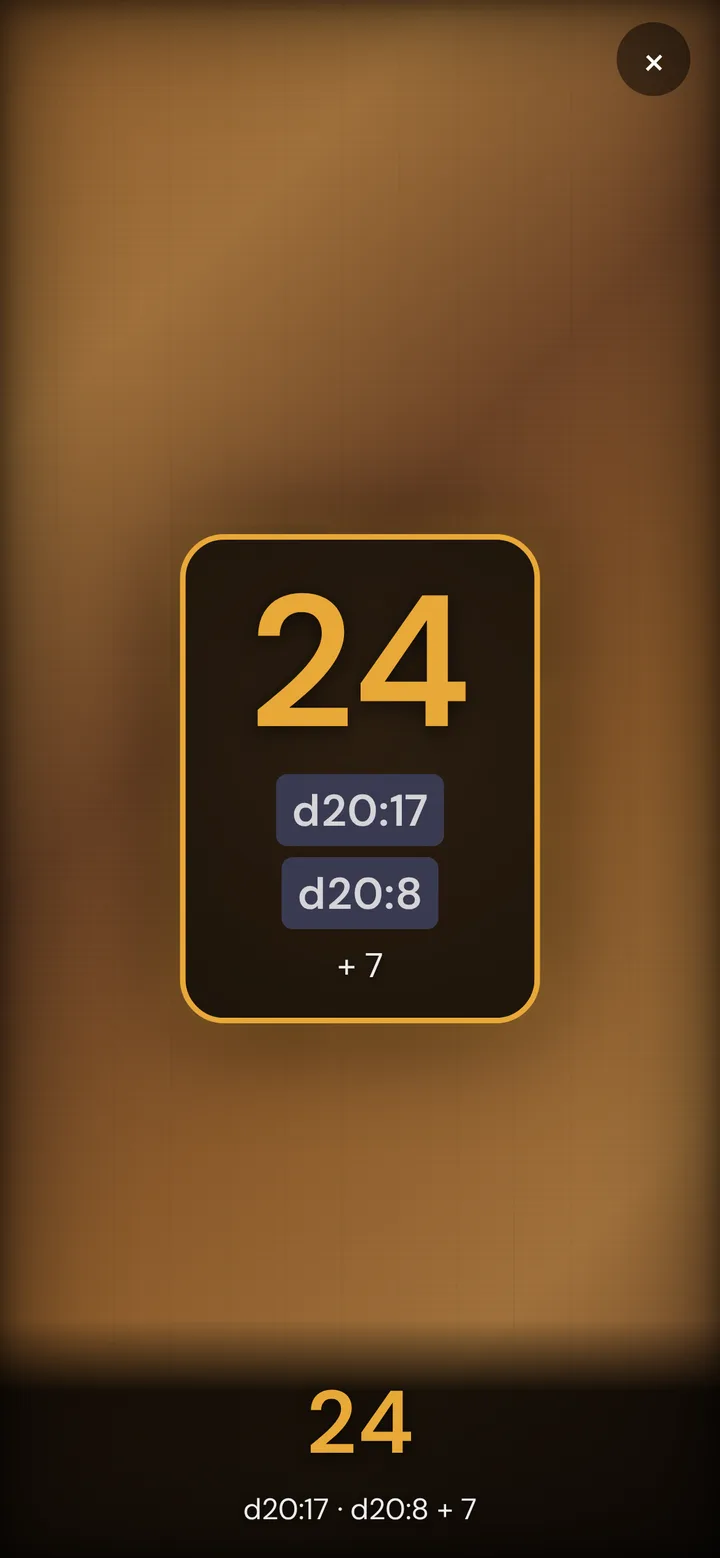
💡 The quick roll from your character sheet always rolls a single d20. For advantage or disadvantage, use the 🎲 Dice area.
Tracking death saves
- When your current HP reaches 0, the Death Saves card appears automatically on the Combat tab.
- Tap 🎲 Death Save to roll, or tap the success/failure pips to set the count by hand (e.g. when a healer or an enemy hit changes things).
- Get healed above 0 HP — or take a Long Rest — and the death-saves count resets on its own.
💡 Tip: Prefer your own dice? Use Enter real dice every time. The GM still gets the full record (it is marked as a real-dice entry), so the roll log and any session recap stay complete.
How a roll works
A quick roll from your character sheet uses a single d20 plus the modifier already on your sheet — you never type the modifier yourself. Tap 🎲 Roll in app, or type the result of your real d20 into the field and tap Enter real dice.
- A natural 20 or natural 1 also triggers the table-wide cut-in flash, if the GM has cut-ins switched on.
- Your phone gives a short vibration on every roll, and a longer pattern on a Nat 20 or Nat 1.
- The roll is saved to the campaign's roll log, so it survives a reconnect and shows up in the session recap.
What the death-saves card does
The card only exists while you are at 0 HP. It holds three Success pips and three Failure pips.
| You do this | What happens |
|---|---|
| Tap 🎲 Death Save and roll 10 or higher | +1 success pip |
| Roll 9 or lower | +1 failure pip |
| Roll a natural 20 | You stabilize — back to 1 HP, all pips cleared |
| Roll a natural 1 | +2 failure pips |
| Tap a pip directly | Sets the success/failure count by hand (tap the last filled pip to step back one) |
| Get healed above 0 HP, or Long Rest | Pips reset to 0/0 automatically |
This follows the standard D&D 5e death-save rules: three successes stabilize you, three failures and your character dies. The card is just there to make counting them effortless on the phone.
What the GM sees
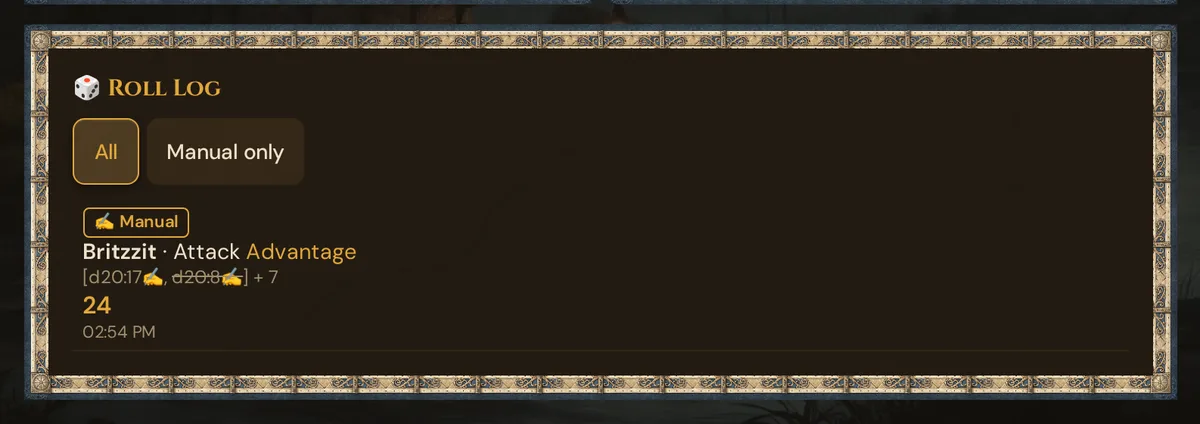
You don't have to announce anything. Every roll you make — app or real-dice, normal check or death save — lands in the GM's live Roll Log with your character's name, the type of roll, and the total. Real dice are marked ✍ Manual; with advantage or disadvantage the die that doesn't count is struck through. The filter Manual only shows just the real-dice rolls.
If the GM has switched on player rolls for Discord, the roll is posted there too. See Whisper & dice for the GM's side of the roll log.
Plan limits
Tap-to-roll and death saves are free and work on every plan — they are part of the player view, and pushing to player phones costs nothing. The cut-in flash on a Nat 20 / Nat 1 also works on every plan; it just has to be switched on by the GM. Everything here — rolling, real-dice entry, HP and death-save tracking — is always on and costs no Threads. See the Threads & costs and Pricing.
Troubleshooting
| Symptom | Cause | Fix |
|---|---|---|
| No Death Saves card | Your HP isn't 0, or your sheet has no max HP set | The card only appears at exactly 0 current HP on a character that has a max-HP value. Tap − under HP until you reach 0, or ask your GM to set max HP. |
| My roll didn't reach the GM | You're viewing the sheet but not joined to the live session | Open the sheet from the live invite/QR so it connects to the running session — a standalone sheet view still rolls, but only a joined player shows in the GM's roll log. |
| "Sync failed" toast after a tap | The phone briefly lost its connection while saving HP / pips | Wait a second and tap again; the sheet reloads itself and re-syncs. Nothing is lost — the server is the source of truth. |
| No cut-in on my Nat 20 | The GM hasn't switched on cut-ins | Cut-ins are a GM-side setting — ask your GM to switch them on; see Cut-in system. The roll itself still counts. |
| Pip count looks wrong | You tapped a pip by hand | Tap the highest filled pip to step the count back by one, or get healed above 0 HP to clear the whole card. |
Related articles
- 🎲 Player characters — the full sheet behind the HUD
- 🎲 Whisper & dice — the GM's roll log
- 🎬 Cut-in system — Nat 20 / Nat 1 flash
- ⚔️ Initiative & combat — where death saves come up
- 📱 Multi-device players — one player, several screens
- 🎟️ Player onboarding invites — getting the sheet onto a phone