🤝 Session Zero
👤 For: Game Masters · 💳 Plan: All plans · 🔄 Updated 2026-10-14
Session Zero is the pre-campaign conversation where everyone shares what they hope for, and what topics to keep off the table. Wovenkeep gives you two ways to collect that: a sharable survey link that players fill out on their own, or a quick GM-side entry form if you'd rather do it live at the table.
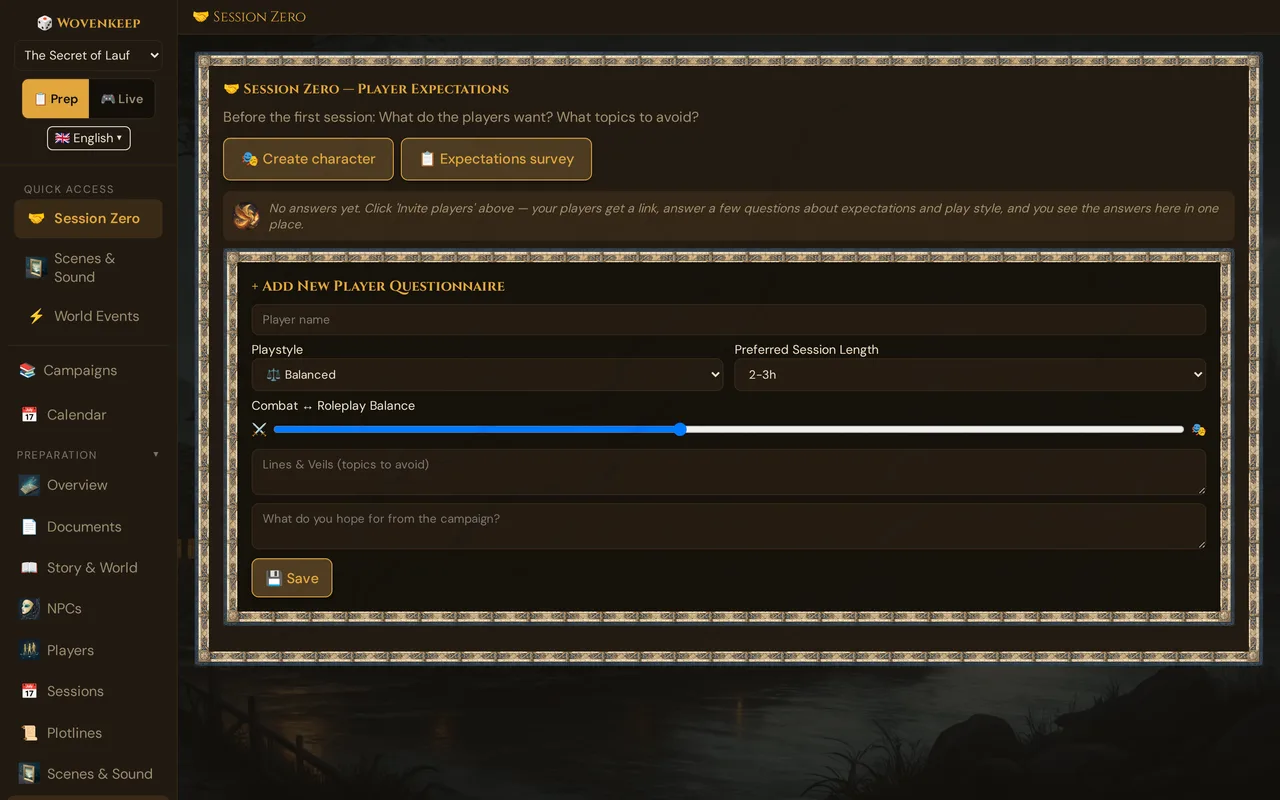
What it does
You send players a link; they answer five questions about playstyle, session length, preferred balance of combat vs. roleplay, topics to avoid, and what they're hoping to get from the campaign. Their answers land as individual cards in your GM view, where you can read and delete them. There is no party-aggregate view yet — you read the cards yourself and adjust your prep accordingly.
When to use it
Before session 1. Send the survey link one to two weeks ahead so you have time to act on the answers. If a new player joins mid-campaign, run it again for just that player.
Step by step
Sending a survey link (recommended)
- Open your campaign and click 🤝 Session Zero in the sidebar.
- Click 📋 Expectations Survey. Wovenkeep creates a shared multi-use link automatically — or reuses the existing one if you already created one.
- The share modal opens. Copy the link, or send it directly via the 💬 WhatsApp, 📧 Email, or 📱 SMS buttons. Alternatively, let players scan the QR code shown in the modal.
- Players open the link on their phone or computer, fill out the form, and tap 💾 Send to GM. No account needed.
- Their card appears in your Session Zero section. The list doesn't refresh by itself — open 🤝 Session Zero again to see new answers.
💡 Tip: The survey link is multi-use — all players share the same link. You do not need to create one link per person.
Adding an entry manually
If a player answered verbally, you can enter their answers yourself via the + Add New Player Questionnaire form at the bottom of the section. Fill in the fields and click 💾 Save.
Sending individual character invites
The 🎭 Create Character button creates a separate per-player link for the character-creation wizard (not the expectations survey). See Player onboarding invites for that flow.
What the player sees
The survey opens as a clean, mobile-friendly page. Fields:
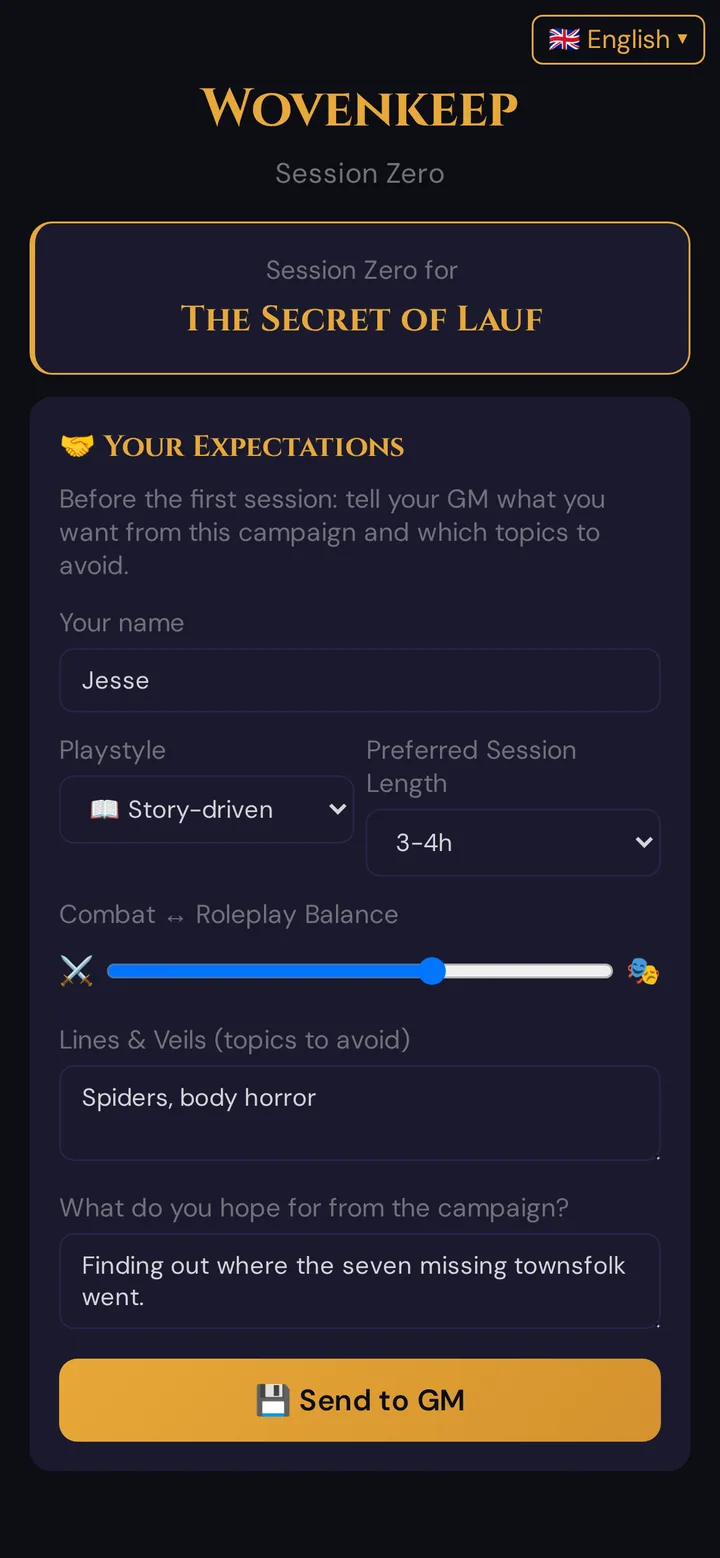
There is one slider for combat–roleplay balance (not two separate sliders). A single free-text Lines & Veils field covers all topics to avoid — there is no hard-no / cautious distinction built into the form.
Reading the responses
Each submission appears as a card in your Session Zero view:
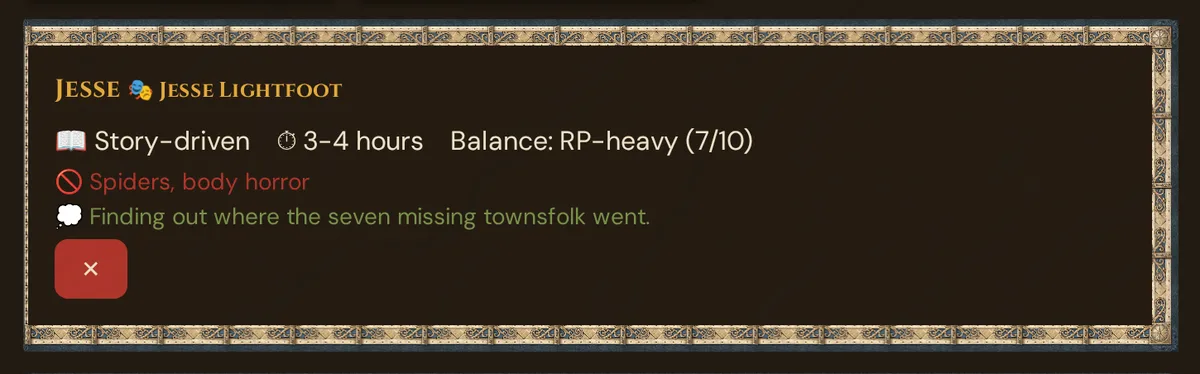
If the player filled out their character invite before the survey, their character name appears as a gold badge (here 🎭 Jesse Lightfoot) next to their player name.
Cards don't arrive live: answers sent while the page is open appear once you open 🤝 Session Zero again.
Acting on the responses
| Pattern | Adjustment |
|---|---|
| Most players chose RP-heavy or Story-driven | Plan more dialog scenes, fewer combat encounters |
| Most players chose Combat-heavy | Plan more encounters, shorter talky sessions |
| Multiple players flagged a theme in Lines & Veils | Remove or rewrite the relevant plotline |
| Players prefer 4h+ sessions | Plan longer arcs per session |
| One player wants exploration, others want drama | Build mixed scenes; give the exploration player a dedicated scene per session |
Editing a response
Responses cannot be edited after submission — the survey form has no update path. If a player needs to change their answer, you have two options:
- Delete their card (the ✕ button) and ask them to fill out the survey link again. Each submission creates a new entry.
- Or update the entry yourself manually via the + Add New Player Questionnaire form at the bottom.
Privacy
Session Zero responses are visible to the GM only. Players do not see each other's answers. Responses are included in the GDPR data export — if a player deletes their account, their Session Zero response is also deleted.
What's not yet built
- Party summary — an aggregated view with average slider values, top playstyles, and a combined topics-to-avoid list. On the roadmap.
- Re-survey reminders — prompting players to update their answers at major campaign milestones. On the roadmap.
For now, Session Zero is a structured collection tool. Reading the cards and adjusting your prep is a manual GM activity.
Troubleshooting
| Symptom | Cause | Fix |
|---|---|---|
| Player says the survey link is expired or invalid | The link's 7-day expiry passed, or it was revoked | Open the modal again — Wovenkeep reuses an existing valid survey link; if none exists, it creates a fresh one |
| Player submitted but their card does not appear | The list doesn't refresh by itself | Reload the Session Zero section; cards persist in the database |
| Player name field is pre-filled on the survey page | The player opened the link with their character token (?player_token=) attached — that is correct behaviour |
No action needed |
| Player wants to change their answer | The form does not allow edits | Delete their card with ✕, then ask them to fill out the link again |
Related articles
- 🎟️ Player onboarding invites — per-player character-creation links (separate from the survey link)
- 🎲 Player characters — the PCs that come out of onboarding
- 🪶 Tantu: name & voice — adjust Tantu's name and tone to your group
- 📅 Sessions — log past sessions and plan upcoming ones