📜 Session recap
👤 For: Game Masters · 💳 Plan: All plans · 🔄 Updated 2026-10-17
The session recap is the "previously on…" card you push to every player's phone at the start of a session. It keeps the whole table on the same page in under 30 seconds — no verbal catch-up needed.
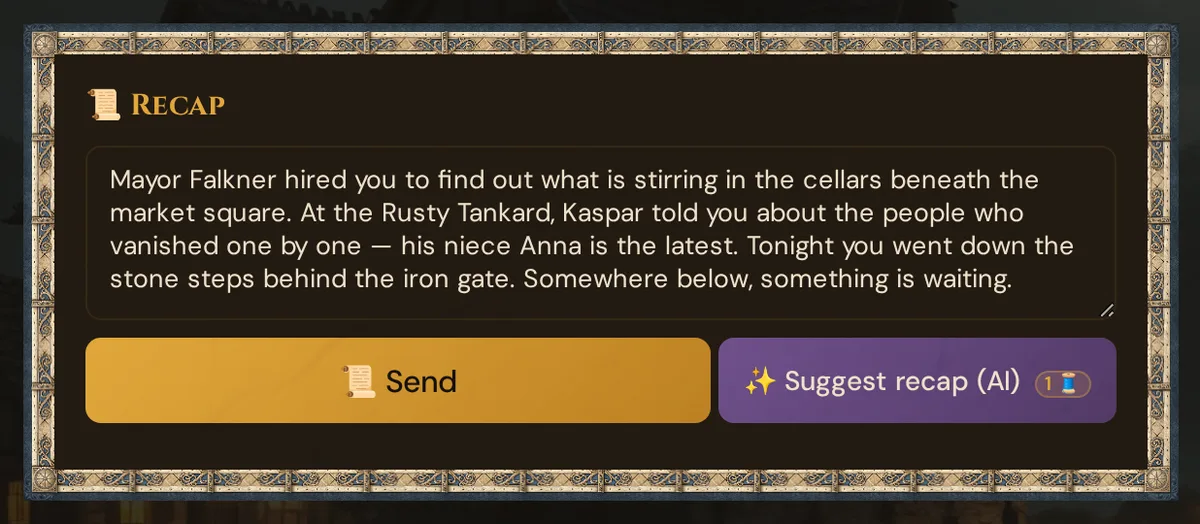
What it does
You type a short summary of the last session (or optionally have one suggested, AI), then tap 📜 Send. Every connected phone instantly shows a styled card with the text. Players dismiss it by scrolling past it and continue into the game view. Tantu can draft a recap of what happened at the table in about 10 seconds — you review, edit, and send.
When to use it
- Session 2 onward of any campaign — reminds players what they did last time
- Returning from a long gap — even week-to-week sessions benefit from a 30-second refresh
- New player joining — brings them up to speed without the group sitting through it verbally
- After a downtime montage — when fiction time jumps forward, a recap can bridge the gap in-world
If it's session 1, skip the recap and go straight to the opening scene.
Step by step
- Switch to 🎮 Live mode and open the Scenes & Sound section.
- Scroll down to the 📜 Recap card.
- Type your summary in the Recap text box. Markdown is supported (see below).
- Click 📜 Send.
Every connected phone receives the recap card immediately.
GM log entry: 📜 Recap pushed.
💡 Tip: Pair the recap with ambient sound — start your campaign's signature sound track a few seconds before clicking 📜 Send for a cinematic opening.
Optional: recap suggestion (AI)
Click the purple ✨ Suggest recap (AI) button next to 📜 Send. The button shows the Thread price as a small badge (1 Thread, 0 with your own AI key), and a confirm dialog with the cost and your current Threads balance appears before anything is charged. The same button sits in the session editor (📋 Prep → Sessions → ✏️), below 📜 Recap (last session).
With the help of AI, Tantu summarises what actually happened at the table, in up to 4–5 sentences. If the Recap text box is empty, the suggestion lands there; if you have already typed something, your text stays and the suggestion waits in the version list below the text box.
Tantu reads from:
- The event log of what was played: scenes, NPC dialogue, items, handouts for everyone, quests, polls, cut-ins, the start and end of fights and new characters (no dice rolls, whispers, conditions, clocks or XP)
- Your live 📝 Session notes
Which evening: in Live, the running session; otherwise every live session of the same planned session; otherwise the last live session of the campaign in which something happened. If that is another session than the one you are looking at, the card says so, for example Recap of session #1. Tantu writes in the language of the GM tool tab you click in; players receive the text exactly as you send it.
If nothing has been played and there are no live notes, there is no suggestion and nothing is charged: Nothing played yet and no live notes: no recap possible. Nothing was charged.
Review before sending:
- Is the tone right? Edit if too dry or too dramatic.
- Did Tantu catch the key moments? Add anything it missed.
- Are character names spelled correctly? Fix them if not.
When you're happy, click 📜 Send. Clicking ✨ Suggest recap (AI) again creates a new suggestion — it never overwrites text that is already in the box; pick it from the version list instead.
Previous versions
After each AI generation, a version history dropdown appears below the text box. You can load any earlier draft back into the text box — useful if you generated twice and preferred the first version.
What the player sees
The recap appears as a styled card at the top of the player's content feed. It has the amber title 📜 Previously on… (in the player's language) and the text you wrote:
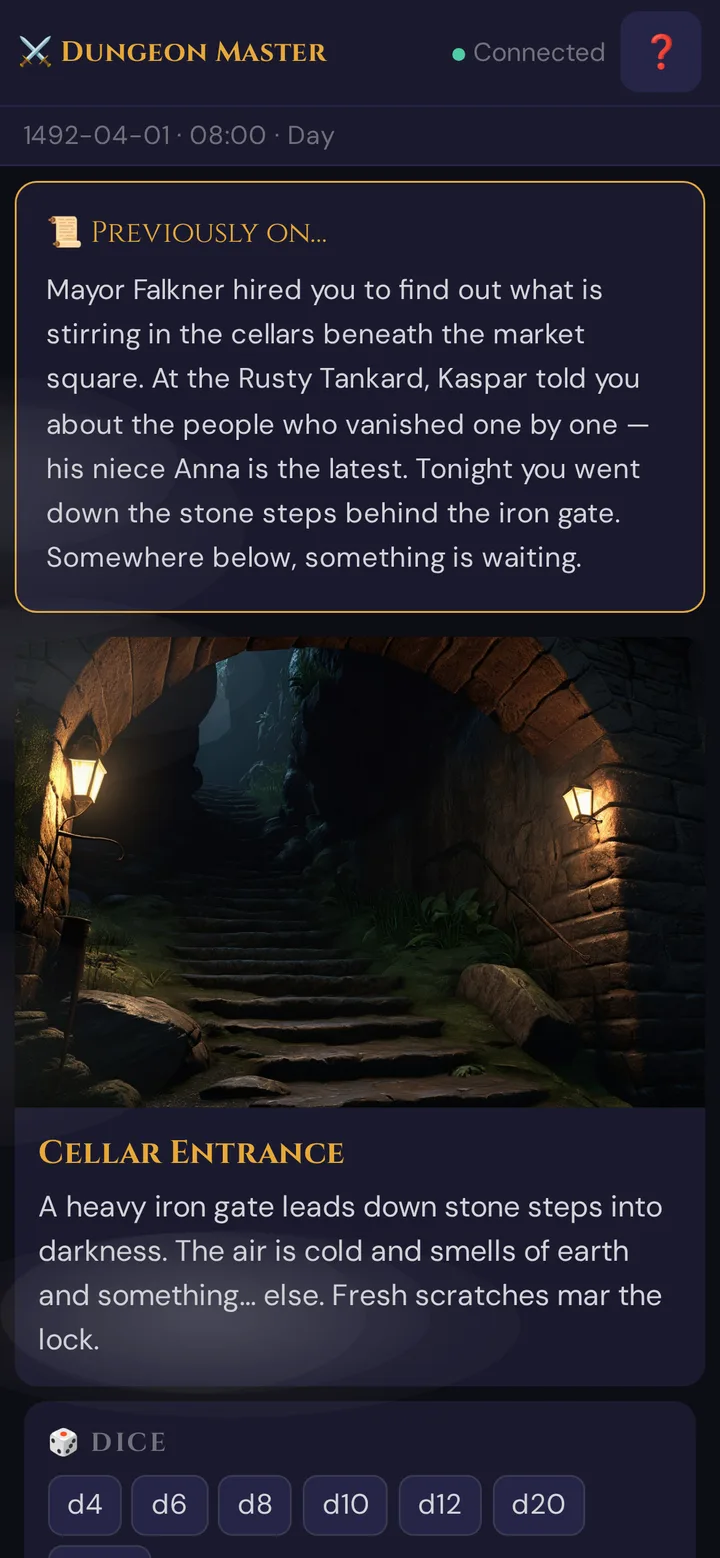
The card:
- Appears at the top of the player's game feed with a fade-in animation
- Triggers a short haptic buzz on supported phones
- Stays visible until the player scrolls down into the normal game view
- Is one-shot: players who join after you pushed the recap don't see it automatically — push it again if needed
Writing a good recap
A useful recap names characters, places, and open questions — not just plot events.
Less useful:
The party defeated the goblins and found a locked door.
More useful:
Lena, Jonas, and Mira fought through the Whispering Ruins to find Captain Morr's body. He died holding a medallion — the same symbol the temple library shows for the Order of the Black Sun. The order disbanded a hundred years ago. Or so the records say.
Aim for 3–6 sentences. Longer recaps lose attention. Shorter ones miss the threads players forgot.
Markdown in recaps
The recap text box supports common markdown:
*italic*               for emphasis or in-world thoughts
**bold**               for character names or key terms
- list item            for "key open questions: …"
> blockquote           for an NPC's last words
Don't overdo formatting — recap is prose, not a wiki page.
Write it yourself or have one suggested
| Aspect | Manual | Suggestion (AI) |
|---|---|---|
| Time | ~5 min to write | ~10 s |
| Tone control | Full | After-edit |
| Accuracy | Perfect (you know the campaign) | Mostly correct, may miss subtleties |
| Requires | Nothing | Something played (event log, live notes) — otherwise there is no suggestion |
| Best for | First few sessions, precise voice | Long campaigns, tight pre-session time |
Jot down three bullet points at the end of the session. That's enough to write the recap yourself in two minutes — or have one suggested and edit it.
What gets saved
Suggestions are kept in the version list; they never overwrite the session's recap by themselves. The recap of the session — the text on its card in 📋 Prep → Sessions — is saved in two places:
- in the window ✅ Wrap up session when you end the live session — it offers the recap you sent with 📜 Send (see End the session);
- in the session editor, where 📜 Recap (last session) saves automatically. A suggestion made there fills an empty field and is saved with it.
Text you type into the live 📜 Recap card is not saved on its own.
Stars & Wishes at the end of the session
The recap opens a session; Stars & Wishes closes it. Before you end the session, every player answers two short questions on their phone: what was great today, and what they wish for in future sessions. It costs no Threads.
You need: a running live session and a session in the session plan (📋 Prep → Sessions). The answers are saved to the same session as your live 📝 Session notes — the planned session with the lowest number, or the latest session if none is planned. Without a session the button is greyed out, with the hint For Stars & Wishes you need a session in the session plan.
Asking the players
- In 🎮 Live mode, open Scenes & Sound and scroll to the ⭐ Stars & Wishes card.
- Click ⭐ Ask players.
- Your 📋 Log confirms:
⭐ Stars & Wishes: question sent to the players.
What the player sees
A form opens on every connected phone that has a saved character:
- ⭐ What was great today?
- 🌠 What do you wish for in future sessions?
Both fields are optional (up to 500 characters each), but at least one must be filled in. The player taps Submit and briefly sees "Thanks! Your answer has reached the GM." Later closes the form and leaves a ⭐ Answer Stars & Wishes button in the player's feed to reopen it.
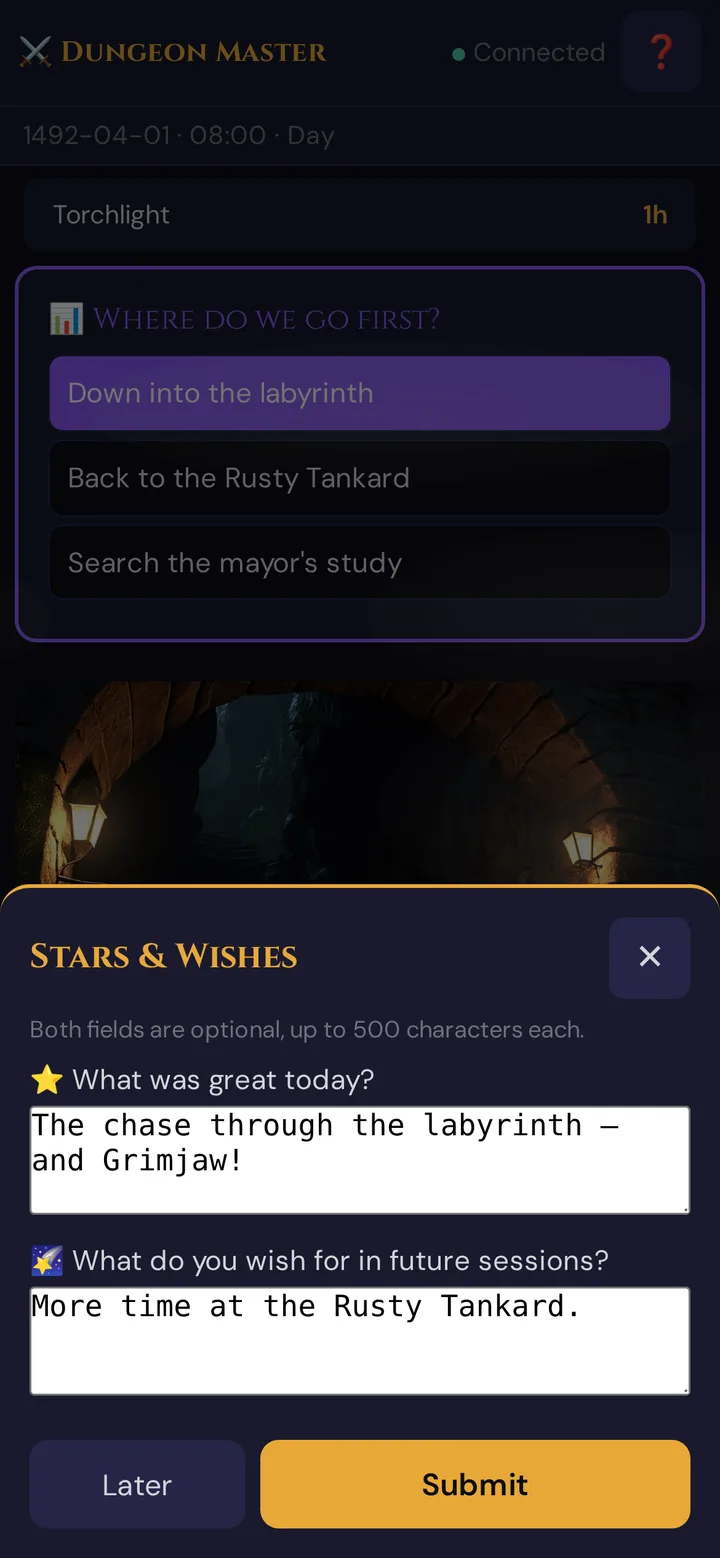
Each character has one answer per session — submitting again replaces the earlier answer. Submitting still works after you've ended the live session.
Where you see the answers
- During the session — in the ⭐ Stars & Wishes card itself. Every new answer refreshes the list (Answers: 3, then each character's name with the ⭐ star and 🌠 wish) and adds a log line such as
⭐ Stars & Wishes: 3 answers. - Later — in 📋 Prep → Sessions, click ✏️ on the session. The ⭐ Stars & Wishes block below the notes shows all answers.
Plan limits
The 📜 Send button (manual recap) is free on all plans.
The ✨ Suggest recap (AI) button works on all plans, including free, and costs 1 Thread per suggestion (0 with your own AI key; nothing is charged when nothing has been played yet). A confirm dialog shows the cost and your Threads balance before anything is charged. See Pricing for how Threads work.
Troubleshooting
| Symptom | Cause | Fix |
|---|---|---|
| ✨ Suggest recap (AI) refuses to generate | Not enough Threads on your balance (a suggestion costs 1 🧵) | Buy Threads or earn more (bug reports, feedback); see Pricing |
| Nothing played yet and no live notes: no recap possible. Nothing was charged. | No events and no live notes yet | Play first — or write the recap yourself |
| Generated recap is in the wrong language | Tantu writes in the language of the GM tool tab you clicked in | Switch the GM tool to the language you want (language menu at the top of the sidebar) and suggest again — or adjust the text manually |
| Recap not appearing on phones | Players briefly lost their connection | Ask them to re-scan the QR code; push the recap again |
| Player joined late and didn't see the recap | Recap is one-shot — late joiners miss it | Push the recap a second time for the late joiner |
Related articles
- 🖼️ Scene push — for the opening scene after the recap
- 🔊 Sound effects — pairing music with the recap
- 📖 AI Story Coach — campaign-level story analysis (separate from the recap)
- 🧵 Threads & costs — how Threads are billed
- 📋 Session notes — where recap source material lives