📊 Player polls
👤 For: Game Masters · 💳 Plan: All plans · 🔄 Updated 2026-10-14
A poll is a live multiple-choice question that lands on every player's phone the moment you fire it. Players tap once to vote; the GM sees vote counts stream in instantly. No debate, no peer pressure — just a fast, anonymous read of the table.
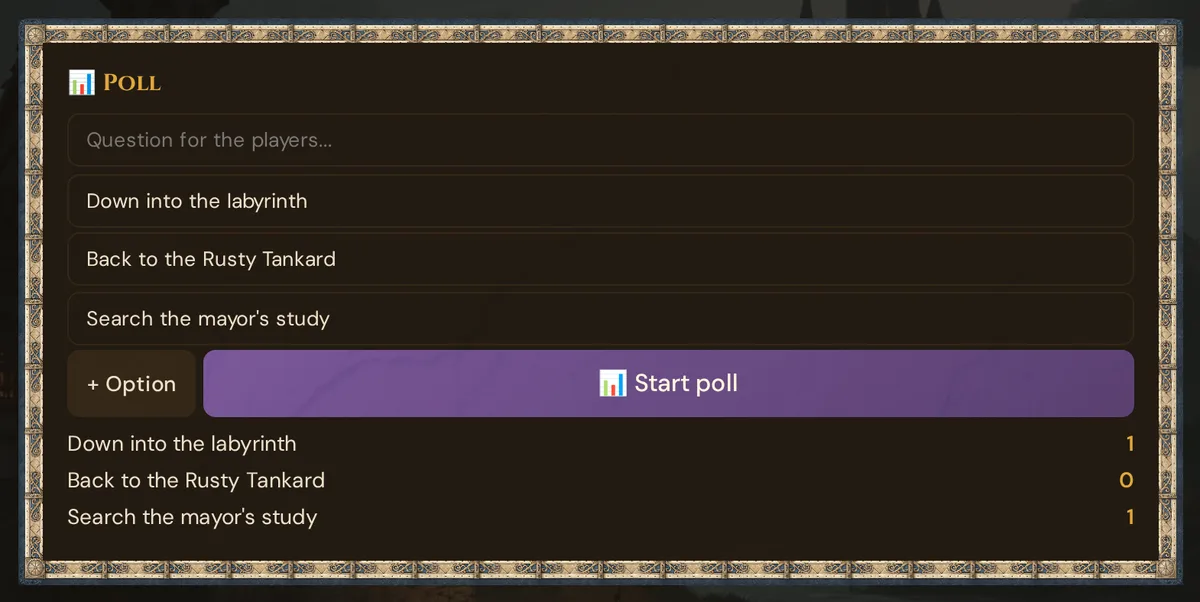
What it does
Polls broadcast a question and up to N options to all connected phones simultaneously. Each player taps once to cast their vote; the result is locked after the first tap. The GM's panel updates in real time as votes arrive. Questions and vote totals are saved in the session log; individual choices are never displayed on-screen.
When to use it
- Direction choice — "Do we go to the haunted forest, the merchant's guild, or the abandoned mine?"
- Trust judgment — "Do you trust the wizard?"
- Tone check — "Do we play this for laughs or horror?"
- Quick consensus — "Short rest or push on?"
- Mid-session mood check — "Pacing so far: 1 (lost) / 2 / 3 / 4 / 5 (great)"
Polls work best when the answer is real (you will act on the result) and when anonymity helps (no peer pressure from the loudest voice at the table).
Step by step
- In the live session view, scroll down to the 📊 Poll card in the main panel.
- Type your question into the Question for the players… field.
- Fill in Option 1 and Option 2 (pre-populated empty inputs).
- (Optional) Click + Option to add more choices. More than five options crowds the phone screen.
- Click 📊 Start Poll.
The poll is sent to every connected phone immediately. The GM log shows 📊 Poll: <your question>.
💡 Tip: The Question field is cleared automatically after you send the poll, so the box is ready for a new question. The option inputs stay populated — edit them and re-fire to adjust wording, but re-firing creates a new poll; earlier votes are not carried over.
What the player sees
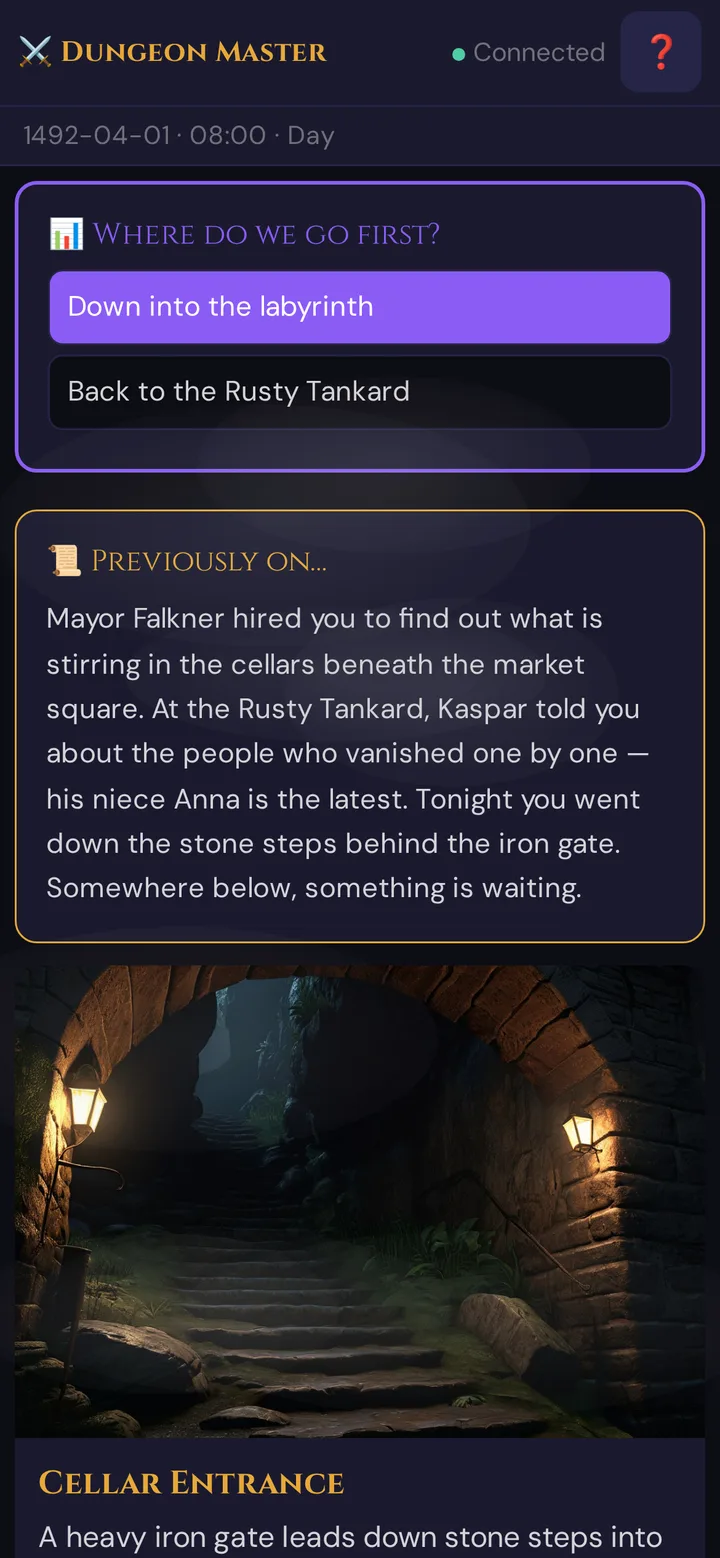
When a poll arrives the phone vibrates (two short pulses) to alert the player even if they're not looking at the screen.
Each option is a tappable button. Tapping it:
- Highlights the chosen button purple (selected state, white text)
- Dims all other buttons and disables the whole set — voting is one-shot; there is no way to change your vote after the first tap
- Sends the vote to the server
There is no "submit" button — the tap is the submission. Designed for one-second decisions.
⚠️ One vote, locked. Once a player taps, all buttons are disabled. If a player needs to correct a misclick, the only workaround is for the GM to re-fire the poll (new question, votes reset).
Live results (GM-side)
The GM sees results update in the Poll results area below the Poll card:
🌲 The haunted forest      ━━━━━━━━━━━━━━  4
⚔️ The merchant's guild   ━━━━━━━            1
⛏ The abandoned mine    ━━                  0
Each option row updates in real time. The number on the right is the current vote count for that option, shown in amber.
The GM panel shows vote counts, not who voted for what. Votes are anonymous on-screen. If you need to know individual choices, ask the table out loud.
Closing a poll
There is no explicit "Close Poll" button. The poll stays open until:
- You start a new poll (it replaces the current one)
- The session ends
- The GM tab closes
In practice, "close" the poll by acting on the result. A verbal "Looks like forest wins — let's go" is enough.
Polls vs. whispers
Polls are group choices with anonymous votes — other players don't see who picked what. If you need a fully private question to a single player, use a whisper instead.
Player-name identity
The poll tracks votes by join-name. If two players share a name (or one player renames mid-session), the second vote with the same name replaces the first. This is rare when every player chooses a unique name at join, but worth knowing for convention games with generic names like "Player 1".
What gets recorded
Each poll you start (the question) is recorded in the Session Log. Vote totals are not stored after the session — screenshot or note the result if it matters for the story.
Patterns
A few setups that work consistently well:
The fork-in-the-road poll
"Three doors. Pick one."
- 🪵 Wooden door (peaceful sounds beyond)
- 🪨 Stone door (carved with warnings)
- ⚙️ Metal door (humming faintly)
Players reveal preferences without group pressure. The purple-highlighted button on each phone shows you the lead option.
The mood-check poll
"On a scale of 1 (lost) to 5 (great), how is the pacing?"
Run this 90 minutes into a session. Anonymous feedback you can actually act on.
The betrayal poll
"Do you trust the captain?"
- Yes
- No
Send before a key reveal. If 4 of 5 say Yes, the betrayal lands harder. If 4 of 5 say No, lean into their suspicion.
Troubleshooting
| Symptom | Cause | Fix |
|---|---|---|
| Poll doesn't appear on a phone | Player connected after the poll was sent | Re-fire the poll, or have them rejoin |
| Phone received the poll but no vibration | Device has vibration silenced / browser vibration blocked | Expected on some browsers — not a Wovenkeep bug |
| Vote counts don't update in GM panel | pollResults element not mounted (rare) |
Hard-refresh the GM tab |
| Player accidentally tapped the wrong option | Buttons are locked after first tap | Re-fire the poll to reset votes |
| "No active poll" shown on phone after rejoin | Session has no active poll | Start a new poll |
Related articles
- 🎲 Whisper & dice — private channels to individual players
- 📡 Running a live session — where polls fit in the session flow
- 📊 Session Log & Analytics — poll history and session recap