🪶 Tantu: name & voice
👤 For: Game Masters · 💳 Plan: All plans · 🔄 Updated 2026-10-17
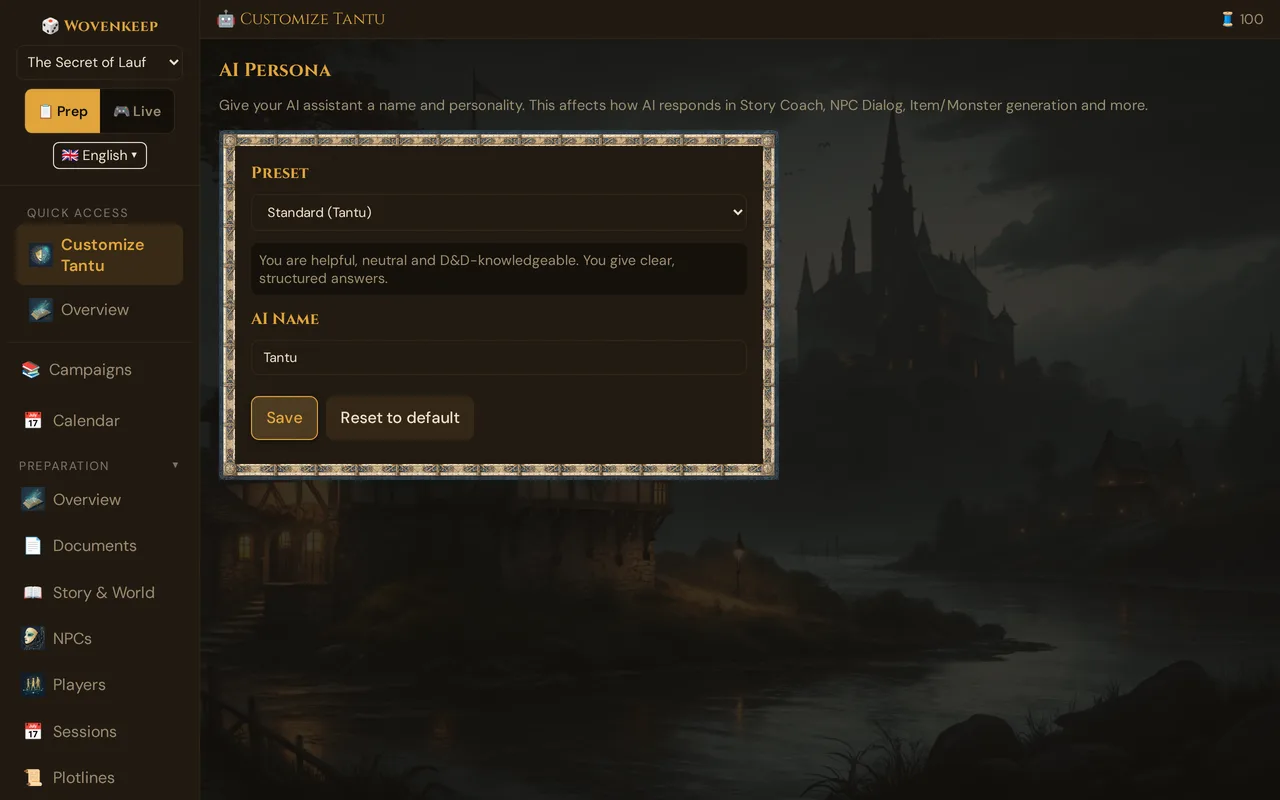
When you use the optional AI help, it answers as Tantu. Tantu answers with the help of AI. Here you give Tantu a different name or tone per campaign — for Story Coach, NPC dialogue, recaps, and suggestions.
What it does
The name and tone you set here apply to every answer from the AI help in this campaign. The setting is saved per campaign, so each of your worlds can have its own voice.
Tantu also answers in the language of your interface automatically (English, German, French, Spanish) — no setting needed.
When to use it
Set it once when you start a campaign. A dark intrigue table reads better with a cryptic narrator; a beer-and-pretzels table reads better with a cheerful one. Pick a preset that matches the mood and forget about it.
Where to find it
Sidebar → Story & Tantu → Customize Tantu (in the GM tool). The page itself is titled AI Persona.
Step by step
- Open a campaign and click Customize Tantu in the sidebar.
- Pick a voice from the Preset dropdown. The preview below shows how that voice speaks.
- Adjust the AI Name if you like — on a fresh campaign it's Tantu; picking a preset fills in that preset's suggested name. If you leave the field empty, it answers as Wovenkeep.
- To write your own voice, choose Custom and fill in Custom Personality (up to 500 characters).
- Click Save. A confirmation shows the name Tantu will now answer with.
💡 Tip: Shorter personality text works better. A focused 50–200 characters steers the voice more reliably than a maxed-out 500.
The form
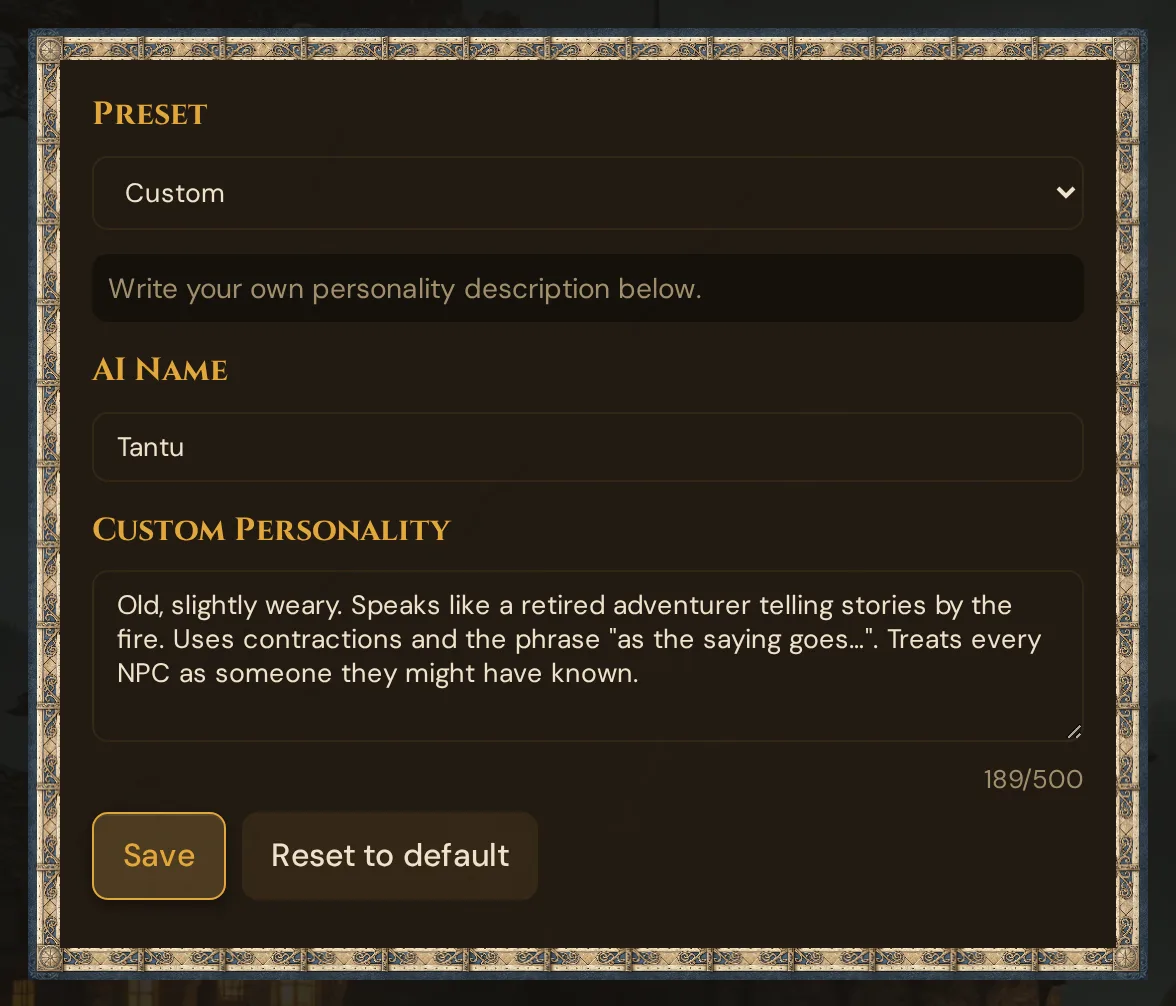
The Custom Personality field (with its counter up to 500) only appears when you pick Custom — as in this picture.
Presets
Each preset comes with a suggested name and a built-in personality. Pick one and the name field fills in automatically (you can still change it).
| Preset | Suggested name | Voice |
|---|---|---|
| Standard | Tantu | Helpful, neutral, rules-aware. The default tool voice. |
| Dramatic | Azrael | Theatrical and dark. Epic, image-rich language; every reply sounds like a prophecy. |
| Cheerful | Pip | Upbeat, encouraging, funny. Cracks jokes and celebrates the players. |
| Scholar | Archivus | Academic and precise. Cites rules, gives exact references, stays factual. |
| Tavern Keeper | Garrick | Jovial storyteller. Speaks in-world and calls the players "adventurers". |
| Mysterious | Die Stimme | Cryptic and suggestive. Speaks in riddles and metaphors, leaves things open. |
| Pirate | Captain Kreuz | Salty seafarer. Pirate slang; treats every quest as a treasure hunt. |
| Custom | (you choose) | Your own name and personality description. |
The preset labels in the dropdown and the preview text below it follow your interface language, with the suggested name in brackets — the names themselves (Tantu, Azrael, Pip, Archivus, Garrick, Die Stimme, Captain Kreuz) are the same in every language. The personalities are written so Tantu keeps its character across every suggestion.
Fields
AI Name
The name Tantu answers with. On a fresh campaign it's Tantu; when you pick a preset, the field fills with that preset's suggested name (e.g. Azrael for Dramatic). If you leave the field empty, it answers as Wovenkeep. Max 20 characters.
Custom Personality
A free-text description of how Tantu should speak and behave. Only used when the Custom preset is selected. Max 500 characters, with a live counter.
Example:
Old, slightly weary. Speaks like a retired adventurer telling stories by the fire. Uses contractions and the phrase "as the saying goes…". Treats every NPC as someone they might have known.
How the persona shapes output
The name and voice you set here shape these suggestions:
| Feature | What the persona changes |
|---|---|
| Story Coach — Analysis | Tone of the dramaturgy feedback (terse vs. warm) |
| Story Coach — Next Session | The strong-start prose and secret-dropping suggestions |
| Story Coach — Description | The atmospheric prose voice |
| NPC Dialog | The narrator/director voice around the dialog |
| NPC live conversation | The framing voice while you chat with an NPC |
| Session Recap | The recap prose style |
| Item suggestions | The flavor text on suggested items |
| Monster suggestions | The flavor text on suggested monsters |
| Loot suggestions | The flavor text on suggested loot |
| World Events | The continued world description after a world-changing event |
It does not change:
| Feature | Why not |
|---|---|
| An NPC's own dialog voice | Set per NPC, not globally |
| SRD descriptions | Static text, no AI involved |
| Error and system messages | Tool-level, not creative |
Automatic language
You don't pick a language for Tantu. Your interface language is passed along with every request, so the reply comes back in English, German, French, or Spanish to match the language you're using the tool in. Switch your interface language and Tantu follows.
Each campaign has its own persona
The persona is saved per campaign. Your dark-fantasy world can use Dramatic (Azrael) while your comedy one-shot uses Cheerful (Pip) — they never affect each other. Switch campaigns and the voice switches too.
Reset to default
Click Reset to default. The form returns to the Standard preset with an empty custom personality and saves immediately. This only changes the persona setting — anything Tantu has already suggested in your notes is untouched.
Persona vs. tone vs. NPC voice
Three independent settings shape how Tantu sounds — easy to mix up:
| Concept | Where set | Affects |
|---|---|---|
| Tantu: name & voice | This page | The narrator voice around Tantu's suggestions |
| Campaign tone | Story & World metadata | What Tantu describes (dark vs. light themes) |
| NPC personality | Per-NPC editor | The voice of that specific NPC in dialog |
A campaign with Tantu's voice = "Tavern Keeper", tone = "Dark fantasy", and an NPC = "cheerful merchant" produces a jovial tavern-keeper narrator describing dark scenes with cheerful merchant dialog inside them. Each layer is independent.
Bringing your own AI key
If you've configured your own AI keys, the persona still applies — it's part of the prompt, regardless of which provider is called. The voice works the same whether you use the bundled AI help (Threads) or your own key.
Examples of strong custom personas
A few that work well in playtesting:
Lovecraftian campaign:
Name: Yog Detached, clinical, faintly disturbed. Speaks of cosmic horror as inevitability. Occasionally trails off mid-sentence. Never panics.
High-fantasy heroic campaign:
Name: Argent Earnest, hopeful, slightly pompous. Speaks in declarations. Uses "noble" and "valiant" unironically. Believes in the heroes.
Political intrigue:
Name: Whisper Quiet, observant, fond of "as you've no doubt deduced". Speaks of motives more than actions. Treats every NPC as a player in a larger game.
Costs
Setting and changing the persona is free on every plan — it's a campaign setting, not an AI action, and costs no Threads. The suggestions it shapes (Story Coach, item & monster suggestions, etc.) each cost Threads per use; with your own AI key, text actions cost 0 🧵 (images are free only with your own Google Gemini key; sound always costs Threads). See Threads & costs for those costs.
Troubleshooting
| Symptom | Cause | Fix |
|---|---|---|
| Tantu ignores my custom text | Preset isn't set to Custom | Pick Custom in the dropdown, then write the personality |
| Personality field is greyed out | A built-in preset is selected | Switch to Custom to enable the field |
| Name change didn't stick | You didn't press Save | Edit the name, then click Save — look for the confirmation line |
| Tantu replies in the wrong language | Interface is set to another language | Language follows your interface; switch the interface language |
| Old notes still use the old voice | Name & voice apply to new output only | Ask for a fresh suggestion for the piece you want in the new voice |
Related articles
- 📖 Story Coach — the main consumer of the persona
- 💬 NPC dialogue suggestions — separate voice per NPC, alongside Tantu's voice
- 🧵 Threads & costs — what each use of the AI help costs; name & voice are free
- 📜 Story & World — the campaign tone field, a separate but related setting