🎟️ Session Zero survey & player invites
👤 For: Game Masters · 💳 Plan: All plans · 🔄 Updated 2026-10-14
Before your first session you can collect two things from each player without anyone installing anything: their expectations (a quick survey) and their finished character (a guided creation link). Both are sharable links you send by WhatsApp, email, SMS, or QR code — players just tap and fill in.
What it does
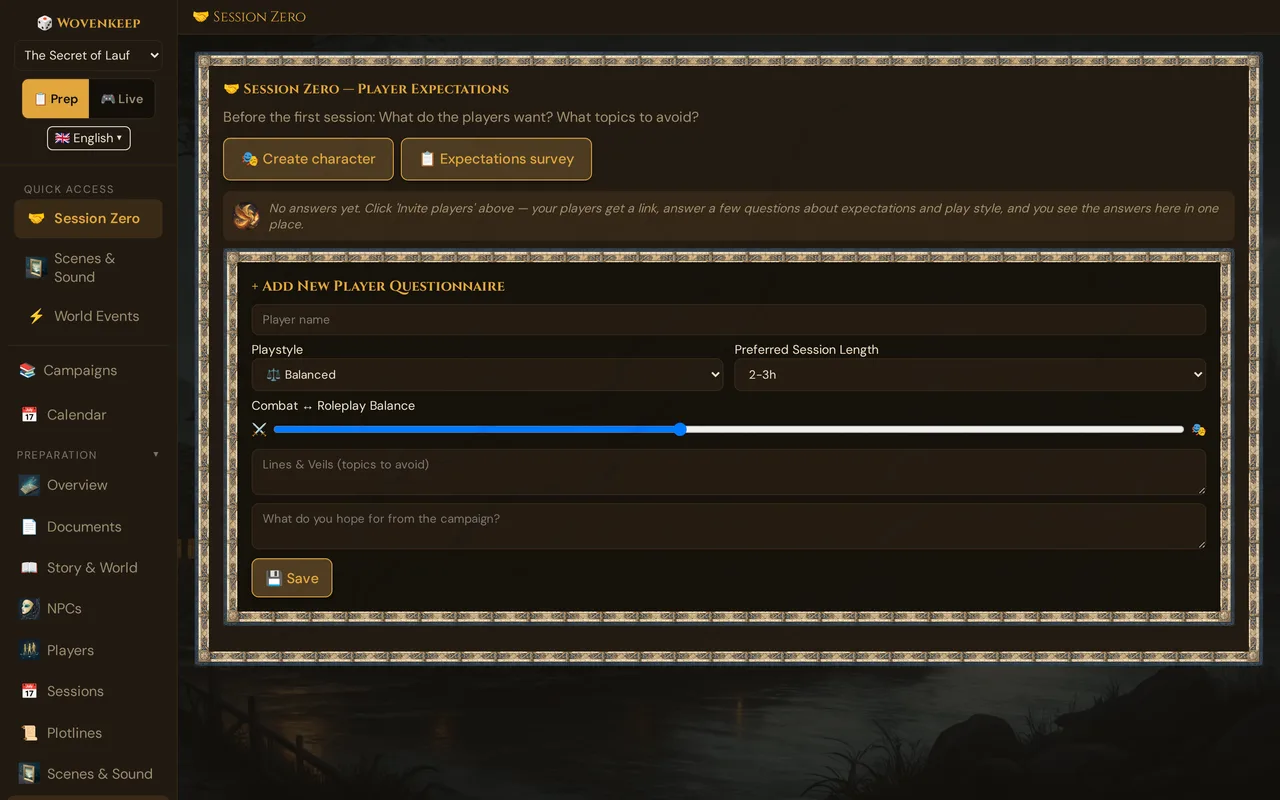
From the 🤝 Session Zero section of your campaign you generate two kinds of links:
- 📋 Expectations Survey — one shared link, everyone fills it in. Answers land as cards in your GM view.
- 🎭 Create Character — a fresh single-use link per player. They build a character that drops straight into your Players list.
When a player has already made a character and then answers the survey, the two are tied together automatically — you see which character each set of answers belongs to.
When to use it
Send both links one to two weeks before session 1. That gives players time to think about their expectations and build a character on their own, so you walk into game night with finished sheets and a clear picture of what the table wants — instead of spending the first hour on setup.
If a new player joins mid-campaign, send them the same two links again.
Step by step
- Open your campaign and click 🤝 Session Zero in the sidebar.
- Click 📋 Expectations Survey. Wovenkeep creates a shared, multi-use survey link — or reuses the existing one if you already made it.
- In the share modal, copy the link or send it directly with the 💬 WhatsApp, 📧 Email, or 📱 SMS buttons. Players on the same network can scan the QR code instead.
- Back in the section, click 🎭 Create Character to generate a single-use character-creation link for one player. Click it again for each additional player.
- Share each character link the same way. As players finish, their cards and characters appear in your GM tool in real time — no reload needed.
💡 Tip: The survey link is multi-use — paste it once into the group chat and everyone uses it. The character links are single-use — generate one per player so each link is "spent" after that player finishes.
The two link types at a glance
| 📋 Expectations Survey | 🎭 Create Character | |
|---|---|---|
| Link path | yourname.wovenkeep.com/survey/… |
yourname.wovenkeep.com/onboard/… |
| Uses | Multi-use — shared by the whole group | Single-use — one per player |
| What the player does | Answers 5 short questions | Builds a full character |
| Where the result lands | A card in 🤝 Session Zero | The 🎲 Players list |
| Account needed? | No | No |
| Default expiry | 7 days | 7 days |
What the survey asks
The player opens a clean, mobile-friendly page and answers five questions:
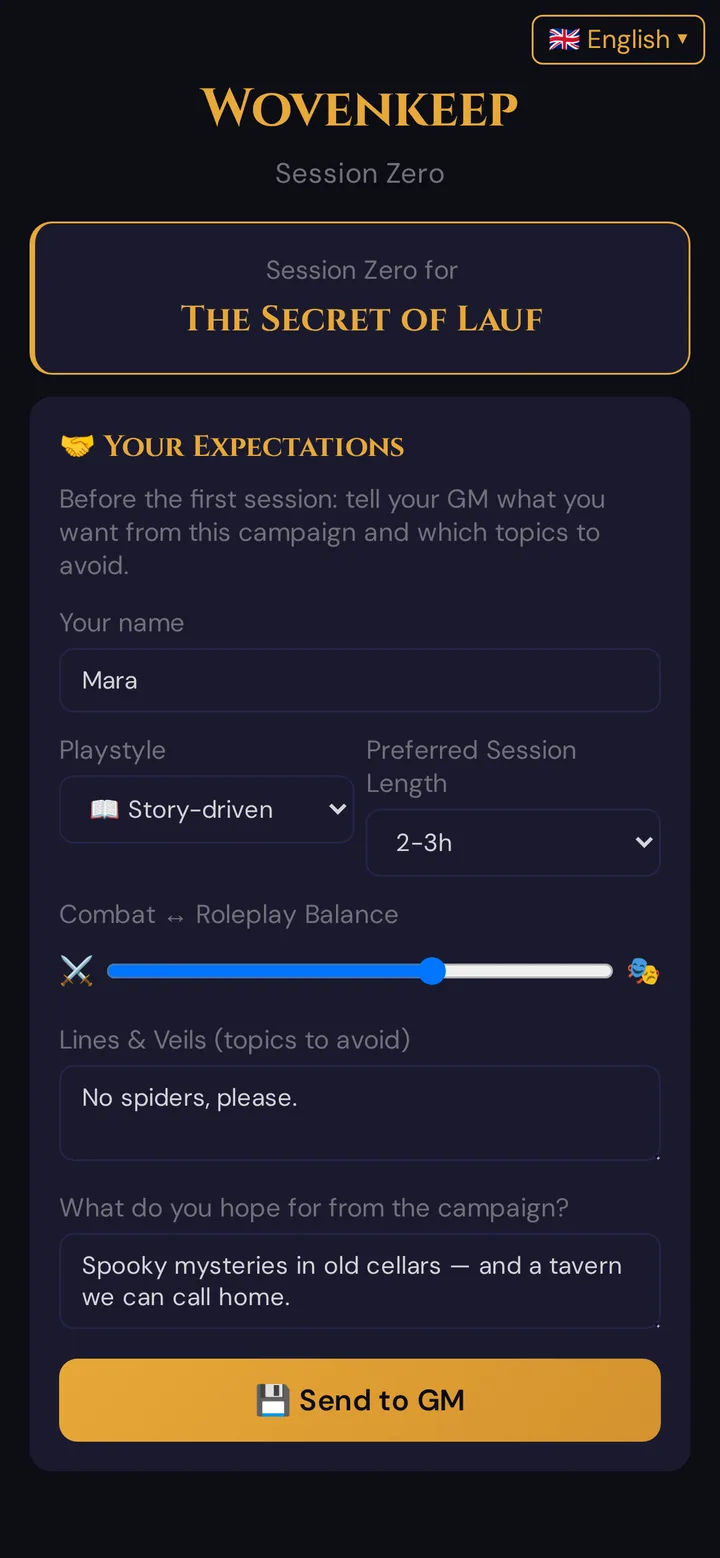
Each answer arrives as its own card in your Session Zero section, where you can read it and delete it. Reading the cards and adjusting your prep is a manual GM step — there is no party-summary view yet.
Linking a survey answer to a character
If a player builds their character first, you can have their later survey answer attach to that character automatically:
- Players who reach the survey from their character link carry their character token in the URL (
?player_token=…). The survey then pre-fills their name and ties the answer to that character. - In your Session Zero view, that card shows a gold 🎭 character-name badge so you know exactly whose answer it is.
If a player just opens the bare survey link, their answer is still saved — it simply isn't matched to a character. That is normal and fine.
Managing your links
- Reusing the survey link: clicking 📋 Expectations Survey again does not flood you with new links — it reuses the active one. You only ever need one survey link per campaign.
- Revoking a character link: open the Session Zero section to see your character invites with their status (open / used by whom). Use the ✕ button to revoke one you no longer want active.
- Adding an answer by hand: if a player told you their preferences verbally, fill them in yourself via the + Add New Player Questionnaire form at the bottom of the section.
Plan limits
Both the survey and character invites are free on every plan — no Threads, no paid plan needed. There is no cap on how many invite links you create. See Threads & costs for what does cost Threads (mostly AI generation).
Troubleshooting
| Symptom | Cause | Fix |
|---|---|---|
| Player says the link is expired or invalid | The 7-day expiry passed, or the link was revoked | For the survey, open the modal again — Wovenkeep reuses a valid link or makes a fresh one. For character links, generate a new one. |
| "This link is not a survey link" | A character (/onboard/…) link was opened on the survey page, or vice versa |
Send the matching link type — survey links start with /survey/, character links with /onboard/. |
| Player finished but nothing appears in the GM tool | Rare connection hiccup | Reload the Session Zero or Players section; submissions are saved in the database. |
| Player name is pre-filled on the survey | They opened it via their character link (token attached) — this is correct | No action needed; the answer will link to their character. |
| Player wants to change a survey answer | The form has no edit path | Delete their card with ✕ and ask them to submit again, or correct it via the manual form. |
Related articles
- 🤝 Session Zero — the full GM-side reference for reading and acting on survey responses
- 🎟️ Player onboarding invites — the per-player character-creation link in detail
- ✨ Character creation — what players go through on the character link
- 👋 Your first session — the full 10-minute path to game night