🔨 Crafting (material → ticks → clock)
👤 For: Players · Game Masters · 💳 Plan: All plans · 🔄 Updated 2026-10-14
Players turn raw materials into real items: pick a recipe, spend the materials you already carry, and watch a progress clock fill as time passes in the story. When the clock is full, the finished item drops straight into your inventory.
What it does
- A player opens 🔨 Crafting on their phone, browses recipes, and taps Craft on one they have the materials for.
- The recipe's materials are consumed from that player's inventory — for good. Crafting is irreversible.
- A progress clock appears (a ring of 4–8 segments). It is not a real-time countdown: the GM advances it by ticking the in-game clock forward, the same way downtime passes in the story.
- When the clock fills, the crafted item lands in the player's inventory automatically — with a buzz and a notification.
The numbers come from the 5e (2024) crafting rules: how many days an item takes and how much gold-value of work it represents are derived from the recipe, then split into clock segments.
⚠️ Note: Recipes can't be created in the GM tool. Players can only craft once the global SRD recipes (potions, antitoxin, …) have been set up for your Realm — if the Recipes list stays empty, contact support.
When to use it
Use crafting for downtime and travel — the stretches between fights when characters brew potions, forge gear, or scribe scrolls. The player decides what to make and supplies the materials; the GM decides how much time passes. It is the in-game-clock turned into something the party can spend.
Step by step
As a player
- Tap 🔨 Crafting in the bottom bar of your character view.
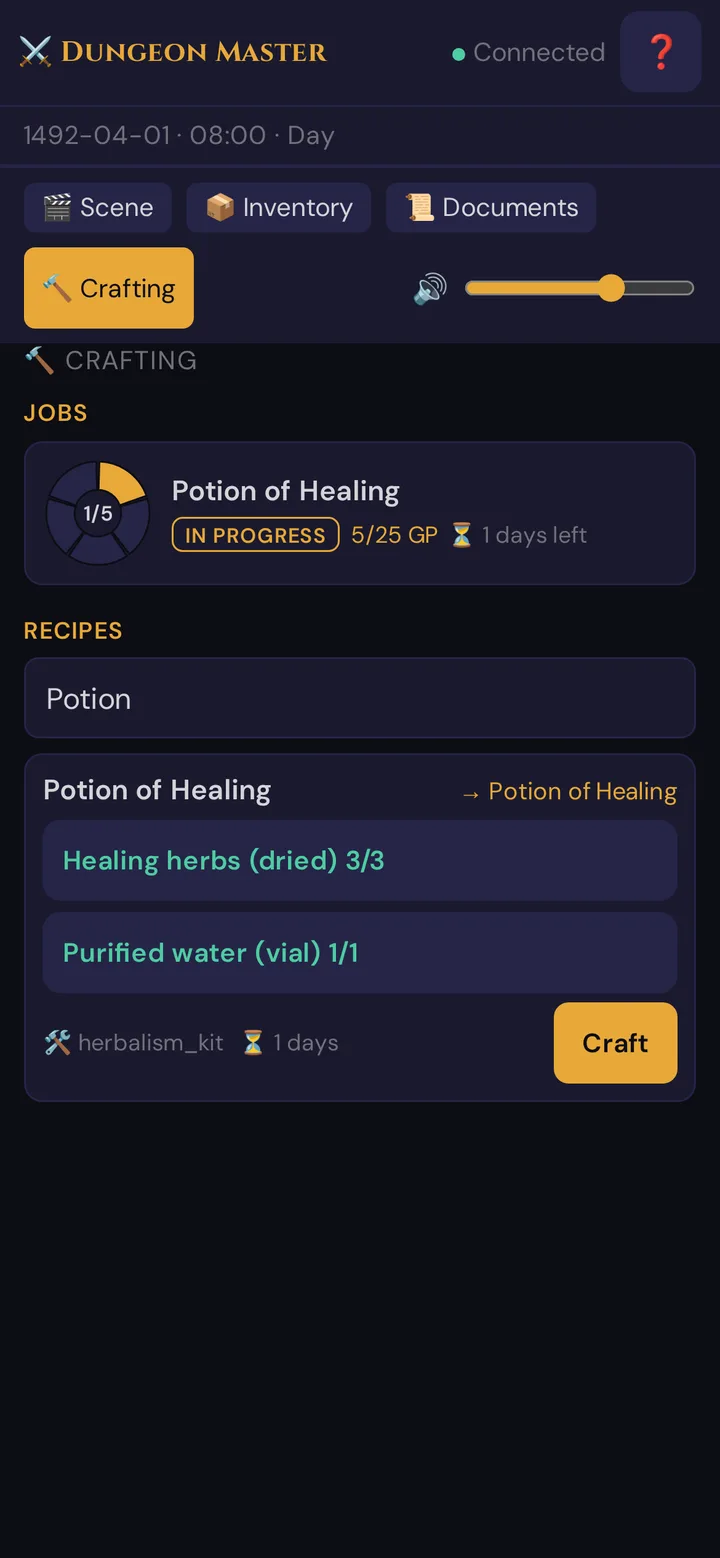
- Under Recipes, find a recipe (use Search recipe… to filter). Each card shows the output item, the materials it needs (your have / needed count, with ✦ marking exotic materials), an optional required tool, and the base time in days.
- When you own everything, the button reads Craft. If you are short, it stays disabled and reads Missing material.
- Tap Craft. Your materials are consumed and a job tile appears under Jobs with a progress clock.
- Watch the clock. As the GM moves in-game time forward, segments fill in. When it is full your phone buzzes, shows Item completed!, and the new item is in your inventory.
💡 Tip: Gather first, craft second. The Craft button only unlocks once every material in the recipe is in your inventory — you cannot borrow a teammate's components for a job.
As the GM
- Open the 🔨 Crafting panel in your live-session sidebar. It lists every player's jobs, grouped by player.
- Each job card shows the progress clock and a gold-piece total. To advance a job, tap the +1 Tick button — one tick fills the next chunk of the clock.
- If a recipe needs exotic materials, the job starts in a gathering state and consumes nothing yet. Once the player has handed over the rare component in the story, tap the confirm-materials button to consume it and switch the job to in progress.
- To stop a job, use the cancel button (you'll be asked to confirm). To nudge progress by a custom amount, type a gold value into the small GP field and use the rescale button.
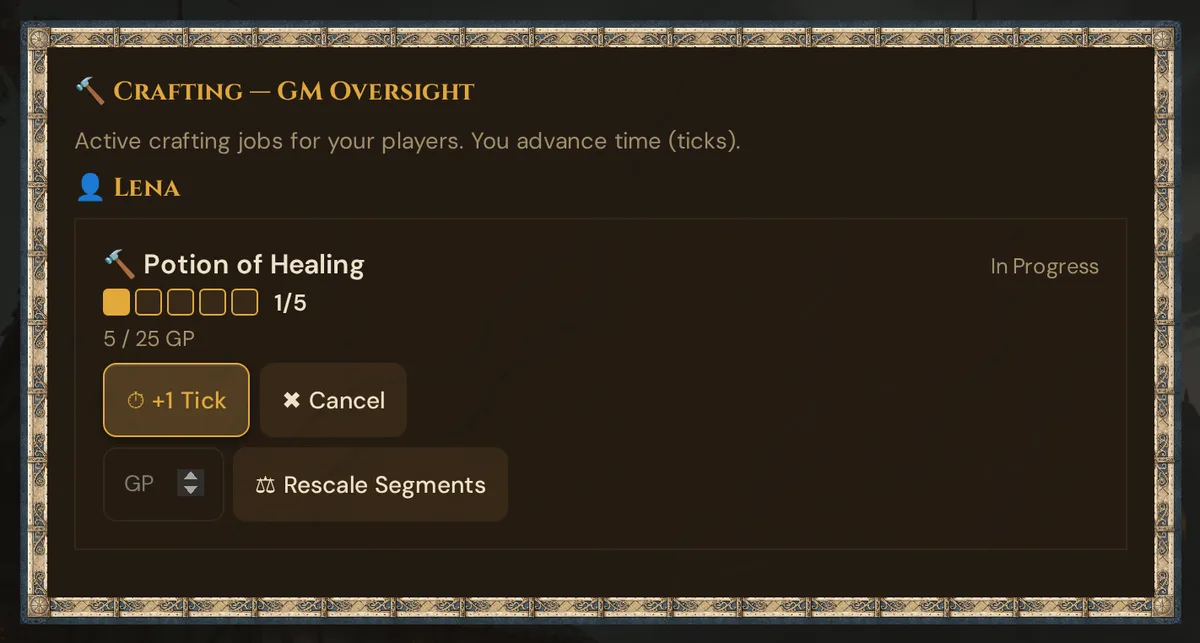
💡 Tip: A tick is your pacing lever, not a stopwatch. Tick a job forward whenever the party "spends a day" of downtime — one short rest's worth of bookkeeping covers a whole session of crafting.
How the clock is built
The recipe sets the workload; Wovenkeep turns it into a clock you can fill:
| Item kind | Workload (2024 rules) |
|---|---|
| Mundane gear | Half the market price in gold, at 5 gp of progress per day |
| Common magic | ~5 days / 50 gp |
| Uncommon magic | ~10 days / 200 gp |
| Rare magic | ~50 days / 2,000 gp |
| Very rare magic | ~125 days / 20,000 gp |
| Legendary magic | ~250 days / 100,000 gp |
- Consumables (most potions and scrolls) take half the time and cost.
- Assistants shorten a job: helping hands divide the days needed.
- The total workload is then sliced into a 4–8 segment clock, so every craft is a few satisfying ticks rather than dozens.
The clock measures story time, not wall-clock time. Nothing fills on its own — the GM ticks it as downtime passes.
What the player sees
Plan & cost
Crafting is free on every plan — starting a job, ticking it forward, and collecting the result cost no Threads. The only thing it spends is the in-game materials in your inventory. If a recipe's output normally comes from a paid generator (for example an AI-generated item image), that generator's usual Threads cost still applies separately. See the Threads & costs for what is metered.
Troubleshooting
| Symptom | Cause | Fix |
|---|---|---|
| Craft button is greyed out / reads "Missing material" | You don't own every material the recipe needs | Check the red have / needed counts on the card and gather the missing items first |
| "No recipes yet" under Recipes | No recipes are available for this Realm | The GM tool has no recipe editor. The global SRD recipes (potions, antitoxin, …) appear once they have been set up for your Realm — contact support |
| Started a job but the clock isn't moving | The clock only advances when the GM ticks it — it is story time, not real time | Ask the GM to advance the job from their 🔨 Crafting panel |
| Job stuck on "Gathering" and consumed nothing | The recipe needs an exotic (✦) material the GM must sign off on | Hand the rare component over in the story; the GM confirms materials to start the work |
| Materials gone but I changed my mind | Crafting consumes materials irreversibly the moment you tap Craft (non-exotic recipes) | There is no refund — the GM can cancel the job, but spent materials are not returned |
Related articles
- 🎁 Items & inventory — where materials live and crafted items land
- 🎲 Player characters — the character sheet that holds the inventory
- ⏱️ In-game clock & calendar — the time mechanic crafts spend
- 📱 Multi-device players — players craft from their own phones
- 📕 SRD Rulebook — the 2024 rules the crafting math follows