📖 Story Coach
👤 For: Game Masters · 💳 Plan: All plans · 🧵 long text 4 · short 1 · 🔄 Updated 2026-10-14
Story Coach is optional AI help: Tantu reads your campaign notes and suggests probing questions, a plan for the next session, or read-aloud text. You decide what to keep.
▶ Open Story Coach in Wovenkeep
What it does
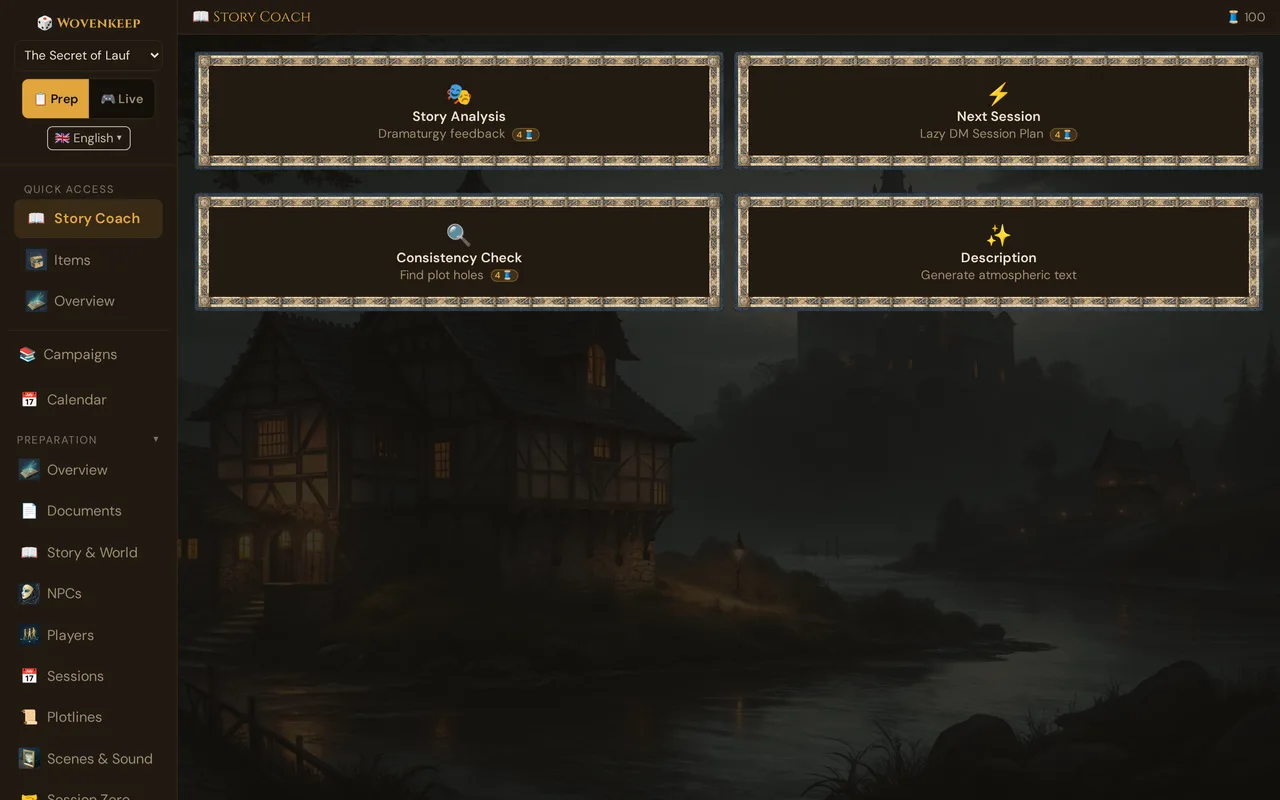
Story Coach offers four distinct suggestions, each drawing on a different slice of your campaign data. Every run is fresh; results are saved and browsable through a Version History dropdown so you can compare older runs or restore a previous draft at any time.
When to use it
- Before a session: get a quick scaffold for tonight's events
- Mid-campaign: surface contradictions before players notice them
- Any time you feel stuck on the story arc or need atmospheric prose
Step by step
- Open your campaign in the GM Tool at
app.wovenkeep.com. - Click 📖 Story Coach in the left sidebar (in the Story & AI group).
- Choose one of the four action cards (see table below) — each analysis card shows its Thread price as a 🧵 badge (0 🧵 with your own AI key).
- A confirm dialog appears first, showing the cost, your current balance, and your balance after the run. Tick "Don't ask again this session" to skip it until you close the tab.
- Wait a few seconds — the result appears in the panel below the cards.
- To revisit a previous result, open the Version History dropdown and select an earlier entry; it loads instantly.
💡 Tip: Fill in your NPCs, Plotlines, and at least one session recap before running Story Analysis or Next Session — the more context you give, the sharper the output.
The four actions
| Action | Threads per use | What Tantu reads |
|---|---|---|
| 🎭 Story Analysis | 4 (long text) | Campaign setting/tone/themes, all NPCs, all plotlines, last 3 sessions, scenes, player characters |
| ⚡ Next Session | 4 (long text) | Same as Story Analysis |
| 🔍 Consistency Check | 4 (long text) | Same as Story Analysis — cross-references for contradictions |
| ✨ Description | 1 (short text) | What you type + campaign setting/tone and Tantu's name & voice |
Bring your own AI key? All four actions run for free (no Threads deducted) when a custom API key is configured under Settings → AI Keys. See Instance Settings → AI Keys.
Version history
Every time you run an action, Wovenkeep saves the result automatically. The Version History dropdown (above the output area) lists all past runs for that campaign, newest first, labeled with date and type. Selecting an entry restores it into the output field — nothing is deleted. The last saved result is displayed automatically when you reopen Story Coach.
What Tantu sees
Campaign data sent to Story Coach
─────────────────────────────────
✓  Campaign setting, tone & themes
✓  All NPCs  →  name, importance, description, secret
✓  All plotlines  →  title, description, status, priority
✓  Last 3 sessions  →  title, recap (or strong start)
✓  Scene titles & status
✓  Player characters  →  name, class, level
✓  Session Zero preferences
✗  Player devices / player-side notes
✗  Your live session in progress
The long Story, World, and Secrets & Twists texts from Story & World feed the ✨ Ask Tantu story helpers (below), not the Story Coach cards.
The ✨ Ask Tantu story helpers (Story & World)
Below the Story, World, and Secrets & Twists fields in Story & World sits a "✨ Ask Tantu: Develop the story" button. It opens the "✨ Tantu helps with your story" dialog with five one-click helpers, each costing 1 🧵 (short text):
| Helper | What it does |
|---|---|
| 📝 Expand story | More details and depth |
| ⚔️ Suggest conflicts | What could go wrong? |
| 🎭 Suggest plot twist | Surprising turn |
| 👤 Suggest NPC | Who is missing? |
| ⚡ Plan first session | How do I start? |
Tantu works from your Story and World fields — Secrets & Twists are never sent. Results persist: a "Saved results" dropdown appears in the dialog once at least one result exists, so you can restore any earlier suggestion.
Tantu's name & voice
Story Coach output adopts the voice set in 🪶 Tantu: name & voice. The same analysis reads differently depending on which preset you have active:
| Preset | Voice |
|---|---|
| Standard | Neutral, helpful, structured |
| Dramatisch | Theatrical, dark, prophetic |
| Fröhlich | Upbeat, humorous, encouraging |
| Gelehrter | Academic, rule-precise, factual |
| Tavernenwirt | In-world, storytelling, calls players "adventurers" |
| Mysteriös | Cryptic, metaphor-heavy, leaves things open |
| Pirat | Nautical jargon, gruff but warm |
Set the persona before running Description — it has the strongest effect on tone-sensitive prose.
Quick reference
| You want… | Click | Then |
|---|---|---|
| A second opinion on your campaign structure | 🎭 Story Analysis | Read the critique, adjust prep |
| A scaffold for tonight's session | ⚡ Next Session | Copy to Session Notes, edit |
| Verify a plot twist won't contradict prior sessions | 🔍 Consistency Check | Fix any flagged contradictions |
| Atmospheric read-aloud text for a scene | ✨ Description | Paste into the scene's Description field |
What it costs
Story Coach works on every plan, including free — there is no feature gate. Each button click is a text suggestion and spends Threads (long text 4, short 1, see table above).
Bring your own AI key and text actions cost 0 🧵. See Threads & costs.
Troubleshooting
| Symptom | Cause | Fix |
|---|---|---|
| A button reports insufficient balance | No Threads left | Top up or earn Threads; with your own AI key, text actions cost 0 🧵 |
| Output cuts off mid-sentence | Very large campaign data hitting context limits | Shorten session recaps; Story Coach always uses the last 3 sessions, not all of them |
| "Description" output ignores what you typed | Input was too short or vague | Type a concrete location plus a mood detail (e.g. "abandoned temple, faint chanting") before clicking ✨ Generate |
| Version History dropdown is empty | First run on this campaign | Run one action — the dropdown populates after the first successful generation |
| Response sounds nothing like your usual persona | Tantu's preset was recently changed | Check Story & World → AI Persona and confirm the correct preset is selected |
Related articles
- 🪶 Tantu: name & voice — sets the voice Story Coach speaks in
- 🧵 Threads & costs — full Thread cost reference
- 📈 Tension Arc — companion pacing tool
- 🌱 Foreshadowing — companion narrative tool
- ⚙️ Instance Settings — AI Keys — use your own key for free text suggestions