💬 NPC dialogue suggestions
👤 For: Game Masters · 💳 Plan: All plans · 🧵 1 per reply · 🔄 Updated 2026-10-14
When the words won't come live at the table: Tantu suggests a line in the NPC's voice, drawn from their personality, motivation, and secret, with the help of AI. Whether you speak it or push it is up to you.
What it does
- Suggests 1–3 lines of in-character speech for a named NPC, informed by their personality, motivation, secret, and voice notes
- Works in prep (NPC editor, for rehearsal) and live (during the session, to keep the game moving)
- Every generation is saved as a version — you can browse past results and restore any earlier line
- A separate Scene Conversation mode suggests a multi-NPC back-and-forth between all cast members of a scene (useful for planning ensemble moments)
When to use it
- You want to hear how an NPC actually sounds before the session — does the voice land? Does the secret create subtext?
- Mid-session, players address an NPC you didn't plan for — get a serviceable line and keep going
- You're prepping a key conversation (the villain's reveal) and want draft lines to refine
Step by step
In prep — NPC list
- Open NPCs from the campaign sidebar
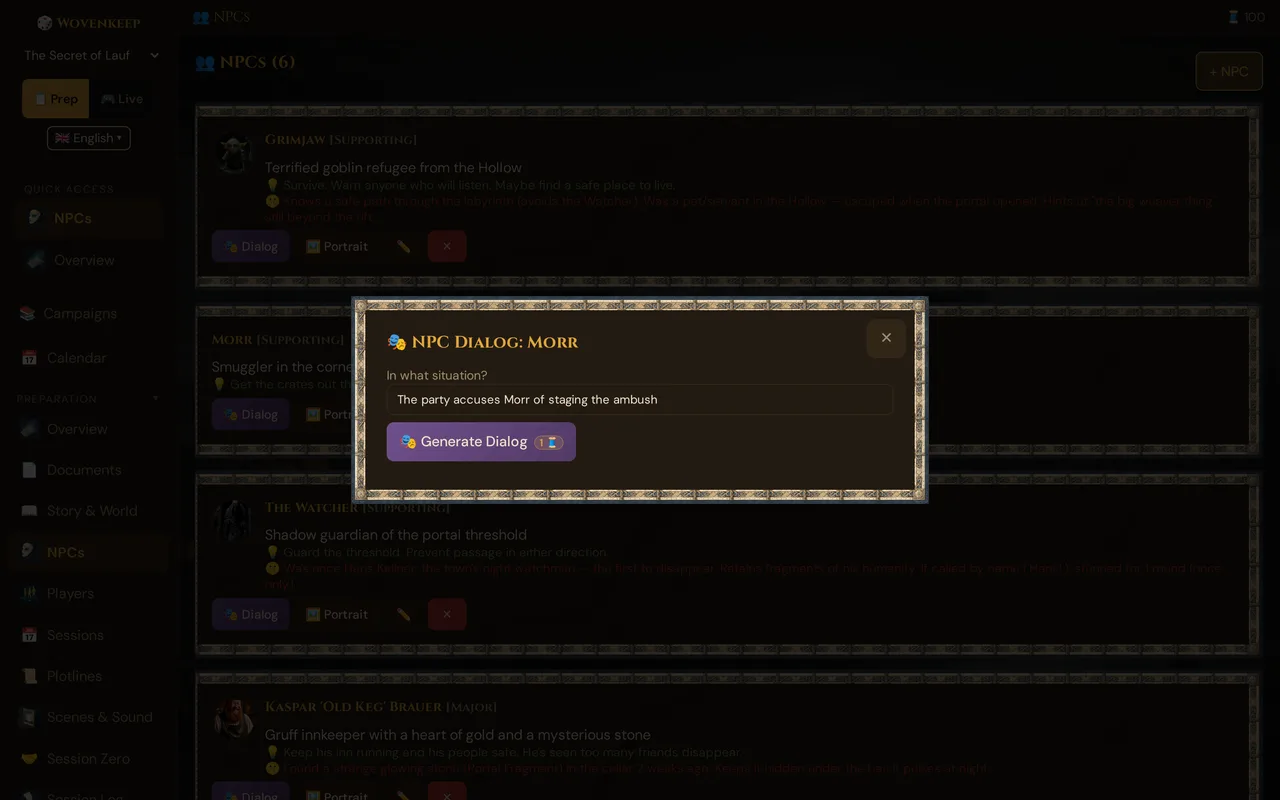
- Click the 🎭 Dialog button on the NPC's row — the 🎭 NPC Dialog window opens
- In In what situation?, type a situation: "The party accuses Morr of staging the ambush"
- Click 🎭 Generate Dialog — the button carries a 1 🧵 cost badge, and a confirmation with cost and balance appears before the spend
- Review the result — use the Versions dropdown to compare past generations or restore an earlier one (the latest saved dialog is restored automatically when you reopen the window)
Live — during the session
- In the live session panel, go to the 🎭 NPC Dialog Generator card
- Pick the NPC from the dropdown (NPCs marked as deceased are excluded)
- Type the situation, or leave it blank for an opening line
- Click 🎭 Generate Dialog (1 🧵 badge + confirmation, same as in prep)
- Edit the line if needed, then click Push — it appears on player phones as a speech bubble with the NPC's portrait
💡 Tip: Choose a mood portrait when you push — an angry Morr looks angry on players' phones. Far more impactful than a neutral face every time.
Scene Conversation (multi-NPC)
From the Scenes editor, open a scene with at least two NPCs in the cast:
- Click ✨ Generate conversation
- Tantu suggests a multi-line exchange between the cast NPCs
- Use the Versions dropdown to restore earlier takes
- Push individual lines via the live panel, or use the result as a script
During a live session, the same generator is also available directly from the 🗣️ NPC conversation (scene) card in the live panel: pick a scene with at least two cast NPCs and click 🗣️ Let the NPCs talk — then release the lines to player phones one by one.
What Tantu considers
NPC.personality        → tone and manner
NPC.motivation         → what they're trying to get
NPC.secret             → subtext (Tantu knows; the words may hide it)
NPC.voice_notes        → speech mannerisms to mimic
NPC.mood (if set)      → friendly / hostile / afraid colours the delivery
Campaign.story+world   → world-grounded references
The situation you type → what they're responding to
Note on memory: Each dialogue suggestion is stateless — Tantu does not see previous lines from the same session. For continuity across a conversation, paste the prior exchange into your situation prompt, or update the NPC's fields after the session.
Quality depends on the NPC fields
The single biggest factor in dialog quality is how well you wrote the NPC. Compare:
Thin NPC:
Personality: friendly dwarf → "Hello there! How can I help you today?" (generic, forgettable)
Rich NPC:
Personality: Gruff, secretly kind, distrusts magic-users, lost a son to a botched spell Voice: Short sentences. Calls everyone "lad". Spits when he says "wizard". Secret: He's the one who reported the party's mage to the inquisition. → "You again, lad. [He doesn't look up from the anvil.] Bring your… spell-flinger friend, did you? [A pause. The hammer comes down hard.] Hope he's worth the trouble he brings." (distinctive, loaded with subtext)
Five minutes on personality + voice + secret pays back every time you generate dialog for that NPC.
Tantu's voice and the NPC's voice
🪶 Tantu: name & voice affects the narration around the dialog (stage directions, scene framing) but not the NPC's own voice — that comes from the NPC's personality field. You can have a warm "Storyteller" persona narrating the scene while a clipped, cold NPC speaks within it.
What it won't do
- It won't decide what the NPC does — it generates speech, not actions. You adjudicate consequences.
- It won't break the secret unprompted — Tantu knows the NPC's secret but won't reveal it unless your situation forces it ("the party produces irrefutable proof").
- It won't be funny if the NPC isn't — comedy needs to live in the personality field. A "serious knight" won't crack jokes.
- It won't remember the last line — each call is independent. Feed prior dialog back into the situation prompt for conversational continuity.
Live workflow tips
Pre-generate for set-pieces. For a planned big conversation (the BBEG's reveal), generate the key lines in prep, copy them into your session notes, and deliver them verbatim. Don't gamble on live generation for the most important beat.
Use it for the unexpected. When players approach an NPC you didn't prep, that's when live generation shines — type the situation, get a serviceable line, keep the game moving.
Edit before pushing. The generated line is a draft. Tweak a word, cut a sentence, sharpen the subtext — then push. Tantu gets you 80 % there fast; the last 20 % is yours.
Use versions as a safety net. Every generation is saved. If you push a line and wish you'd used an earlier draft, open the Versions dropdown and restore it.
Plan limits
NPC Dialog uses 1 Thread per generation (both single NPC and Scene Conversation).
If you provide your own AI key in Instance Settings, dialog generation costs 0 Threads.
See Threads & costs for how to top up.
Troubleshooting
| Symptom | Cause | Fix |
|---|---|---|
| "NPC not found" error | NPC was deleted or the wrong ID is being used | Refresh the NPC list; re-open the NPC editor |
| Generic, flat dialog | Thin NPC fields — personality / voice / secret are empty or vague | Add specific personality text, voice notes, and a secret |
| Dialog ignores the situation | Very short or ambiguous situation prompt | Be specific: name who's speaking, what just happened, what the NPC wants |
| "Threads insufficient" message | Not enough Threads in your wallet | Buy Threads at app.wovenkeep.com → Billing, or add your own AI key |
| Push button missing | Live session not started, or NPC is marked deceased | Start the session; check the NPC's status field |
| Versions dropdown empty | First generation for this NPC | Generate once — the dropdown populates after the first save |
Related articles
- 👤 NPCs — write rich NPCs for better dialog
- 🪶 Tantu: name & voice — narration voice (separate from NPC voice)
- 📡 Running a live session — where live dialog fits in the session flow
- 🧵 Threads & costs — 1 Thread per suggestion, BYO key = free