🎲 Whisper & dice
👤 For: Game Masters · Players · 💳 Plan: All plans · 🔄 Updated 2026-10-17
Two essential live-session channels: Whisper for private GM-to-player messages, and Dice for rolls — digital, analog, and GM-requested.
What it does
- Whisper — sends a private purple message to one specific player. No other player sees it. The phone vibrates to signal something private has arrived.
- Dice — every player has a full dice roller in their game screen; every roll lands in a persistent, filterable roll log on the GM's panel.
- Roll Request — the GM can ask one player or all players at once to roll, naming the type, the exact skill or ability, and the DC. The player gets a banner prompt with their modifier; the result comes back with an automatic success/failure verdict.
- Hidden GM rolls — tick one box and only you see your own roll; player phones get nothing.
When to use it
Use Whisper whenever the fictional moment is asymmetric: only one character would know this, hear this, or feel this. Use Roll Request to enforce a specific check without trusting the player to pick the right dice. The Roll Log is your audit trail — check it after a session to see exactly who rolled what, when.
Whisper
Sending a whisper
- Open Live → Scenes & Sound in the GM panel.
- Locate the 🔮 Whisper card (purple-tinted).
- Pick the target player from the — Player — dropdown. The dropdown lists every connected player by their join-name.
- Type the message in the text field. Anything over 3–4 sentences usually feels long on a phone.
- Optional: in the Note: – list pick 🤫 Keep it to yourself or 💬 You may tell the others — the phone shows that note below the message.
- Click 🔮 Whisper (purple button).
The GM log confirms: 🔮 Whisper → Lena. The text box is auto-cleared so you can fire another immediately. Without a player or a message, the card says Select a recipient and enter a message.
💡 Tip: There is no audio cue for whispers by design — a chime would tell other players something was sent. If you want a private tactile nudge, the phone already vibrates when the whisper arrives, so nothing extra is needed.
What the player sees
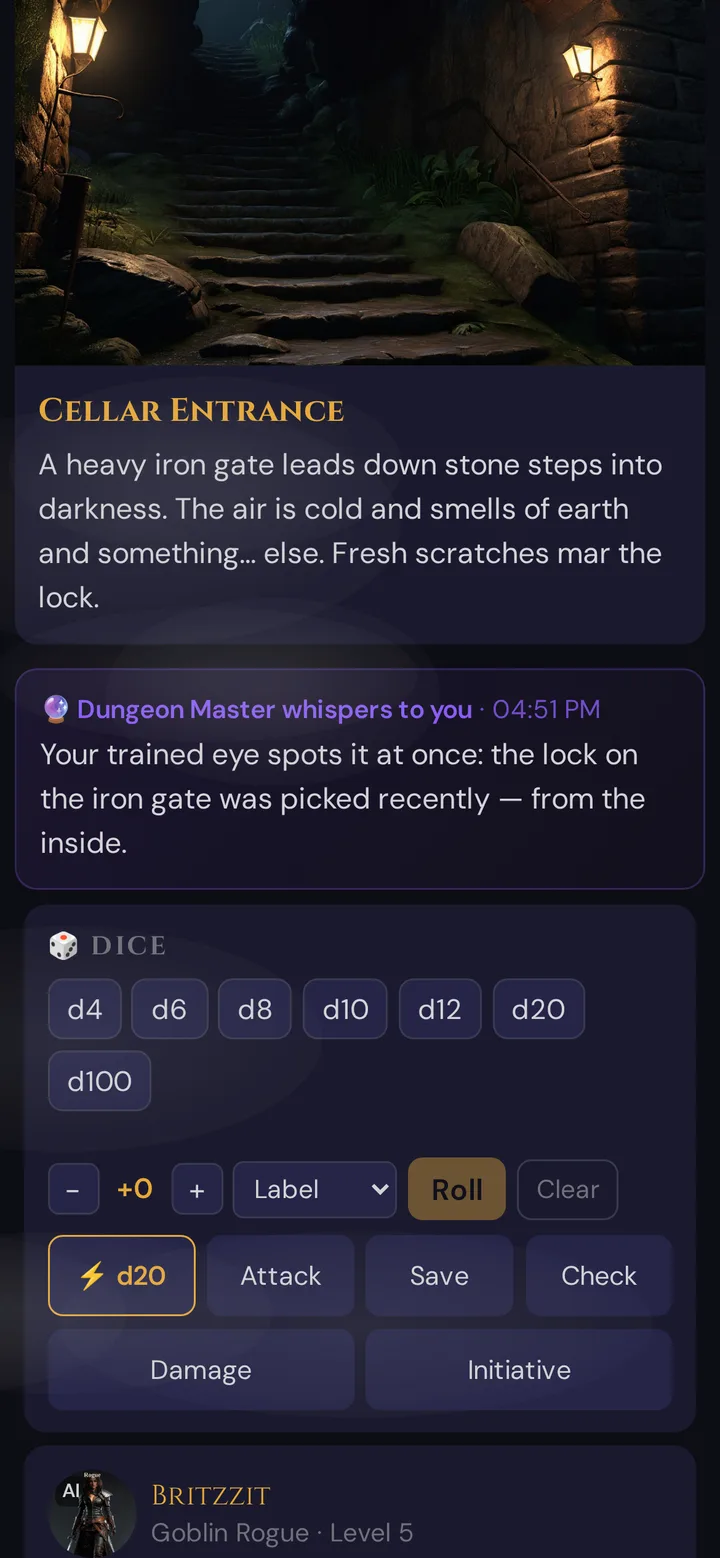
The card shows who is whispering (your GM name) and the time. It fades in gently and scrolls into view in the player's content area. It stays on screen until new content pushes past it.
The phone vibrates [100 ms — pause — 50 ms — pause — 100 ms] when a whisper arrives.
Multi-device whispers
If the target player is connected on multiple devices (phone + tablet, etc.), the whisper appears on all of their devices — but no one else's. The player always sees the message regardless of which screen they're looking at.
What gets logged
Whispers leave a short trace in the session event log: the target player's name — not the message. The text is not stored anywhere — if you want a record, copy it into a session note before sending.
Plan limits
None — Whisper works on every plan, including Adventurer (free). Whispering never costs Threads.
Dice — player-side
Every connected player has a dice roller fixed to their game screen.
Rolling
The player taps a die-type button to roll it. The unified Roll Prompt opens, showing the selected die with an auto-filled modifier (pulled from their character sheet if available). They can:
- Adjust the modifier before rolling.
- Switch between App (digital) and Manual (real dice) mode per die.
- Submit the roll.
The result appears on-screen. The GM sees it instantly in the Roll Log.
Real-dice mode
For players using physical dice, the Roll Prompt has a Manual input. The player types the number they actually rolled. The roll is logged identically to a digital roll, just with a ✍️ source badge in the GM's feed — no one is excluded from the log for loving their lucky d20.
What the GM sees — Roll Log
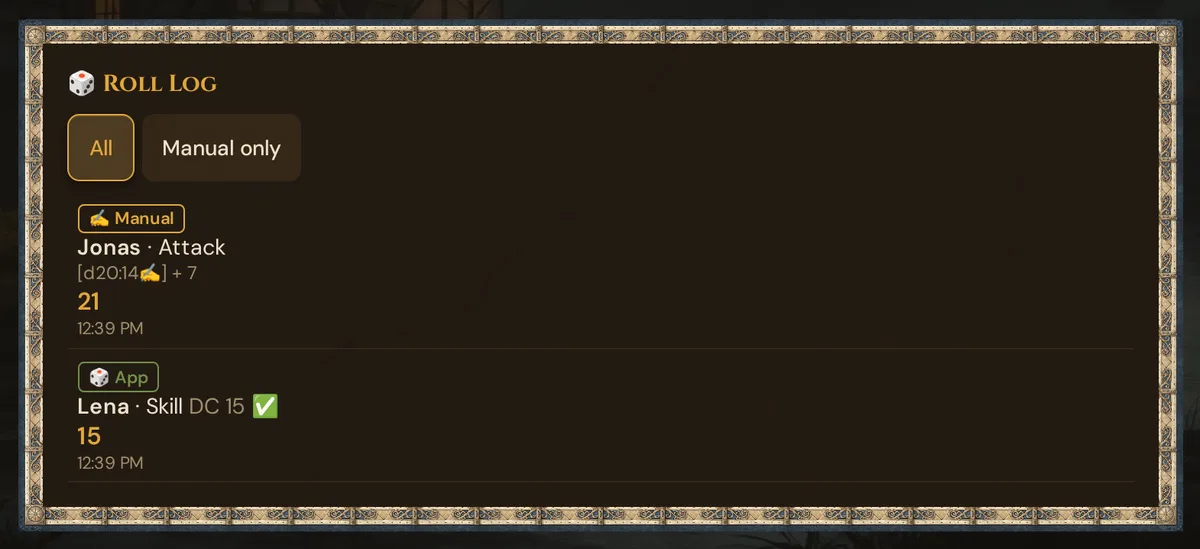
Every roll from every player (and from the GM) appears in the 🎲 Roll Log card in the GM panel. The feed is:
- Persistent — backed by the
roll_logtable server-side, so it survives disconnects and page reloads. - Filterable — two buttons: All | Manual only.
- Per-roll detail — each entry shows: source badge · player name · roll type / label · dice breakdown with per-die source icons · modifier · total · timestamp.
Source badges at a glance:
| Badge | Meaning |
|---|---|
🎲 App |
All dice rolled digitally |
✍️ Manual |
All dice entered by hand |
✍️🎲 Mixed |
Mix of app and manual dice in one roll |
Example feed entries:
✍️ Manual  Lena  · Save          [d20:17✍️] + 2    19   10:42 PM
🎲 App     Jonas · Attack        [d20:4🎲, d6:3🎲] + 5   12   10:43 PM
🎲 App     👑 GM · Perception    [d20:14🎲]              14   10:44 PM
Dice — GM-side
The GM panel has its own dice roller: the 🎲 GM dice card in Scenes & Sound (live sidebar). The GM rolls using the same unified interface as players.
Normally every GM roll goes to all player phones. Players see a subtle notification:
🎲 GM rolls: 18 (1d20)
Use open GM rolls for NPC initiative, environmental damage, and any fate-of-the-world moment you want the table to witness.
Hidden GM rolls
For a roll the players shouldn't know about — an NPC's secret Stealth check, a hidden trap, a result you might fudge — roll hidden:
- In 🎮 Live mode, open Scenes & Sound and scroll to the 🎲 GM dice card.
- Tick 🙈 Roll hidden (players see nothing).
- Roll as usual.
What happens with a hidden roll:
- Only you see the result. Player phones get no notification at all.
- It isn't posted to your Discord channel either (if you've connected one).
- Your 📋 Log card notes it, e.g.
🙈 Hidden roll: 1d20 → 17. - It is still saved in the roll history as a GM roll, just like an open one.
💡 Tip: The tick isn't remembered. When you switch to another section and come back, the box is unticked again — check it before every hidden roll.
Roll Request
Roll Request is in Live → Players, below the initiative list.
Sending a request
- Select the target in the — Player — dropdown: one player, or — All — to ask every connected player at once (players marked absent are left out).
- Choose the roll type: Save · Attack · Skill · Ability.
- Pick what exactly is rolled in the second dropdown: for Skill one of the 18 skills (e.g. Perception), for Save and Ability one of the six abilities (e.g. Wisdom). Attack has no second choice.
- Set the DC (default 15).
- Click 📩 Send.
The player receives a banner on their phone:
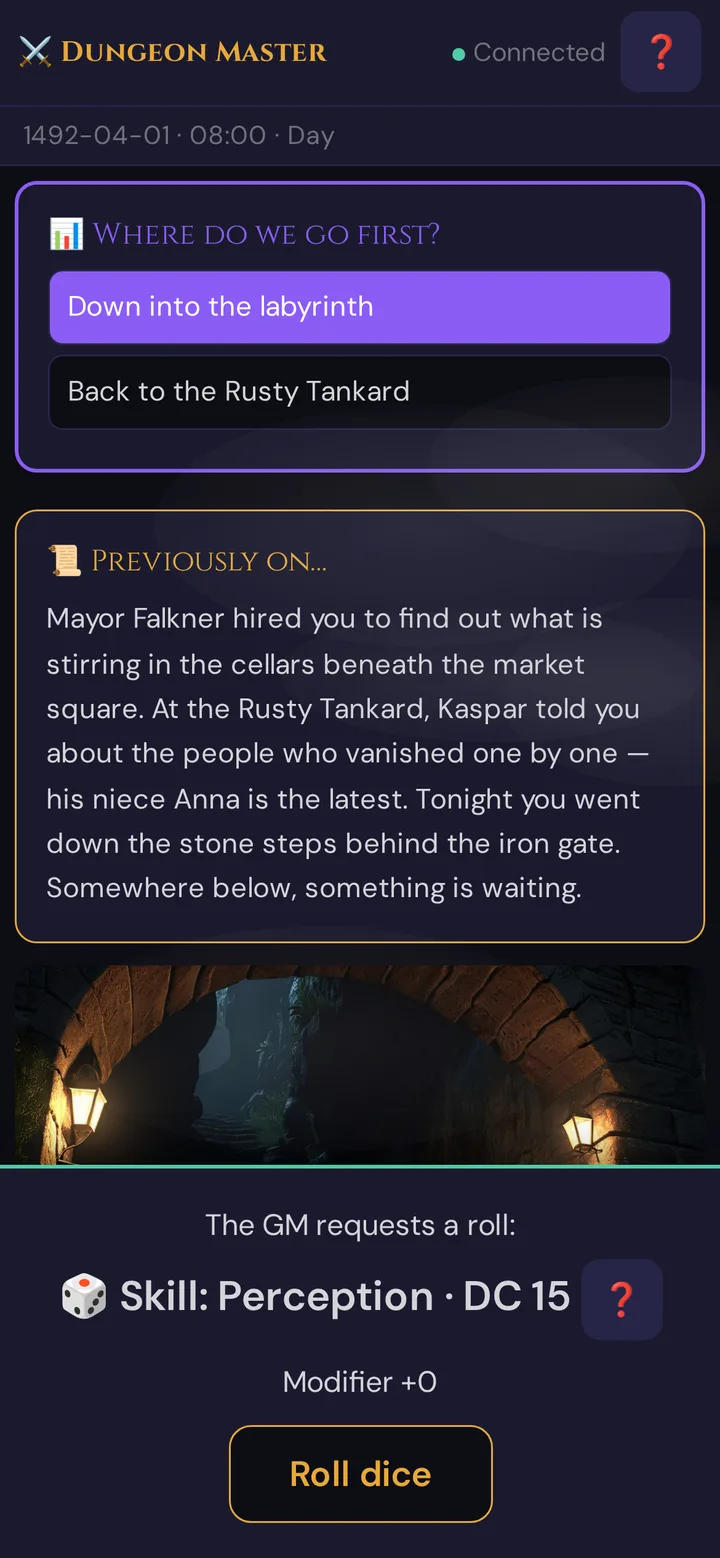
The phone vibrates when the request arrives. The modifier comes from the player's character sheet: the skill or saving-throw bonus shown there, or the ability modifier for an ability check. Tapping Roll dice opens the Roll Prompt pre-loaded with the requested dice and that modifier. The ❓ next to the roll explains in a few words what to roll.
What the GM sees
Right after sending, the Roll Request Log below the Send button shows one waiting line for the open request — for a single player, e.g. 📩 Perception DC 15 → Lena (waiting…), which disappears when the result arrives; for — All —, the line counts down, e.g. (4 open). Only the latest request has a waiting line. Without a player chosen, the card says Select a player. After each player rolls, the result appears in the same log, newest on top:
Lena: Perception 19 (+3) vs DC 15 ✓
Jonas: Perception 11 (+1) vs DC 15 ✗
✅ Success: Mira Attack = 17 (DC 15)
Lena: Initiative = 14
Rolls without a DC — such as the initiative rolls Wovenkeep requests when combat starts — show only the total, without a success/failure verdict.
The result is also added to the Roll Log feed with the DC and outcome badge.
Pacing timer
In the Live section there is a small ⏱ 0:00 indicator. Click to start/stop a stopwatch tracking total session time:
- Green — under 2 hours (sweet spot)
- Amber — 2:00–2:30 (start wrapping up scenes)
- Red — over 2:30 (most groups want to stop)
The timer is GM-only — players don't see it. It's a self-discipline tool, not a player-facing countdown.
For dramatic countdowns visible to players, use a poll with the time in the question text, or announce it verbally.
What gets recorded
| Channel | Persisted? |
|---|---|
| Whispers | Partially — the session event log keeps the target name, not the message |
| Player dice rolls (app + manual) | Yes — roll_log table, survives reconnects |
| GM dice rolls | Yes — roll_log table, is_gm = 1 |
| Hidden GM rolls | Yes — saved like open GM rolls; they are never sent to player phones |
| Roll Requests + outcomes | Yes — included in roll_log with DC + outcome |
Troubleshooting
| Symptom | Cause | Fix |
|---|---|---|
| Whisper card appears greyed out | Stale page state (e.g. after a reconnect) — Whisper works on every plan, no upgrade needed | Refresh the GM page; if it persists, contact support |
| Whisper sent to wrong player | Dropdown stale after a disconnect/reconnect | Refresh the GM page or wait for the player list to repopulate |
| Player can't see whisper | They're on the wrong session, or the card scrolled out of view | Have them rejoin via QR; whispers don't persist across reconnects |
| Player rolled but Roll Log is empty | Their phone briefly lost connection | Roll Log loads from the server — have them re-roll; the next roll will appear |
Real-dice entry shows NaN |
Player typed letters instead of a number | Re-enter as an integer |
| GM roll doesn't show on player phones | 🙈 Roll hidden (players see nothing) was ticked — or the players lost their connection | Untick the box for open rolls; otherwise have them rejoin — the next GM roll will appear |
| Roll Request banner not appearing | Player has no active session connection | Check their connection indicator; have them rejoin |
Related articles
- 📊 Player polls — group-vote channel visible to all
- 🎵 Sound & ambient — pair whisper with private SFX
- 📊 Session Log & Analytics — full session history including dice statistics
- ⚔️ Initiative & combat — the combat turn tracker