⚒️ Suggestions: items, monsters, images, sound
👤 For: Game Masters · 💳 Plan: All plans · 🔄 Updated 2026-10-17
You can create all of this yourself (see Encounters, Items & Monsters). If you'd like a starting point, Tantu suggests a draft from a single sentence, with the help of AI: a magic item, a monster statblock, atmospheric images and sounds, or 5e-balanced loot. You then edit the draft.
What it does
From your short concept, Tantu returns a structured draft — never a wall of text you have to clean up. Items come back with rarity, mechanics, and lore; monsters as a balanced statblock with proper action economy; images as artwork; sounds as a playable ambient clip. You review, tweak, and save.
Each suggestion spends Threads (your credit for optional extras — see Threads & costs). If you bring your own AI key, text suggestions are free — images and sound still cost Threads. There is no per-feature subscription wall: the suggestions work on every plan as long as you have Threads.
When to use it
You're prepping a session and need a signature magic sword, a custom boss the players have never seen, a portrait for the innkeeper you just wrote, or the right ambience for the haunted crypt — and you don't want to stat, draw, or score it by hand. Let Tantu suggest a draft in seconds, then make it yours.
Item suggestions
Where: GM tool → ⚔️ Custom Items → ✨ Ask Tantu
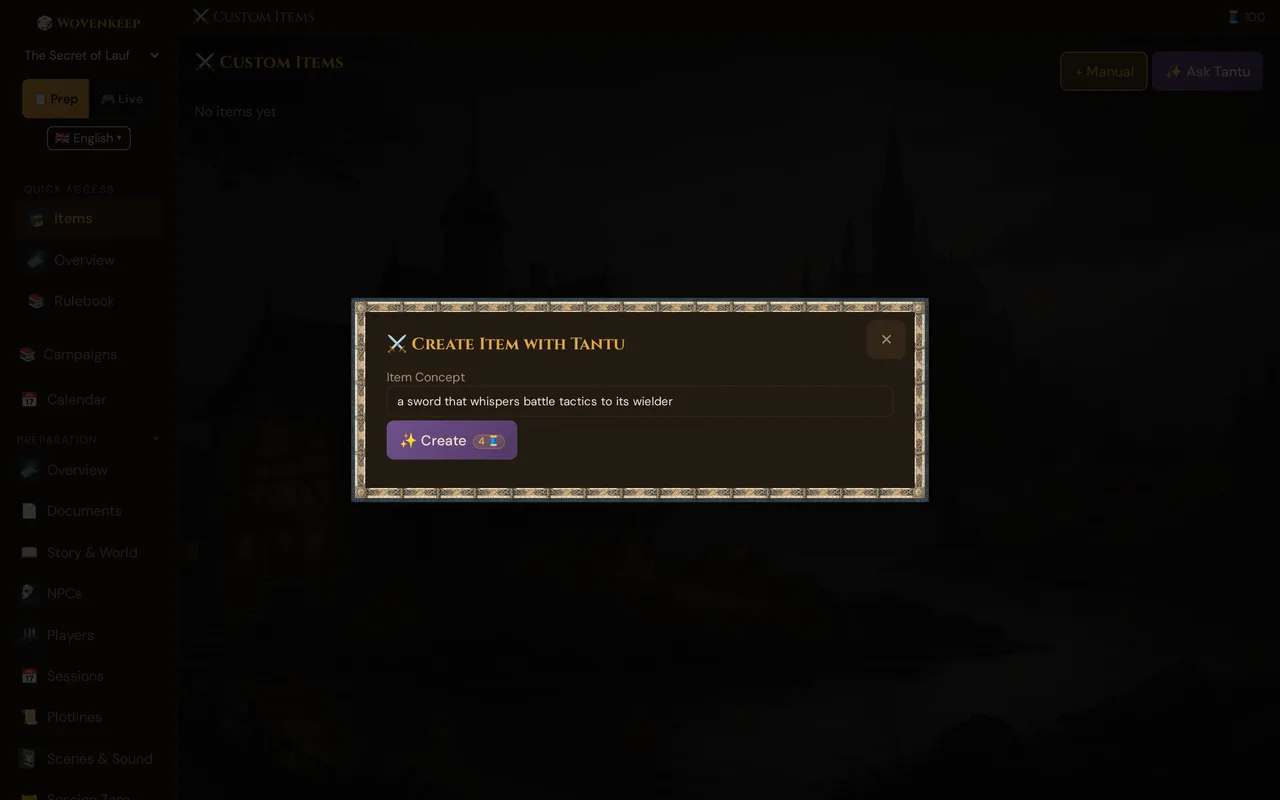
- Click ✨ Ask Tantu (next to + Manual) — the ⚔️ Create Item with Tantu dialog opens
- In Item Concept, type what you want: "a sword that whispers battle tactics to its wielder"
- Click ✨ Create (the button shows the 4 🧵 cost as a badge; a confirmation with cost and balance appears before the spend)
Tantu suggests a complete magic item:
Murmurblade
Rare · Weapon (longsword) · Requires attunement

+1 to attack and damage rolls. While attuned, at the
start of your turn you may use a reaction to gain
advantage on the next attack roll this turn — the
blade murmurs the opening.

Curse: The whispering never fully stops. While
attuned, you have disadvantage on saves against
being frightened — the blade also whispers what
could go wrong.

Lore: Forged for a general who could not sleep…
The draft is saved immediately, so dismissing the dialog never throws away a suggestion you paid for. Edit anything (rename it, soften the curse, change the rarity), then keep it. The item lives in your custom items and can be handed out during play via item transfer / loot.
Cost: 4 Threads (long text generation).
Monster suggestions
Where: GM tool → Create → 🐉 Monsters → ✨ Ask Tantu (opens 🐉 Create Monster with Tantu)
- In Monster concept, describe the creature: "a fire-breathing turtle the size of a house, ancient and slow"
- Set the CR (default 3)
- Under Boss?, choose Normal or Boss (legendary) — a boss gets legendary actions
- Click ✨ Create
Tantu returns a full statblock with proper action economy:
Emberback Colossus
Gargantuan beast, unaligned · CR 12

AC 18 (natural armor)   HP 287 (23d20+46)
Speed 20 ft, swim 30 ft

STR 26  DEX 6  CON 22  INT 3  WIS 14  CHA 8

Saving Throws CON +10, WIS +7
Damage Immunities fire
Senses passive Perception 12
Languages —

Shell Fortress. While withdrawn, AC becomes 22 and
the colossus has resistance to all damage but cannot
take actions.

Actions
  Bite. +12 to hit, 3d10+8 piercing.
  Fire Breath (Recharge 5–6). 60-ft cone, DC 18 DEX
   save, 14d6 fire damage (half on success).

Legendary Actions (3/turn)        [if Boss checked]
  Stomp. The colossus moves up to its speed…
The draft is already saved under Custom Monsters, so nothing gets lost. Review it and click 💾 Save to campaign — this keeps the draft instead of adding a second monster. Saved monsters appear under Custom Monsters, where you edit them with ✏️ like any other monster, and they are available in the Encounter builder and the live Initiative tracker.
💡 Tip: Boss creatures support lair and legendary actions on the classic (2014) rules path, which is the tested mode. Keep legendary action design simple — three solid options beat ten fiddly ones.
Cost: 4 Threads (long text generation).
Custom monster artwork
After generating a monster, click ✨ Generate Image in the same window — or, for any custom monster, the ✨ button on its card (it shows its price, 5 🧵). This runs the image pipeline tuned for creatures — full-body and dramatic rather than a head-and-shoulders crop.
The image attaches to the monster. During a live session you can push it to player phones as part of a scene ("the Emberback Colossus rises from the lake").
Cost: 5 Threads (image generation, repeatable). Click Regenerate for a fresh take — that's another 5 Threads.
Image suggestions
Image suggestions are available in several places. All cost 5 Threads per image, no external tools required.
| Generator | Where | What you get |
|---|---|---|
| Portrait (NPC / PC / monster) | NPC portrait window, monster card (✨), character tools | A character portrait, painterly fantasy style, no text or watermark |
| Scene image | Scenes → 🖼️ Generate AI image | A backdrop for a scene, driven by its 🎭 Base setting (drives AI image & sound) text |
| Location image | Locations editor → generate image | Establishing art for a place in your world |
| Custom item image | Custom item → generate image | An illustration for a magic item you created |
For portraits specifically, the auto-fill helper pulls the entity's existing name and appearance text into the prompt field, so "a portrait from the description I already wrote" is a couple of clicks. There's also a prompt generator that writes a text prompt and copies it to your clipboard if you'd rather use an external image tool — paste the resulting image back via the portrait URL field.
💡 Tip: A scene's and location's image and sound both read from the same 🎭 Base setting (drives AI image & sound) text. Write that one description well and both generators get better at once.
Cost: 5 Threads per image (regenerating is another 5 Threads). Full portrait walkthrough on the NPCs page. Earlier generations are never lost: the 🖼️ Image variants picker on item cards (and 🗂️ Choose from media in the NPC portrait window) reactivates any previous image for free — see Portrait variants & generations gallery.
Sound suggestions
Where: Scenes → 🎙️ Sound by Tantu, an encounter → 🎙️ Combat sound by Tantu, or the Media page → ✨ Create with Tantu
Tantu suggests an audio clip from your scene or encounter description — atmospheric soundscape for a scene, cinematic battle tension for a fight. On the Media page you describe the sound yourself and choose an Effect (about 4 seconds, for example a cannon shot) or a Background sound (about 22 seconds that loop, for example rain) — see Media.
Write the description in any language: before the sound is made, Tantu turns it into a short English prompt for the sound model. If that step fails, your own text is used. You preview the result locally before pushing it to the table. See Sound & ambient for playing and pushing sound in a session.
Cost: 1 Thread per clip.
Loot suggestions
Where: A creature's loadout → generate loot
Produces a treasure haul that respects 5e balance — the engine picks appropriate items and Tantu writes their flavor, optionally tying a piece to a scene as foreshadowing. Hand the loot to players through loot transfer after the fight.
Cost: 1 Thread per generation.
Cost summary
All costs are in Threads. Bring your own AI key and the text suggestions (item, monster) are free — images only with your own Google Gemini key; sound still costs Threads.
| Generator | Threads | Output |
|---|---|---|
| Item | 4 | Full magic item (name, rarity, mechanics, curse, lore) |
| Monster | 4 | Full statblock for the CR you choose |
| Portrait / scene / location / item image | 5 per image | Finished artwork |
| Sound (scene / combat / Media page) | 1 per clip | Ambient audio, effect or background sound |
| Loot (5e-balanced) | 1 per generation | Treasure haul with optional foreshadowing |
Other optional AI help has its own pages: Story Coach, NPC dialogue suggestions, free Voice Input, and the planned Voice Interview (not yet in the tool).
Plans & Threads
The suggestions are not gated by plan — they work on every tier, including the free Adventurer plan, as long as you have Threads in your wallet. Each use spends Threads (table above); bring your own AI key and the text suggestions cost nothing — images and sound still cost Threads. New accounts start with free Threads, and you can earn or buy more. See Threads & costs and Pricing.
Generated images push to player phones for free, like any scene push. Image pushes are unlimited on every plan, including the free plan. Pushing text and scenes is always free.
Generation quality tips
Be specific in the concept. "A sword" → generic. "A sword that hums louder as enemies approach, forged from a fallen star, hated by the fey" → distinctive and mechanically interesting.
Set the right CR for monsters. Tantu balances to the CR you specify. For a tough fight against level-5 PCs, ask for CR 6–8, not "strong".
Edit before saving. A generation is a strong draft, not the final word. Rename the item, tweak the curse, adjust an ability score. Two minutes of editing makes it yours.
Batch your images. Generating five NPC portraits in one sitting keeps you in the visual-consistency mindset and helps you pick a coherent style across the cast.
Troubleshooting
| Symptom | Cause | Fix |
|---|---|---|
| "Insufficient balance" / suggestion refused | Out of Threads | Top up in Threads & costs, or add your own AI key (text suggestions cost no Threads) |
| Image suggestion does nothing | No image model key reachable | Add a Gemini key in AI settings, or wait — the platform key may be temporarily unavailable |
| "Sound generation is not set up on this instance" | The platform's sound service is unavailable | Sound runs on a platform-side key — nothing to configure in your Realm. Try again later; if it persists, send a bug report |
| Statblock fields look off-balance | Tantu estimated the stats for your CR | After saving, open the monster with ✏️ and nudge HP/AC/damage — the Encounter builder shows how it plays against your party |
| Generated item came out generic | Concept too thin | Add specifics — material, a quirk, who hates it, what it does in one vivid line |
| Players can't run paid AI | The GM toggle is off | Enable Players may use paid AI in AI settings if you want players to spend the Realm's Threads |
Related articles
- 👤 NPCs — full portrait + auto-fill walkthrough
- ⚔️ Encounters, Items & Monsters — where generated content gets used
- 🎵 Sound & ambient — playing and pushing generated sound
- 🖼️ Scene push — sending generated images to player phones
- 🧵 Threads & costs — how Threads and BYO keys work
- 📕 SRD Rulebook — the compendium with 3,761 openly licensed entries behind balance