⚔️ Campaign & Prep
👤 For: Game Masters · 💳 Plan: All plans · 🔄 Updated 2026-10-17
Everything you build before the players sit down — campaigns, NPCs, scenes, plotlines, locations, world history, the whole world. The prep side is where most of your time goes; the live side is where it pays off.
What it does
Wovenkeep organizes your campaign into interconnected layers: the world and its lore, the people and places inside it, the plotlines that drive the story, and the sessions where it all plays out. Every piece links to every other — a Location ties to a Scene, a Plotline ties to an NPC, a World Event ripples through your whole world state. Prep in any order; Wovenkeep keeps the connections.
When to use it
Use this section whenever you are working before a session starts — writing story, sketching NPCs, planning plotlines, or assembling scenes for tonight's push to player phones.
The structure of prep
A Wovenkeep campaign is organized like a set of nested, interlinked layers:
- Campaign
- Story & World — narrative foundation, world text, GM secrets
- Worlds & Planes — multi-realm settings (Material / Feywild / Shadowfell / custom)
- Pantheon — gods per world (SRD templates + custom)
- Races — species per world (SRD + homebrew)
- World History & Secrets — timeline entries with reveal-reward mechanic
- World Events — news, changing places, NPC fates, plot progress and deicide, with a world-state overlay, planning and undo
- World Clocks — campaign-wide progress timers
- Worlds & Planes — multi-realm settings (Material / Feywild / Shadowfell / custom)
- Locations — named places with image, description, entity links
- NPCs — the inhabitants (portraits, dialog, voice, loadout)
- Player Characters — managed by GM; players use the character sheet on their phones
- Plotlines & Quests — main plot, side quests, character arcs with objectives + push
- Sessions — one per game night; strong start, recap, linked resources
- Linked NPCs / Scenes / Encounters
- Scenes — pre-built scene cards (image, sound, cast, overlay) for live push, optionally grouped into acts and chapters
- Encounters — combat, social, exploration, trap and puzzle encounters, linked to scenes
- Items & Monsters — custom homebrew content, optional suggestion (AI)
- Handouts — a library of documents you send to players live
- Session Zero — player preferences + survey link before session 1
- Story & World — narrative foundation, world text, GM secrets
You can build top-down (start with Story → add Locations → plan sessions) or bottom-up (write an NPC you love → scaffold a story around them). Everything links.
The core prep pages
Dashboard & navigation
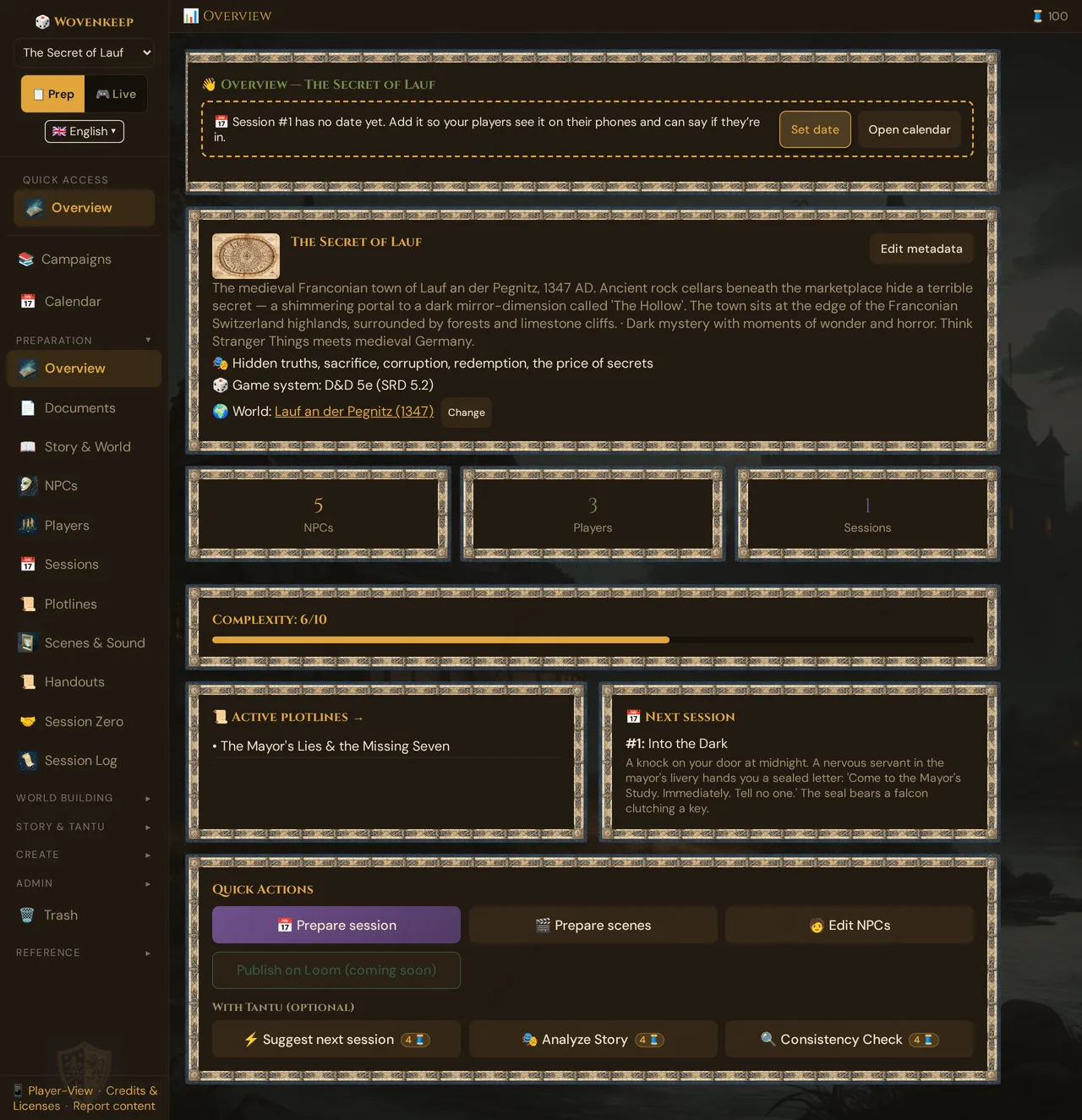
- 📊 GM Dashboard — campaign command center, complexity score, quick actions
Story & world
- 📜 Story & World — the three text boxes at the heart of every campaign: story, world, GM secrets
- 🌍 Worlds & Planes — multi-realm settings; each world carries its own Pantheon and Races
- ⛪ Pantheon — gods per world (Celtic / Greek / Egyptian / Norse SRD templates + custom), license badges
- 🧝 Races — species per world; adopt SRD races or build your own with traits and ability bonuses
- 📖 World History & Secrets — timeline entries with GM truth and a reveal-reward you grant to players
- ⚡ World Events — news, changing places, NPC fates, plot progress and deicide; plan events, trigger them later, undo them
- ⏱ World Clocks — campaign-wide countdown and progress timers
Locations
- 📍 Locations — standalone place entities with an image (your own or a suggestion with AI), description, scene links, and entity connections
Sessions & narrative
- 📅 Sessions — one row per game night: strong start, recap, notes, and linked resources
- 📜 Plotlines & Quests — main / side / personal plotlines with objectives, statuses (active / on_hold / resolved / abandoned / completed_by_other), and player push
- 🎬 Scenes (prep) — pre-build scenes with image, sound, cast (NPCs + monsters), overlay, and secrets for one-click live push; group them into acts and chapters
- 🤝 Session Zero — player playstyle and boundary collection; share a survey link so players fill it in themselves
Story tools
- 🌱 Foreshadowing — plant clues, link them to NPCs, places and scenes, mark them found, harvest them later
- 📈 Tension Arc — rate your scenes or sessions from 1 to 10 and see the dramatic shape of your campaign, with hints
- 🕸️ Story Web — interactive visual map of NPCs, locations, factions, events
Reference & media
- 📄 Handouts (prep library) — letters, maps, posters built in advance, sent live from the card 📚 From the library
- 📊 Session Log & Analytics — what actually happened in past live sessions
Optional AI help for your story
- 📖 Story Coach — Tantu suggests questions, a next-session plan, a consistency check and read-aloud text (costs Threads)
- 📈 Tension Arc — optionally, Tantu draws a tension curve from your recaps
- 🪶 Tantu: name & voice — the name and tone of Tantu, the persona of the optional AI help (default name: Tantu)
Creating a campaign
When you create a new campaign, Wovenkeep offers two paths:
Quick Create — a name and you're in. All fields start empty; you fill in what you want, when you want. Under 30 seconds. Good for experienced GMs who know what they want.
Demo campaign: "The Secret of Lauf" — a pre-seeded campaign (available in your realm on first login) that showcases world history, a full pantheon, locations, and scenes. Use it to explore the tool or as a structural template. A banner inside lets you reset it if you experiment.
💡 Tip: Start with three things — your opening scene, one secret, and your most interesting NPC. Everything else grows from those.
Entity Links — connecting everything
NPCs, locations, plotlines, clues and scenes have a 🔗 Links panel. From there you link them to scenes, player characters, items, monsters, deities, world events, clues and each other — n:n relationships between any two things. A haunted tavern location links to the ghost NPC, which links to the plotline about the missing heir, which links to the world event that started it all.
Links appear in the Story Web and make the GM Dashboard's complexity score meaningful.
Plotlines & Quest push
Plotlines now have Objectives — a checklist of goals with optional hidden items the GM reveals when the players earn them. A plotline's status tracks through: active → on_hold → resolved / abandoned / completed_by_other.
When a plotline is visible to players you can push it to their phones mid-session: open the plotline, tap 📤 Push to Players. Players see it in their session view.
Plotlines carry forward between sessions automatically — open objectives from the previous session appear in the next session's prep view.
Session Zero survey link
Session Zero is no longer just a GM-side form. Open Session Zero in the campaign nav and tap Generate Survey Link. Share the link (or QR code, or WhatsApp share button) with each player. They fill in their playstyle preferences and hard lines from their own device. Answers populate the GM view automatically.
The same flow creates character invite links (/onboard/:token) so new players can submit their character details before session 1.
Scenes: cast, image, sound
Each scene now has three new layers beyond the overlay and secrets:
- Cast — assign NPCs and monsters as participants. The cast list auto-populates encounter options and feeds the optional Scene NPC Conversation (Tantu suggests a dialogue between two or more cast members).
- Image — your own image, or optionally an image suggestion (AI) based on the scene's setting field (5 Threads). The image pre-loads on player phones when you push the scene.
- Sound — your own sound, or optionally a sound suggestion (AI) for the scene's ambience (1 Thread). Preview it locally before pushing.
Cast, your own image and your own sound cost nothing. The optional suggestions work on every plan and use Threads; with an empty balance you get a clear prompt to top up.
Autosave everywhere
All prep editors save on their own — text saves a moment after you stop typing, dropdowns save instantly. You'll see ✓ Saved next to each editor. See Autosave for details.
A few areas still have explicit save buttons (portrait selection). The roadmap is to convert these too.
Tips from experienced GMs
- Prep less than you think — five strong NPCs beats fifteen forgettable ones. Three planned scenes per session is plenty.
- Lean into the Lazy DM method — strong opening scene, three secrets, five possible scenes. The rest happens at the table. The Tantu help bubble at the bottom right links a Lazy DM checklist.
- Watch the complexity score — the GM Dashboard shows a complexity number; over 7 means too many NPCs or plotlines for the system to track cleanly. Consolidate before the next session.
- Build NPCs you'd want to play — voice, mannerism, secret. The boring ones nobody remembers anyway.
- Use World History as a design constraint — write three historical secrets before you write a single plotline. It forces coherent lore.
- Link as you go — every time you create a Location or NPC, add one Entity Link. The Story Web pays off fast.
Where Tantu can help (and where it can't)
Tantu answers with the help of AI. All of this is optional: you can prep a whole campaign without it. Suggestions use Threads, your credit for optional extras. Bring your own AI key and text actions cost 0 🧵 — image suggestions only with your own Google Gemini key; sound suggestions always cost Threads. Every button with a price shows it as a small 🧵 badge, a confirm dialog with the cost and your balance appears before each action that costs Threads, and the top bar shows your live Threads balance.
| Activity | Can Tantu help? | Threads |
|---|---|---|
| Story Coach (analysis, next-session plan, consistency) | Yes | 4 per run |
| NPC dialogue suggestions | Yes | 1 per reply |
| NPC portraits | Yes | 5 per image (all plans) |
| Scene image | Yes | 5 per image |
| Scene ambient sound | Yes | 1 per generation |
| Scene NPC conversation (two or more cast members talk) | Yes | 1 per reply |
| Location image | Yes | 5 per image |
| Item suggestion | Yes | 4 per generation |
| Monster suggestion (v2 with Lair / Regional / Legendary) | Yes | 4 per generation |
| Loot suggestion (5e-balanced + foreshadowing) | Yes | 1 per generation |
| Tension Arc visualization | Yes | 4 per run |
| Filling in the World text box | No | your tone, your voice |
| Adjudicating rules | No | the SRD is reference, not a ruling engine |
| Making creative decisions | No | Tantu suggests; you choose |
See Threads & costs for the full cost table and how to add your own AI key.
Troubleshooting
| Symptom | Cause | Fix |
|---|---|---|
| "Insufficient Threads" on an image / sound suggestion | Thread balance is zero | Top up in Settings → Threads, or use your own image / sound |
| Scene image doesn't appear on player phones | Image added but not yet pushed | Open the live session, tap the scene, and push again |
| Plotline shows wrong status options | Old bookmark or cached UI | Reload the page; statuses are: active / on_hold / resolved / abandoned / completed_by_other |
| Session Zero survey link not visible | Feature not enabled for your realm | Reload; if missing contact support via Settings → Help |
| Entity Links panel missing on an entry | Entry type doesn't support links yet (some legacy items) | Use the session or plotline link fields as a workaround |
Related articles
- 🚀 Getting Started — orientation tour and first campaign walkthrough
- 👤 NPCs — the most-used prep section
- 🎬 Scenes (prep) — building scene cards for live push
- 📜 Plotlines & Quests — quest objectives, statuses, and player push
- ⚡ Live Session — what all this prep is for
- 🪙 Threads & costs — credit for optional extras, costs, own AI key