⚡ Live Session
👤 For: Game Masters · 💳 Plan: All plans · 🔄 Updated 2026-10-17
The Live tab turns your screen into a session cockpit. Push scenes, sound, secrets, items, and handouts straight to your players' phones — no app to install, no setup, no friction.
How a Wovenkeep live session works
┌─────────────────┐                       ┌─────────────────┐
│   You (the GM)  │                       │ Players (phones)│
│   the GM tool   │ ◄──── live link ────► │  (scan QR code) │
└─────────────────┘                       └─────────────────┘
        │                                          │
        │ start session → 8-character code         │
        │ push scene/sound/whisper/item            │
        │ track initiative + in-game time          │
        │ reveal lore, quests, secrets             │
        │ ───────────────────────────────────────► │ instantly
        │                                          │
        │ ◄─── dice rolls (hybrid log), joins ──── │
Everything you send appears on the players' phones instantly. If a player loses Wi-Fi, they just scan the QR code again — they pick up exactly where they were, with their items and position intact, for the whole session.
One Realm runs one live session at a time. If you open the GM tool on a second device mid-session it joins the same session rather than starting a new one.
What you can push to player phones
| Push type | What players see | GM trigger |
|---|---|---|
| Scene | Full-bleed image + title + description | Live → Scenes & Sound |
| Sound | Ambient loop or one-shot SFX | Live → Scenes & Sound (sound library; preview locally before pushing) |
| Cut-In | Full-screen flash with text + style | Live → Scenes & Sound → 🎬 Cut-In: ⚔️ Nat20 / 💀 Nat1 / ⚡ Twist / 🎭 Custom |
| Particle overlay | Rain, snow, fog, embers, fireflies | Live → Scenes & Sound → 🌧️ Atmosphere |
| Whisper | Purple card visible only to one player | Live → Scenes & Sound → 🔮 Whisper |
| Item | Inventory entry (identified or hidden) | Live → Items & Handouts → 🎁 Give item |
| Handout | Document with title + body + image | Live → Items & Handouts → 📜 Give handout |
| Initiative | Combat order with current turn highlighted | Live → Players → ⚔️ Initiative |
| Poll | Tap-to-vote multiple choice | Live → Scenes & Sound → 📊 Poll → 📊 Start poll |
| Recap | "Previously on…" card at session start | Live → Scenes & Sound → 📜 Recap → 📜 Send |
| In-game clock | Date, time, and active effects | Live → In-Game Clock (players see the current IG date/time/round + place clocks) |
| Quest / Plotline | Quest card with title and visible objectives | Prep → Sessions → plotline panel → 📤 push button |
| Revealed Lore | World-history secret with title + lore text, optional XP or item reward | Prep → World History → Reveal |
| Video | (Coming soon — GM button present but player display not yet active) | — |
| NPC dialog suggestions (AI) | Visual-novel-style speech bubble with portrait | Live → NPC Dialog → 🎭 What does the NPC say? → 🎭 Suggest dialogue |
| NPC conversation suggestion (AI) | Tantu suggests an exchange between two scene NPCs, delivered as a dialog sequence | Live → NPC Dialog → 🗣️ NPC conversation (scene) → 🗣️ Let the NPCs talk |
💡 Tip: The push itself is always free. Image generation (AI scene images, portraits) costs 5 Threads per image; generated images then push at no extra cost. Image pushes are unlimited on every plan, including the free Adventurer plan.
Live tab structure
When you click 🎮 Live in the GM sidebar, the navigation switches to seven sections:
- Scenes & Sound — round counter, effects and rests, scene push, prepared scenes (grouped by act and chapter), random tables, clocks (free ones and those of the pushed scene), clues of the pushed scene, recap (versioned), whisper, sound effects (with local preview), cut-ins, atmosphere overlays, the media library, GM dice, polls, Stars & Wishes, session notes, log and the hybrid roll log
- Players — connected players (with portrait upload review), initiative tracker, roll requests
- Items & Handouts — give items (open or unidentified), give handouts, send handouts from your library, hand out creature loot
- Crafting — advance running crafting jobs, release materials, cancel jobs
- NPC Dialog — have Tantu suggest in-character NPC speech or a multi-NPC scene conversation (AI)
- In-Game Clock — date, time, calendar, travel calculator, scheduled events
- Rulebook — the same SRD reference as in prep mode
The full live-session walkthrough
If you've never run a live session before, start here:
- 📡 Running a live session — start-to-finish, from QR code to recap
- 📱 Multi-device players — when a player joins with phone + tablet
- 📡 Push-check (health ping) — verify every phone is receiving
Pushing content
- 🖼️ Scene push — image + title + description, full-bleed on phones; auto-starts bound encounters on scene change
- 🎵 Sound & ambient — ambient loops, one-shot SFX, custom uploads, local preview before push
- 🎬 Cut-in system — Nat20, plot twist, custom dramatic flashes
- 📜 Session recap — write it yourself or optionally have Tantu suggest one (AI): "previously on…", with version history so you can restore earlier drafts
Player interactions
- 🎲 Hybrid dice & roll log — unified roll feed with source badges (manual ✍️ / app 🎲 / mixed ✍️🎲), filterable and persistent; GM can request a specific roll from a named player (with label + DC)
- 📊 Player polls — live multiple-choice votes
- 🎁 Items & inventory — open and mystery (unidentified) items
- 📜 Handouts — send documents to one player or the whole party
- 🗺️ Quests & lore reveals — push quest cards and world-history secrets to players mid-session
- 🖼️ Player portrait upload — players upload their own portrait; a pending badge appears in your live player list for you to approve or reject
Combat & time
- ⚔️ Initiative & combat — initiative tracker, HP, encounter import; encounters auto-start when you push a scene that has one attached; add further encounters mid-fight with the floating + Encounter button; Lair Action triggers with cooldown and legendary-effect options are available for boss combatants
- ⏱️ In-game clock & calendar — Gregorian, neutral Fantasy calendar, or custom, travel, timed effects, scheduled events, place clocks visible to players
Player HUD (on phones)
Players get a full responsive character sheet in the live view — not just a passive display:
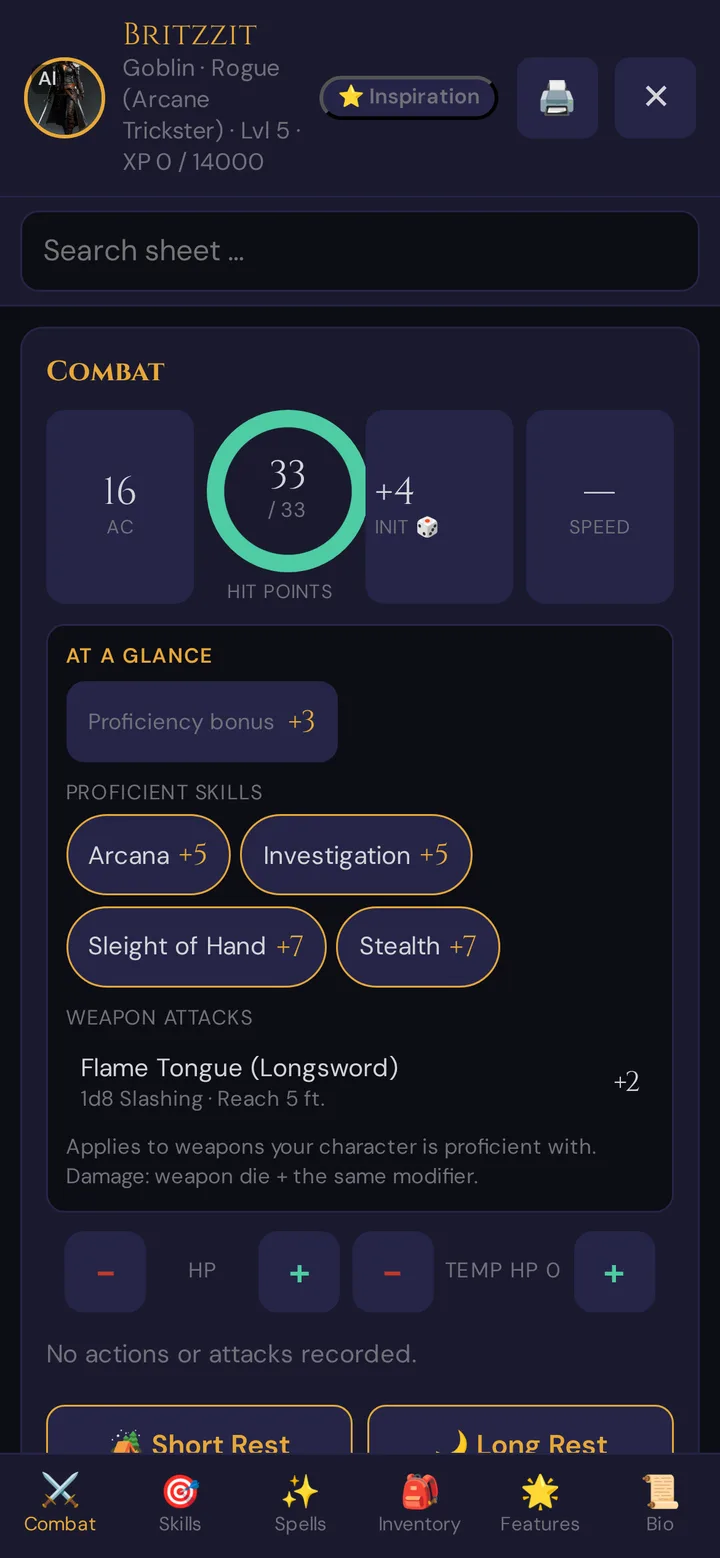
Players can roll directly from their character sheet (Tap-to-Roll), track spell slots, trigger short or long rests, and mark death saves — all feeding into the shared hybrid dice log you see on your GM screen.
What's new (since June 2026)
- Hybrid dice log — unified roll feed with source badges and GM roll-request (named player + DC)
- Lair Actions in combat — boss combatants with action options, cooldown, and legendary effect trigger
- Player clock view — players see the current in-game date, time, and active place clocks
- Revealed World Lore — push world-history secrets to players mid-session, with optional XP/item reward
- Quest push — send a quest card (title + visible objectives) directly to player phones
- Recap versioning — recap suggestions (AI) are versioned; restore any earlier draft from the dropdown
- Player portrait approval — players upload portraits; you approve or reject via a pending badge in the live player list
- NPC scene conversations — Tantu suggests a dialog exchange between two scene NPCs (AI), pushed as a sequence
- Encounter auto-start — attaching an encounter to a scene now starts it automatically on scene push
- Sound preview — preview ambient tracks locally before pushing to player phones
Related articles
- 🎟️ Player onboarding invites — invite players to your campaign before session day
- 🎮 GM Dashboard — get to know the prep side of Wovenkeep
- 🧵 Threads & costs — how Threads work as the pay-per-use currency for optional AI help
- ⚔️ Lairs & boss encounters — set up Lair Actions before session day
- 🗺️ World History & Secrets — prepare lore reveals and secret rewards