📋 Login Log
👤 For: Game Masters · 💳 Plan: All plans · 🔄 Updated 2026-10-17
The Login Log is your Realm's authentication history — every password attempt, successful or not, with the source IP and device. It's a quick security check: confirm it was always you who logged in.
What it does
Every time someone submits the GM password at yourname.wovenkeep.com/gm, Wovenkeep records the IP address, the browser/device, and whether it succeeded. The log shows the last 100 attempts, grouped by date, newest first.
ℹ️ Timestamps are always Central European Time (CET/CEST, Europe/Berlin) — not your local timezone. Keep this in mind if you are outside of Germany.
When to use it
- You want to confirm nobody else has accessed your Realm
- You notice something odd and want to trace when it started
- A quick monthly sanity-check (30 seconds)
Step by step
- Open your Realm at
yourname.wovenkeep.com/gmand log in. - In the sidebar, open the Admin group and click 🔐 Login Log.
- Review the entries — each shows time, IP address, and device.
💡 Tip: The log loads automatically when you open the section — no refresh needed.
What the log shows
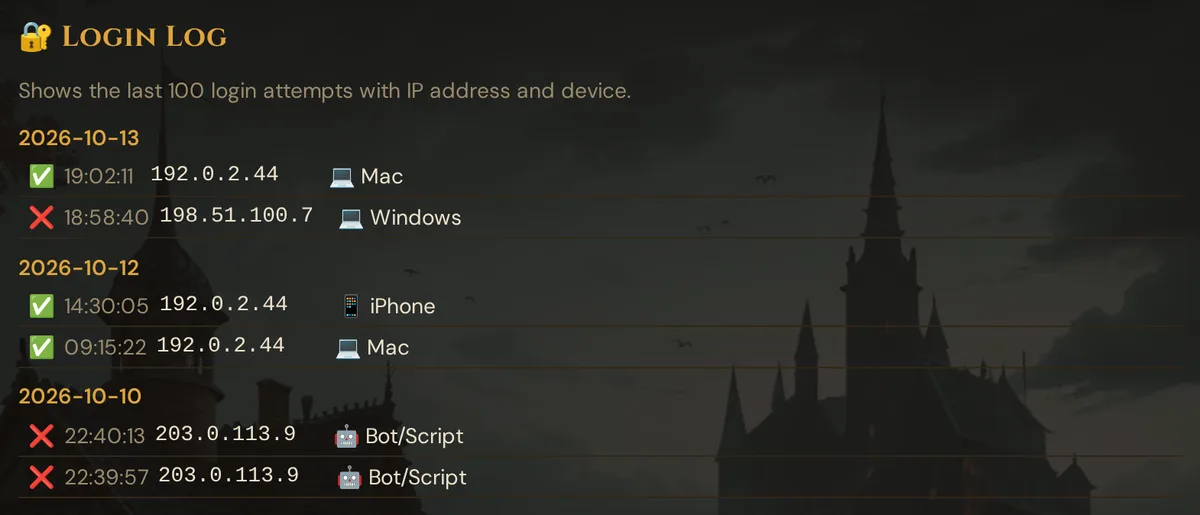
Each row contains:
| Field | What it shows |
|---|---|
| ✅ / ❌ | Whether the login succeeded (correct password) or failed |
| Time | HH:MM:SS in Europe/Berlin time |
| IP | Source IP address of the request |
| Device | Detected from the browser's user-agent string |
What the log does NOT record
- Platform logins at
app.wovenkeep.com— your platform account login is separate from the Realm. It shows up in the platform's own account activity, not here. The GM password atyourname.wovenkeep.com/gmis the only way into the GM tool, and every submission of it is recorded. - Player sessions — players joining via QR code are not logged here; they never touch the GM password.
- API tokens — there is no token-creation entry in this log.
Reading it for security
Green flags — only your known IPs, consistent device pattern, no bursts.
Red flags:
- A ✅ success from an IP or device you don't recognise
- A burst of ❌ failures from an unfamiliar IP, especially if followed by a ✅ (password-guessing succeeded)
- Any entries from a time when you weren't using Wovenkeep
If you suspect unauthorized access:
- Change your GM password immediately — on your account dashboard at
app.wovenkeep.com, your Realm's card (Instance) → Change GM Password, or Forgot GM Password? for a new one by email. The GM tool itself has no password setting. - The new password stops new logins with the old one — and it signs out every device that was signed in to the GM tool, yours too. Sign in again with the new password.
- Review recent campaign edits (scenes, NPCs, notes) for unexpected changes
- Contact support if data was altered — point-in-time backups can restore a prior state
Retention
The log keeps the last 100 entries. For a Realm used solo that covers many weeks of history. It is a security review tool, not a permanent audit archive.
The log is not part of the GDPR data export yet — if you need a longer record, note the entries you want to keep.
Privacy note
The Login Log records GM-account access only — it tracks password attempts at the GM tool, not player activity. Players who join a live session via QR are not logged here.
Troubleshooting
| Symptom | Cause | Fix |
|---|---|---|
| "No logins yet." shown | Either the log is genuinely empty (new Realm) or the auth token is missing | Log out and log in again, then re-open the section |
| Only see failures, no successes | You may be looking at a bot-scan of your subdomain — this is normal; as long as no ✅ appears from an unknown IP, nothing is compromised | No action needed if no ✅ from unknown IPs |
| Log doesn't update after a fresh login | The log fetches on section open; navigate away and back to the Login Log section to reload | Re-click 🔐 Login Log in the sidebar |
| Entry shows wrong time | Timestamps are fixed to Europe/Berlin (CET/CEST), not your local timezone | Mentally convert: CET = UTC+1, CEST (summer) = UTC+2 |
| Looking for platform-side access history | Logins at app.wovenkeep.com are platform account activity, not Realm logins |
Check your account activity on app.wovenkeep.com |
Related articles
- 🔑 Account & plans — your platform account, plans and Realm access
- 🔒 GDPR & Data Export — what the data export contains
- 🔧 Instance Settings — consent audit and other admin tools
- 🏛️ The Realm concept — Realm vs. platform authentication explained