🏛️ What is "your Realm"?
👤 For: Everyone · 💳 Plan: All plans · 🔄 Updated 2026-10-14
When you sign up for Wovenkeep, you get your own Realm — your personal, private corner of Wovenkeep at an address like yourname.wovenkeep.com. This page explains what that means in plain terms: what your Realm is, why it's private to you, and what lives where.
What it does
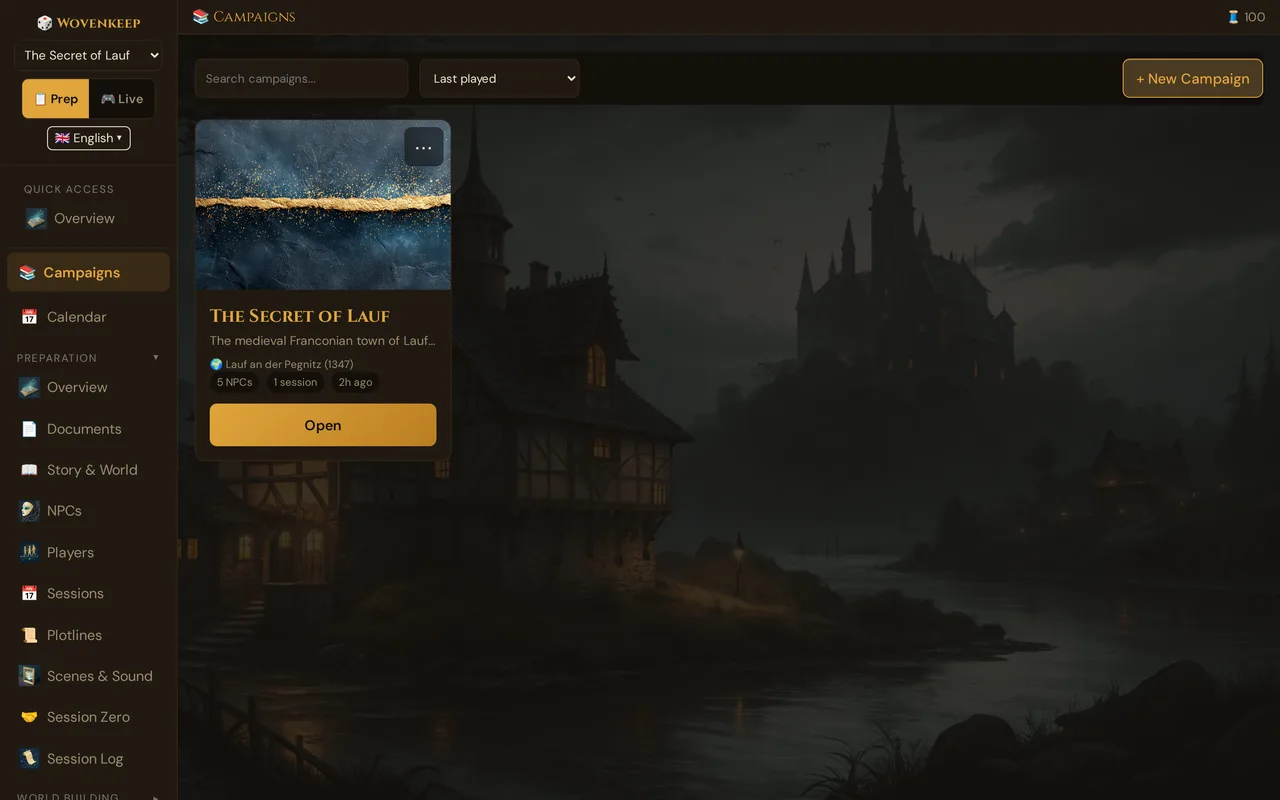
Your Realm is a fully isolated game-master workspace. Every campaign, character, scene, image, and sound you create lives there and nowhere else. Other Wovenkeep users have their own separate Realms; they can never reach into yours, and you can't reach into theirs. Wovenkeep keeps your Realm online for you — no installing, no hosting, no maintenance.
Your Realm address
When you sign up, you choose a short name. Most people use their first name:
lena.wovenkeep.com
the-story-weaver.wovenkeep.com
captain-morr.wovenkeep.com
3ravens.wovenkeep.com
A few simple rules for the name:
- Lowercase letters, numbers, and dashes only
- Between 3 and 20 characters
- Must not start or end with a dash
- A few names are reserved (like
www,admin,app,docs) and can't be used
💡 Tip: You can start with a digit —
3ravensis a valid Realm name.
The three web addresses you'll use
There are two "sides" to Wovenkeep, and three addresses in total:
| Address | What it's for | Who uses it |
|---|---|---|
app.wovenkeep.com |
Your account, billing, plan, Threads balance | You |
yourname.wovenkeep.com/gm |
The GM tool — where you prep and run games | You |
yourname.wovenkeep.com/player/ |
The player view — what your players see on their phones | Your players |
The first one is the account side. The other two are your Realm.
You only log in once. When you sign in at app.wovenkeep.com, one click takes you straight into your Realm's GM tool — no second password.
What's kept where
Some things live with your account, some live in your Realm:
| Thing | Lives with | In plain terms |
|---|---|---|
| Your email and password | Account | How you log in |
| Your plan and payments | Account | What you're subscribed to |
| Your Threads balance | Account | Your credit for optional extras, earned or bought |
| Your campaigns, characters, scenes | Your Realm | Everything you build |
| Your uploaded images and sounds | Your Realm | Your media |
| Your players' handouts and items | Your Realm | What happens in your games |
When does my Realm become ready?
As soon as you confirm your email, Wovenkeep sets up your Realm for you. This takes about a minute and a half, and then you get a second email with your login link.
In rare cases it can take up to five minutes (nothing's wrong — the platform is just busy). If your Realm still isn't reachable after ten minutes, contact support.
Getting started: the onboarding walkthrough
The first time you open your Realm's GM tool, a welcome screen greets you with three paths:
- Take a guided tour — a 6-step spotlight walkthrough that shows you every major section.
- Try a demo campaign — "The Secret of Lauf" is pre-loaded so you can poke around with real data before you touch your own content.
- Jump straight in — skip the tour and start from scratch.
You can restart the tour any time from the help button in the GM tool.
What is one live session per Realm?
Each Realm runs exactly one live game session at a time. All devices you open the GM tool on will converge to that same session — no split-screen, no parallel sessions. When you end a session, everything resets cleanly for the next one.
This means you can seamlessly move from your laptop to a tablet mid-session without losing anything.
What are Threads?
Threads are your credit for optional extras — things like an NPC suggestion, a scene image, or a summary with AI, or extra storage. Every use of an AI help spends a small number of Threads from your account balance. You start with a free bonus on signup, and you can earn more by completing milestones or buy bundles in the store.
Pushing text and scenes to player phones is free — Threads are only spent on optional extras. If you bring your own AI API key under ⚙️ Tantu Settings, text actions cost no Threads — images are free only with your own Google Gemini key; sound always costs Threads.
See Threads & costs for the full breakdown.
How the free plan works as your trial
There is no time-limited "premium trial". Your starting plan is Adventurer — the free tier — and it's a complete GM tool. To try the optional AI help you're curious about, you use the free Threads you get on signup (100 Threads when you complete signup) plus more you earn through milestones. Those free Threads are your trial: spend them on portraits, NPC generation, scene suggestions, or whatever you want to try, with no clock running out on you.
If your Realm later goes inactive for a while it's paused to save resources, not deleted. While your account is paused your data is preserved and you can reactivate anytime; permanent deletion only happens on your request (see Data Export).
Is my work safe?
Yes. Wovenkeep backs up your Realm automatically several times a day. If something goes wrong — you accidentally delete a campaign, for example — contact support and they can restore an earlier version.
You can also download your own copy any time: in your Realm under ⚙ Settings → Download My Data — a single ZIP file with your campaign content and uploads. See Data Export.
What happens when Wovenkeep updates?
When Wovenkeep releases improvements, your Realm updates automatically. Your data is never touched. You'll see a small banner with a Reload button when a new version is live — click it and you're on the latest version.
Keeping your account secure
Two-factor authentication (TOTP authenticator app or email code) is set up during sign-in at app.wovenkeep.com — currently only for accounts that require it (admin accounts); there's no setting to switch it on yourself yet. Recovery codes are generated during setup — save them somewhere safe. See Two-factor authentication.
Your Realm's GM password is managed from the account dashboard at app.wovenkeep.com: change it there directly, or request a reset link by email if you've lost it.
Plan limits
| Plan | Storage | Monthly Threads |
|---|---|---|
| Adventurer (free) | 100 MB | — (earn or buy) |
| Game Master | 1 GB | 60/month |
| Storyteller | 5 GB | 130/month |
| Guild Master | 20 GB | 300/month |
You can expand storage with a Threads storage pack (+500 MB per pack, 50 Threads). See Plans & pricing for the full comparison.
Free-tier note: Realms on the Adventurer plan that are not used for 14 days are automatically stopped to save resources. Your data is kept — just subscribe or re-activate and the Realm starts right back up.
Can I have more than one Realm?
For now, one Realm per account. If you want a completely separate space — say, one for a public game and one for a private group — sign up with a different email address for the second account.
Troubleshooting
| Symptom | Cause | Fix |
|---|---|---|
| Realm not reachable after 15 minutes | Provisioning error | Contact support with your signup email |
| "Session already running" on a second device | One-session-per-Realm design | Open the GM tool on your main device; the second device will sync automatically |
| Realm shows a loading spinner and doesn't open | Idle-stop (free tier, 14 days inactive) | Sign in at app.wovenkeep.com, then click Open Realm to restart it |
| Login loop / kicked back to sign-in page | Browser blocking the session cookie | Make sure third-party cookies are allowed for *.wovenkeep.com |
Related articles
- 👋 Your first session — what to do once your Realm is ready
- 🗺️ Tour of the GM tool — finding your way around
- 💰 Plans, Threads & costs — what each plan includes
- 🔒 Your data & privacy — download or remove your data
- 🧵 Threads & costs — how Threads work