🖼️ Portrait variants & generations gallery
👤 For: Everyone · 💳 Plan: All plans · 🔄 Updated 2026-10-17
Every portrait or image you get suggested is kept as a version — not overwritten. You build up a gallery of variants and can switch the active one with a single click: for NPC portraits, and for custom item art too.
What it does
When you get a portrait or image suggested (AI), the result is saved as a new version rather than replacing the old one. Three places let you reuse those versions:
- 🗂️ Choose from media inside any NPC's portrait window — the portraits and pictures of your campaign (or of all campaigns), ready to assign to the current NPC with one click.
- The 🖼️ Image variants picker on custom item cards — every image ever generated for that item, reactivate any earlier one for free.
- The Media page (shelves 🎭 Portraits and 🖼️ Images) — every version with the badge Created by Tantu, where you rename, move or delete any version. Exactly one version is "active" per entity at a time, the others stay as history.
Player characters get their own paid portrait suggestions (AI), which you allow with a GM toggle.
When to use it
- You generated a portrait, regenerated it, and liked the first one better — reactivate it instead of generating a third time.
- You want one NPC's portrait reused on another NPC — pick it with 🗂️ Choose from media, no re-generation, no extra Threads.
- A player wants their own character portrait suggested — turn on the GM toggle and let them.
Choosing a portrait from media
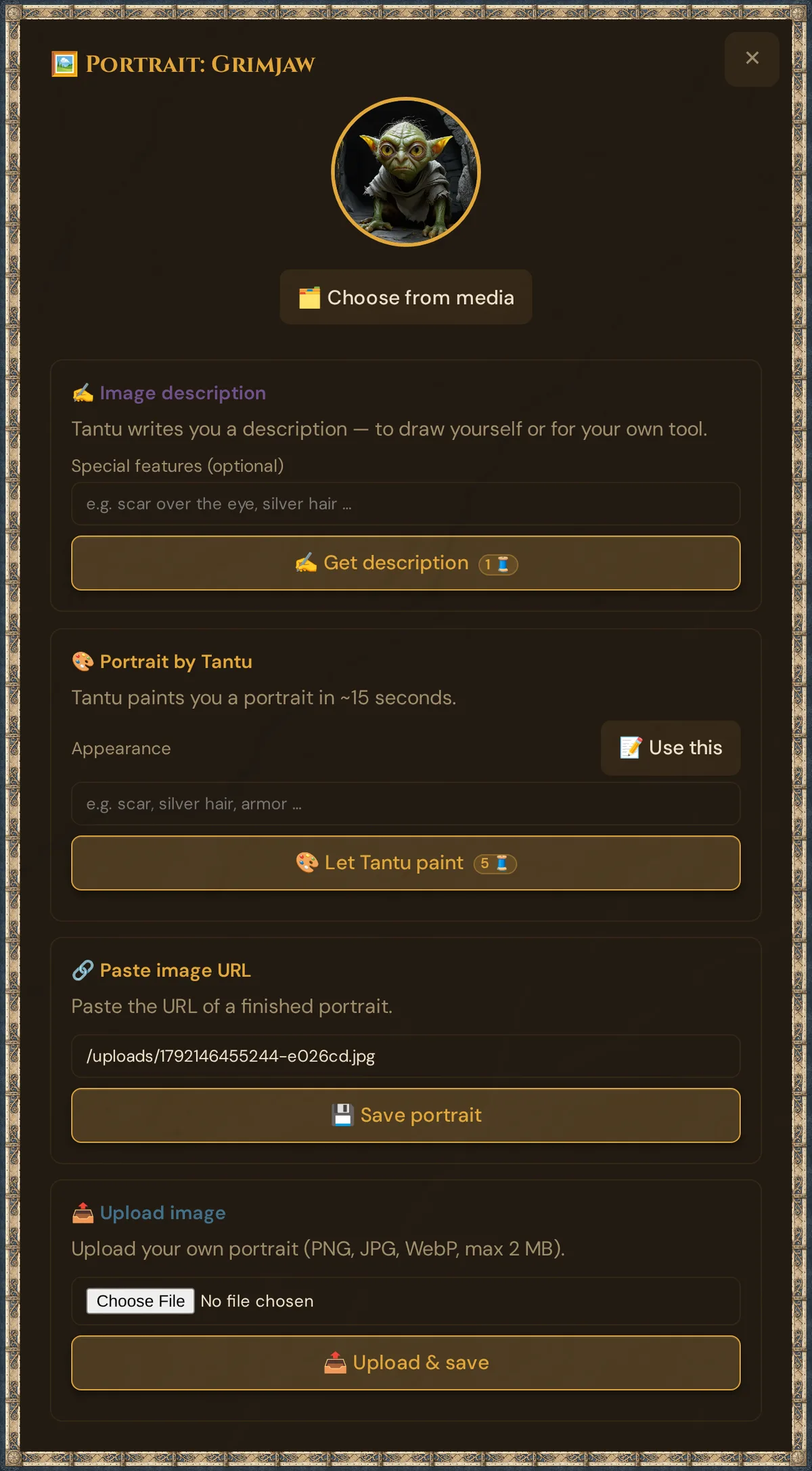
Open any NPC card → 🖼️ Portrait. Below the current portrait, 🗂️ Choose from media opens 🗂️ Choose a portrait from media:
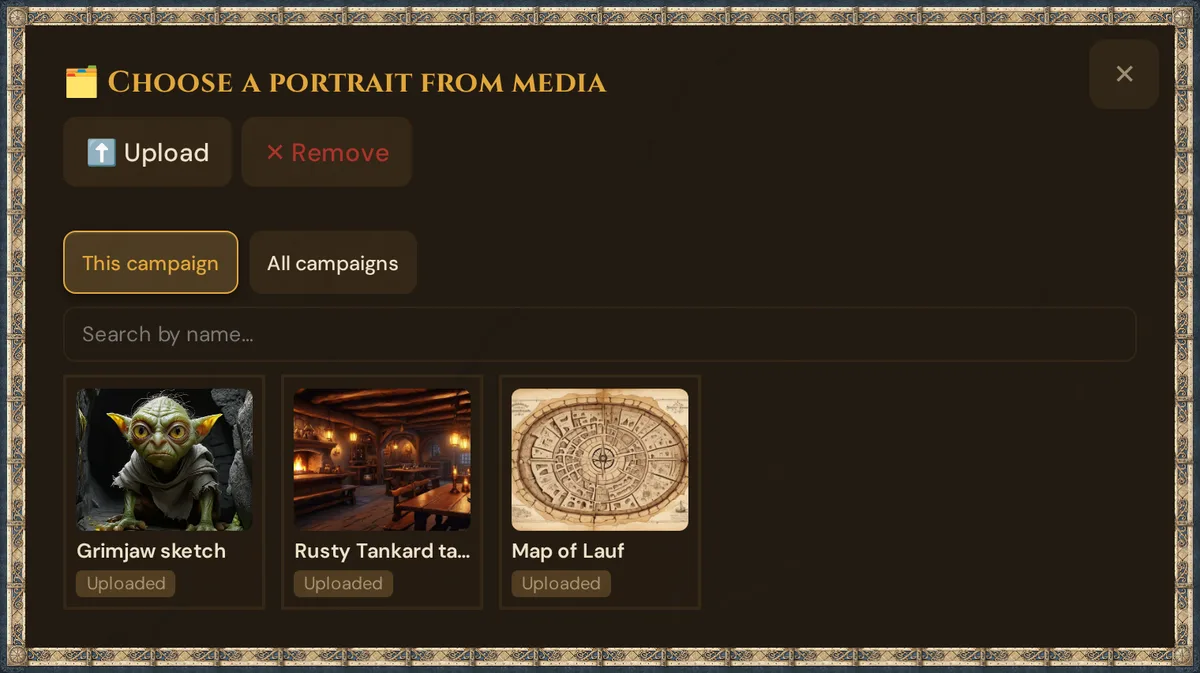
- The dialog shows the portraits of the campaign first, then its other pictures — each with its origin, such as Created by Tantu or Uploaded. All campaigns shows those of your other campaigns too; Search by name… narrows the list.
- Click any picture to assign it to the current NPC instantly. No re-generation, no Threads spent.
- ⬆️ Upload adds a new picture right there; ✕ Remove takes the portrait off the NPC.
💡 Tip: This is the cheap way to do mood variants. Generate neutral / angry / sad once, then reuse each one wherever you need it — you never pay to reuse an image you already made.
How assigning works
Picking a picture sets it as that NPC's portrait directly (it writes the image to the NPC's portrait_path). It does not move the image away from whichever NPC it came from — so the same portrait can sit on several NPCs at once.
More about the dialog: Choose from media.
Item image variants: 🖼️ Image variants
Custom items keep their generation history too. On any custom item card (GM tool → ⚔️ Custom Items) that already has an image, an 🖼️ Image variants button appears:
┌─ Whispering Blade  [rare] ──────────────────────┐
│  ◖item art◗                                     │
│  A sword that murmurs battle tactics…           │
│  [✕] [🖼️ Image variants]                        │
│                                                 │
│  🖼️ Previously generated images                 │
│  ◖img◗⭐  ◖img◗   ◖img◗                          │
│  active                                         │
└─────────────────────────────────────────────────┘
- Click 🖼️ Image variants to unfold the 🖼️ Previously generated images strip below the card (click again to close it).
- Every image ever generated for this item is listed, 64×64, newest first; the active one has the ⭐ amber border.
- Tap any other thumbnail to reactivate that version — free, instant, no Threads. The item card and everywhere the item art shows switch to the chosen version.
- Regenerating a new image (5 Threads) adds another version; the older ones stay available here.
So an unlucky regeneration never costs you the good version you already had — flip back any time.
The Media Library — versions, rename, delete
The deeper gallery is the Media page, shelves 🎭 Portraits and 🖼️ Images. It lists every portrait and image in your Realm, newest first; versions made with AI carry the badge Created by Tantu, and Used in: … shows which NPC or scene uses a version right now.
For each of these items you can:
| Action | What it does |
|---|---|
| ✏️ Rename | Give a version a friendly display name (otherwise it shows the name of its NPC, scene or item). |
| 📁 Campaign | Move a version to another campaign or to Without campaign. |
| 🗑️ Delete | Move a version to the trash and free its storage immediately — you can restore it there for 30 days. If you delete the active version, the next-newest version of the same entity is auto-activated. |
The Media page does not mark the active version. Switching the active version happens with 🗂️ Choose from media in the NPC portrait window and with the 🖼️ Image variants picker on item cards. Switching there is free and reversible; older versions remain on the Media page as history.
💡 Tip: Reactivate beats regenerate. If you regenerated and the new portrait is worse, pick the old version with 🗂️ Choose from media — free, instant, no new Thread.
Portrait suggestions (AI) for player characters (paid)
Players can get a portrait suggested for their own character from their phone — but only if the GM allows it, because the cost comes out of the GM's Thread balance.
Turning it on (GM)
GM tool → sidebar ⚙️ Tantu Settings, section 🎮 Player Tantu access:
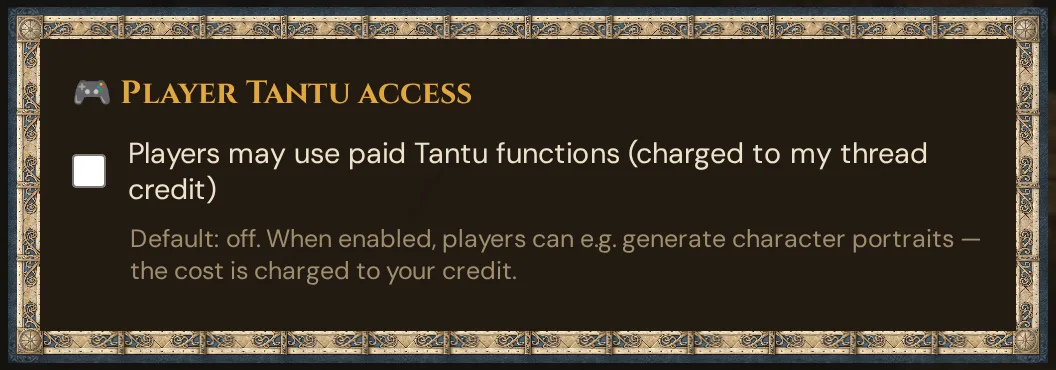
This is the allow_player_paid_ai toggle. Default: off. While it is off, a player's portrait request is refused before anything is generated or charged.
What the player does
On the character sheet (and on the onboarding success screen after creating a character):
- Optionally describe their appearance in a sentence.
- Tap 🎨 Generate portrait. A "Your portrait is being painted…" status shows.
- ~15 seconds later the portrait appears on the sheet and is saved to their character.
Behind the scenes Tantu creates a head-and-shoulders fantasy portrait from the appearance, species, class, and level, with the help of AI — dramatic lighting, dark background, painterly style, no text or watermarks.
Players uploading their own picture
A player can also upload their own image (JPG/PNG/WebP, max 2 MB) instead of getting one suggested. Uploaded portraits go into a pending state and require GM approval — the GM approves or rejects from the campaign's pending-portraits list before the image appears.
Plan limits
The push and the gallery are free. Suggestions cost Threads:
| Action | Cost |
|---|---|
| Portrait / item image suggestion (AI) | 5 Threads per image (all plans) |
| Reactivate / choose from media | Free — reusing an existing version never costs Threads |
| Rename / delete a version | Free |
| Player portrait (when the GM toggle is on) | 5 Threads, charged to the GM's balance |
- Bring-your-own AI key: makes AI text actions free (0 🧵) — image generation still costs 5 Threads per image.
- Insufficient balance returns a "Threads too low" message with a link to top up — nothing is generated and nothing is charged.
- Storage full stops generation before it starts (a portrait would not fit in your quota). Free up space or add a +500 MB storage pack.
See Threads & costs and Pricing.
Troubleshooting
| Symptom | Cause | Fix |
|---|---|---|
| 🗂️ Choose from media shows no portraits | No portraits in this campaign yet | Switch to All campaigns, upload one, or generate one — it appears immediately |
| No 🖼️ Image variants button on an item card | The item has no image yet | Generate an image for the item first — the button appears once art exists |
| Picked a picture, NPC still shows the old one | Browser cache | Hard-refresh (Ctrl+Shift+R / Cmd+Shift+R) |
| Player sees no Generate portrait button / gets "disabled" | GM toggle allow_player_paid_ai is off (the default) |
GM: Tantu Settings → Player Tantu access → enable Players may use paid Tantu functions (charged to my Thread credit) |
| Player portrait request says balance too low | The GM's Thread balance is empty | GM: top up Threads, or the player can paste/upload an image instead |
| Generation stops with "storage full" | Realm storage quota reached | Delete unused versions on the Media page, or add a storage pack |
| Uploaded player portrait never shows | Uploads need GM approval | GM: approve it from the campaign's pending player-portraits list |
| Reactivated a version but the old one is gone | It is not gone — reactivating only flips which is active | Open the Media page (🎭 Portraits); older versions remain as history |
Related articles
- 👤 NPCs — NPC portrait panel and mood portraits
- 🎲 Player characters — character sheets and portraits
- ✨ Character creation — the player onboarding wizard
- 🎨 Media Library — manage all generated media
- ⚒️ Suggestions: items, monsters, images, sound — how image suggestions are made
- 🧵 Threads & costs — Thread costs and BYO key