🌱 Foreshadowing
👤 For: Game Masters · 💳 Plan: All plans · 🔄 Updated 2026-10-17
Foreshadowing is the GM's quiet superpower. A small detail in session 2 that becomes the key clue in session 11. A throwaway NPC line that turns out to have been a prophecy. Wovenkeep's Foreshadowing tracker lets you plant clues, link them to the NPCs, places, plotlines and scenes they belong to, mark them as found by the players and harvest them when they pay off — so nothing gets forgotten.
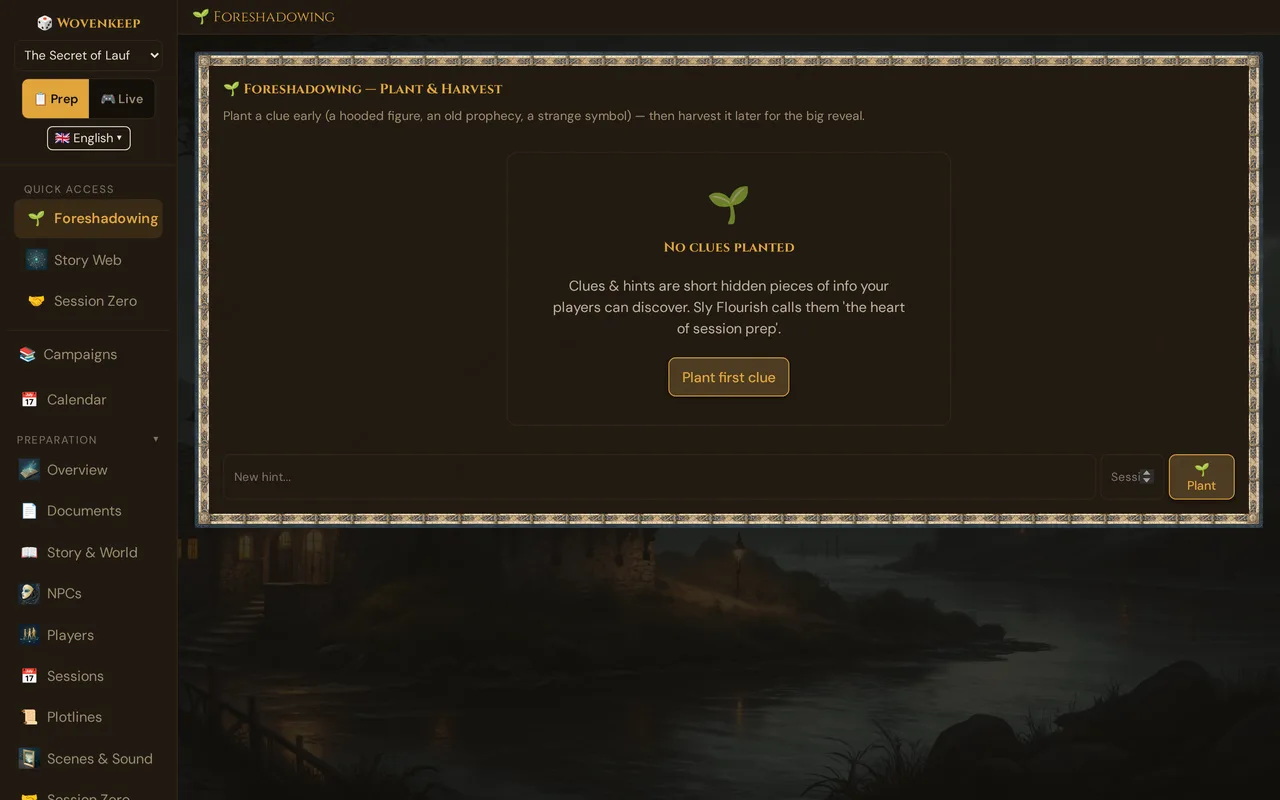
What it does
The tracker keeps a running list of every clue you've planted, with the session number and the full text. Each clue has one of three states, can be linked to anything in your campaign, and shows up live as soon as you push a scene it belongs to. When the payoff lands, you harvest the clue and record what happened — a permanent record of your campaign's setup and payoff.
When to use it
Open Foreshadowing when you're prepping a session and want to check what seeds are still in the ground — or right after a session ends, to plant the subtle clue you just slipped in before you forget about it.
Where to find it
Sidebar → Story & Tantu → 🌱 Foreshadowing.
The three states
Each clue is in one of three states:
- 🌱 Planted — you've dropped it, or plan to. The seed is in the ground.
- 🔍 Found by the players — the players have noticed it, but haven't connected the dots yet.
- 🌾 Harvested — the payoff has happened.
Clues stay planted for as long as you want — sometimes a few sessions, sometimes the whole campaign. You can set any state by hand in the edit dialog; 🌾 harvests a clue with its payoff text, and ✓ Found in the live clue card marks it as found.
Step by step
Planting a clue
- Open the Foreshadowing section from the sidebar.
- Type your clue into the New hint… field below the list.
- Enter the session number in the Session # field.
- Click 🌱 Plant.
The clue appears in the list immediately.
| Field | Required | What it's for |
|---|---|---|
| New hint… | Yes | The clue you're planting. Write it as it would appear in play — concrete and specific. |
| Session # | Optional | Which session it drops in. Left empty, the list shows #?. |
Sample clues:
Captain Morr's medallion catches the firelight unusually — Lena notices the symbol matches one in her old order's banner.
The barkeep mentions a stranger asking about the medallion two days before the party arrived.
In the temple ruins, a defaced inscription. Players notice the defacement is recent — the original word is still half-legible, and it reads "Vaerin".
Each clue is a single concrete moment, not a vague theme.
Editing and linking a clue
Click ✏️ on a clue to open ✏️ Edit clue:
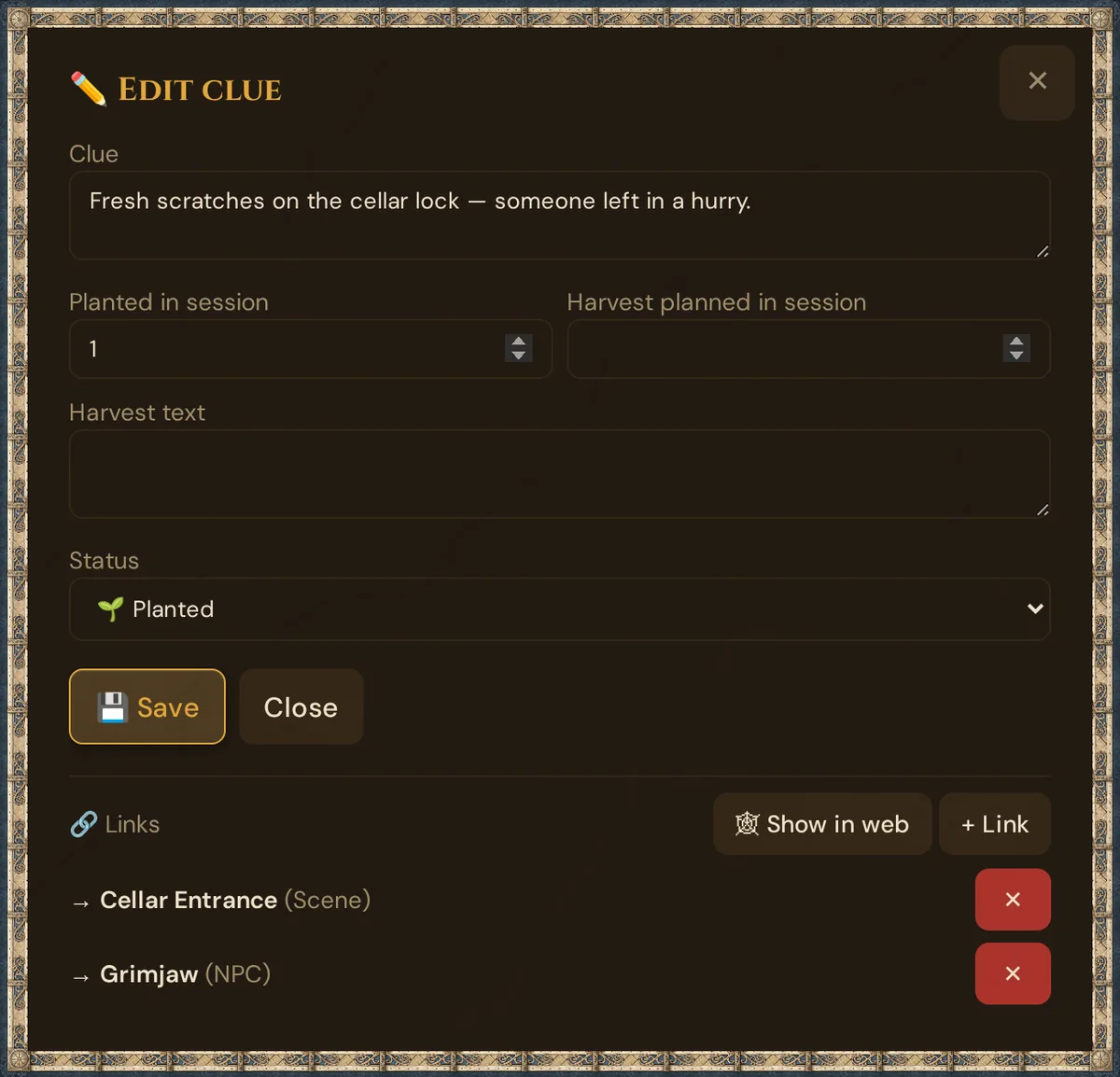
| Field | What it's for |
|---|---|
| Clue | The text of the clue — it must not be empty |
| Planted in session | The session number it drops in (empty = unknown) |
| Harvest planned in session | When you plan the payoff — your reminder |
| Harvest text | How it paid off |
| Status | 🌱 Planted, 🔍 Found by the players or 🌾 Harvested |
💾 Save stores the fields; Close leaves without saving them.
Below, the 🔗 Links panel connects the clue to the rest of your campaign: click + Link, choose what to link — an NPC, a Scene, a Location, a Plotline, a player character, an item, a monster, a deity, a world event or another clue — pick the entry, optionally describe the Relationship, and click + Link. Links are saved at once; ✕ removes one. 🕸 Show in web opens the clue in the Story Web in a new browser tab, where linked clues appear as 🔍 nodes.
- Link a clue to the scene where it turns up — then it appears in Live when you push that scene (see Clues during the session).
- NPCs, locations, plotlines and scenes have the same 🔗 Links panel, where Clue is one of the choices — for a scene, at the bottom of ✏️ Edit Scene.
The 🔗 number in the list shows how many links a clue has.
Harvesting a clue
When the foreshadowed event happens:
- Find the clue in the list.
- Click the 🌾 button on that clue's row.
- The window 🌾 Harvest foreshadowing asks How did it pay off?
- Write a brief payoff description and click 🌾 Harvest.
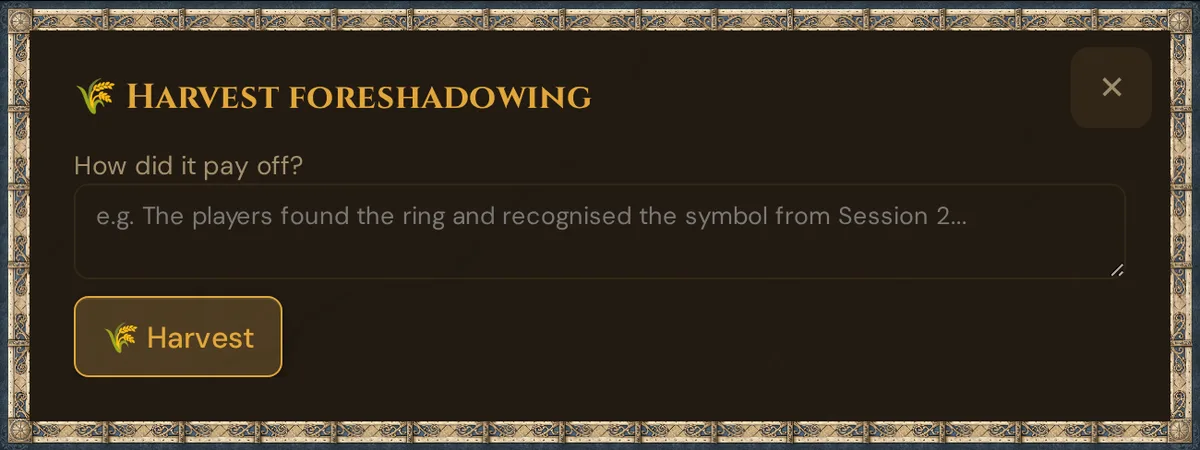
Sample payoff: "In Session 6, Lena directly confronts Morr — 'You're one of Vaerin's old order.' Morr admits it. The medallion symbol from Session 3 was the foreshadowing."
After harvesting, the clue stays in the list with the payoff text shown below it in green — a permanent record of what worked. If the payoff was only a partial reveal, set the Status back with ✏️.
Deleting a clue
🗑 asks Move this clue and its links to the trash (30 days)? in a browser window. The clue and its links wait in the 🗑️ Trash for 30 days, listed as Clue; ↩️ Restore brings the clue back with its links.
The clue list
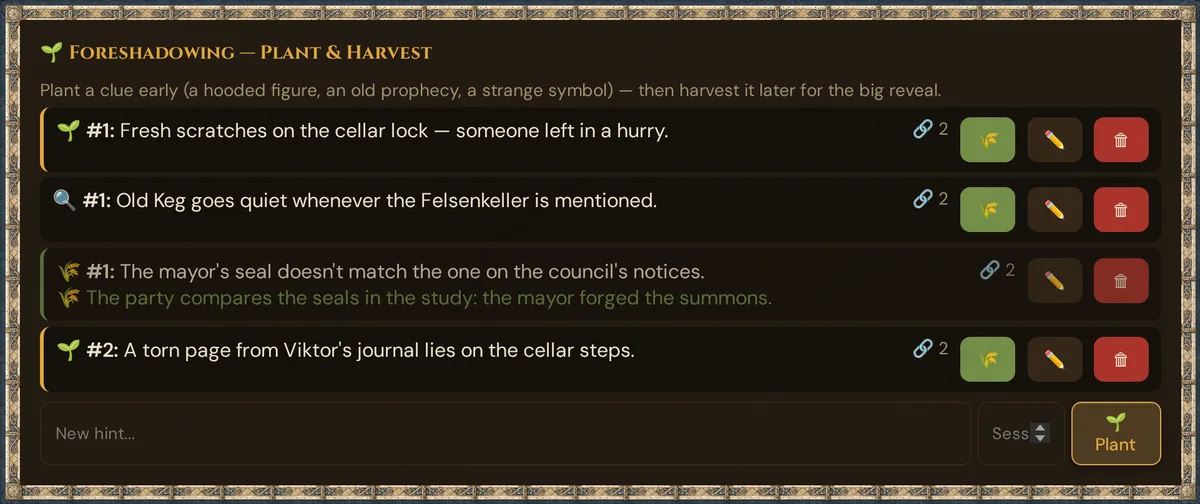
Each row shows the state icon, the session number (#? without one), the clue and — for harvested clues — the payoff in green. Next to it: 🔗 with the number of links, 🌾 (except for harvested clues), ✏️ and 🗑. The list is sorted by session number.
Clues during the session
When you push a prepared scene in 🎮 Live (card 📋 Prepared scenes), the card 🔍 Clues for this scene appears in 🎬 Scenes & Sound — with every clue linked to that scene:
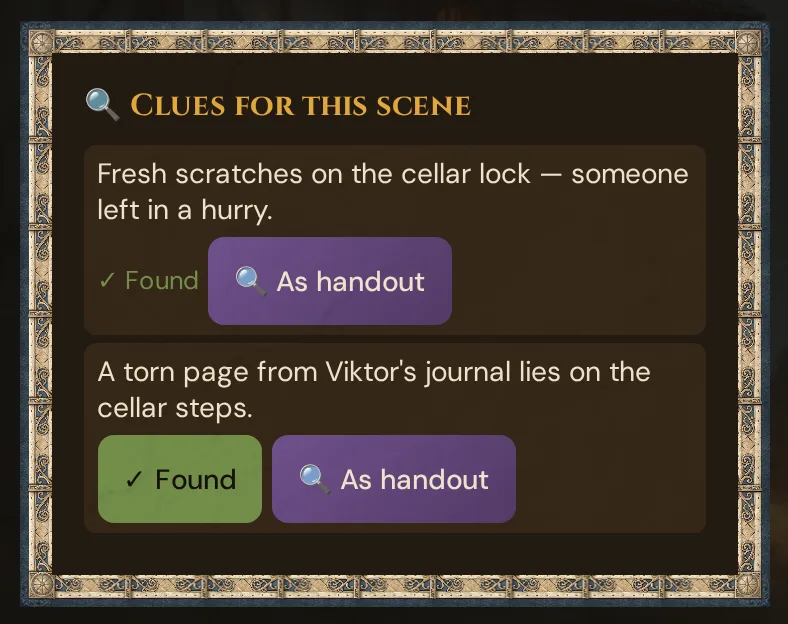
- Each clue shows its state. A clue that is only planted has the button ✓ Found; a clue that is already found shows ✓ Found as plain text, a harvested one 🌾 Harvested.
- ✓ Found sets the clue to 🔍 Found by the players and notes it in the 📋 Log. Players see nothing. Before saving, Wovenkeep checks the saved state again — a clue that was found or harvested in the meantime is never set back.
- 🔍 As handout sends the clue text to all players as a document with the title Clue and the 🔍 icon. Its state doesn't change.
The card only appears for prepared scenes with linked clues — not for a scene you type into 🎬 Push scene, and not for clues that are only linked to the scene's NPC or location. It disappears when you open another live section, until you push the next scene.
Craft patterns
The rule of three — important reveals work best with three planted clues before the payoff. One clue feels arbitrary; three feel inevitable.
Plant early, harvest late — the longer the gap between plant and harvest, the more satisfying the reveal. Plant in session 2, harvest in session 8 → players feel like geniuses.
Plant at the moment of relevance — don't plant 17 clues upfront and forget about them. Plant 1–2 per session, only when there's a natural moment to deliver them — and link them to that scene.
Track even the ones you didn't plan — some of your best foreshadowing happens accidentally. When a player's offhand theory turns out to be right, retroactively plant it: "Lena guessed in session 3 that the captain was hiding something — that's now foreshadowed."
Harvest publicly — when you harvest a clue, share it with your players: "Remember when you noticed the medallion's symbol in session 3? That was always Morr's old order." Players love seeing the planted seeds.
Costs
The Foreshadowing tracker works on every plan, including free. Planting, linking and harvesting clues is manual bookkeeping — it costs no Threads.
→ See Pricing for what the plans differ in (monthly Threads, campaigns, player seats, storage, support).
Troubleshooting
| Symptom | Cause | Fix |
|---|---|---|
| Plant first clue does nothing | The New hint… field is empty | Type the clue into New hint…, then click 🌱 Plant |
| 🌾 button doesn't appear on a clue | The clue is already harvested | Use ✏️ to change its state |
| Harvest saves but payoff text is blank | The How did it pay off? field was empty — the harvest only saves with text | Enter a payoff description before clicking 🌾 Harvest |
| The clue must not be empty. | The Clue field is empty | Type the clue, then save |
| Could not save the clue. | A session number is not a whole number | Use whole numbers from 0 — or leave the field empty |
| The 🔗 number didn't change after linking | The list updates when you close the dialog with Close | Close the dialog with Close |
| No 🔍 Clues for this scene card in Live | The pushed scene has no linked clue, or you pushed it from 🎬 Push scene instead of 📋 Prepared scenes | Link the clue to the scene with ✏️ → + Link → Scene, then push the prepared scene |
| Deleted a clue by mistake | Deleted clues go to the trash | 🗑️ Trash → ↩️ Restore (within 30 days) |
Related articles
- 📜 Plotlines — link clues to a story arc
- 🎬 Scenes (prep) — the scenes a clue turns up in
- 🖼️ Scene push — pushing a prepared scene shows its clues
- 📖 Story Coach — analysis of your campaign (AI); its Next Session suggestions can help you decide when to harvest
- 🕸️ Story Web — linked clues appear there as nodes
- 📊 Tension Arc — see your campaign's pacing over time