🗣️ Voice Input
👤 For: Game Masters · 💳 Plan: All plans · 🔄 Updated 2026-10-16
Voice Input lets you dictate into the text fields of the GM tool. Click the 🎤 button next to a field, speak, and your words are turned into text — for free.
What it does
Voice Input is plain dictation — a typing replacement. You press the microphone button on a field, talk, and the transcript is appended to whatever is already in that field. It uses your browser's built-in speech recognition, so:
- It costs nothing — no Threads, no plan upgrade, no AI key needed.
- In supporting browsers, your audio stays on your device — the browser does the recognition. Only where the browser can't (see Browser support) is a short recording sent for transcription.
- It works alongside the keyboard: type some, dictate some, type a correction. Everything mixes freely.
When to use it
Reach for the mic when you'd rather talk out a chunk of prose than type it — a scene description, an NPC's backstory, a session recap, a strong-start paragraph. It's fastest for longer narrative text where you can ramble in one flow and clean up afterward.
Step by step
- Find a text field with a 🎤 button next to it (most multi-line text boxes have one).
- Click the 🎤 button. The first time, your browser asks for microphone permission — allow it.
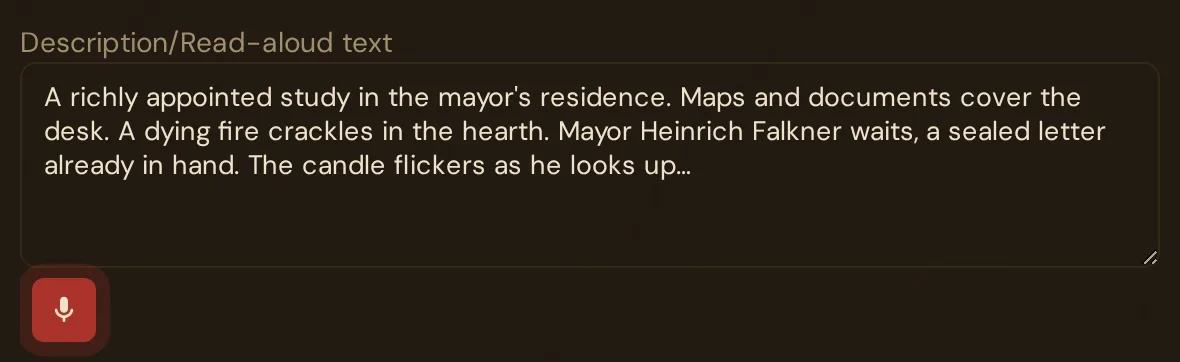
- The button turns red and pulses — it's listening. As you speak, your words appear in the field as a preview (ending in
…). - Keep talking. When you pause, each finished sentence is appended to the field with a leading space.
- Click the 🎤 button again to stop. (It also stops on its own after about 60 seconds of silence — see below.)
- Edit the inserted text as needed. It autosaves like any typed text (see Autosave).
💡 Tip: Dictate the first draft, type the polish. Speak the paragraph in one go, then keyboard-fix the proper nouns and trim. It's much faster to fix three mis-heard names than to type the whole thing.
Where the mic button appears
The 🎤 button sits next to multi-line and longer text fields throughout the GM tool, including:
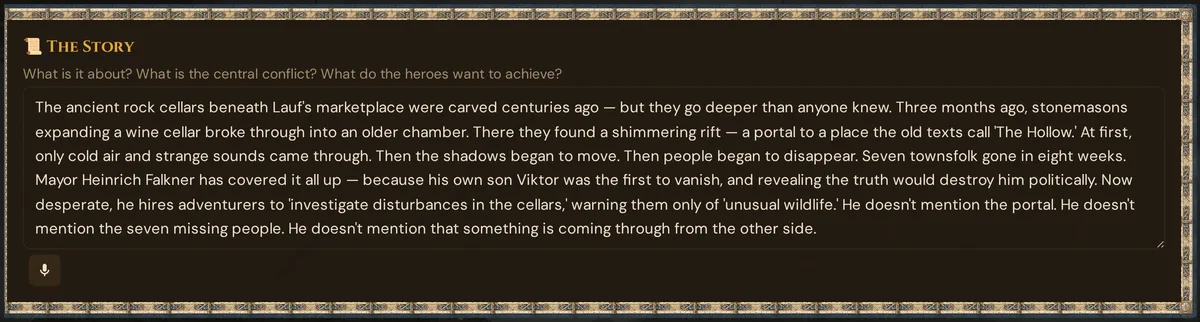
- Story / World / GM Secrets text boxes (Story & World)
- NPC personality, motivation, secret and voice fields (NPCs)
- Scene descriptions (Scenes prep)
- Session strong-start, recap and notes (Sessions)
- Plotline and handout text
It does not appear on toggles, dropdowns, dates, numbers, or other single-value controls — there's nothing to dictate there.
What the GM sees
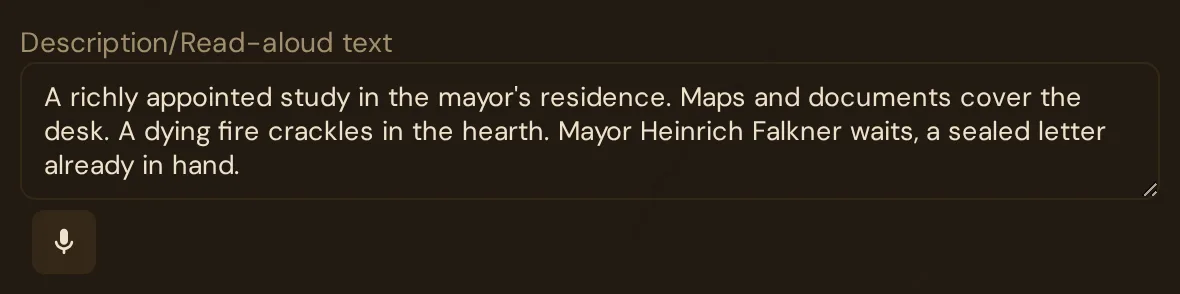
Ready to dictate — the microphone button sits right below the field:
Recording — the button turns red and pulses; your words appear in the field as a preview ending in …:
Browser support
Voice Input uses your browser's built-in speech recognition. That feature exists in Chromium-based browsers — Chrome, Edge, Brave and Opera. In browsers that don't support it (Firefox, and Safari to varying degrees), Wovenkeep records briefly instead and has the recording turned into text with the help of AI. If that fallback isn't available either, the 🎤 button doesn't appear at all — the tool hides it rather than showing a dead control. If you see no mic buttons next to text fields, switch to Chrome or Edge for dictation.
Language
Voice Input transcribes in the language of your GM-tool interface:
- Interface set to German → German dictation (
de-DE) - Interface set to English → English dictation (
en-US) - Interface set to French → French dictation (
fr-FR) - Interface set to Spanish → Spanish dictation (
es-ES)
The language is set when a text field opens: if you switch the interface language while an editor is open, reopen the editor to dictate in the new language.
Accuracy notes
Browser speech recognition is good but not perfect:
- Proper nouns (your custom NPC names, invented places) are often misheard — "Vaerin" might come out "Verin" or "Veron". Expect to fix these.
- Game jargon ("d20", "AC", "DC 15") can garble — "Roll a DC 15 Wisdom save" might become "roll a deci-15 wisdom save".
- Clean speech transcribes very well — narrative prose, descriptions and dialogue ideas come through accurately.
Treat the output as a fast first draft.
Voice Input vs. Voice Interview
These two are easy to mix up — note that Voice Interview is in development and not yet available in the tool:
| Voice Input | Voice Interview (in development) | |
|---|---|---|
| What it is | Dictate into one text field | Guided Q&A that builds structured content |
| Where it runs | Your browser's speech recognition (fallback: short recording, transcribed with the help of AI) | Audio transcribed by the server, then compiled with the help of AI |
| Availability | Live now — free, no Threads | Not yet available — in development |
| AI involvement | Only in the fallback — transcription only | Transcription + adaptive questions + compilation |
| Best for | "I want to dictate this scene description" | "I want to brainstorm a whole world by talking" |
Voice Input is a typing replacement. Voice Interview is a creative tool.
Privacy
In supporting browsers, the recognition happens inside your browser and your audio isn't sent anywhere. Where the browser can't recognize speech, a short recording is sent for transcription. Either way, only the resulting text is saved — into whatever field you dictated into.
Plan limits
Voice Input is free on every plan and costs no Threads. It uses your browser's speech recognition. Where the browser can't do that, Wovenkeep records briefly and has the recording turned into text with the help of AI. (For the optional AI help that does use Threads, see Threads & costs.)
Troubleshooting
| Symptom | Cause | Fix |
|---|---|---|
| No 🎤 button appears next to text fields | Your browser has no built-in speech recognition and the fallback isn't available — the button is hidden | Use Chrome, Edge, Brave or Opera |
| Nothing happens after clicking 🎤 | Microphone permission was denied | Re-allow the mic in the site's browser permissions, then click again |
| "Microphone access denied" tooltip | Permission blocked for this site | Allow microphone access in your browser's site settings |
| Recording stopped by itself | No speech detected for ~60 seconds (auto-stop) | Click 🎤 again to resume — speak sooner this time |
| Names/jargon come out wrong | Speech recognition mishears proper nouns and game terms | Dictate the prose, then keyboard-fix the names |
| Dictation came out in the wrong language | The editor was opened before you switched the interface language | Close and reopen the editor, then dictate again |
Related articles
- 📜 Story & World — a prime dictation target
- 💾 Autosave — dictated text saves like typed text
- 🧵 Threads & costs — which features use Threads