🧵 Threads & costs
👤 For: Everyone · 💳 Plan: All plans · 🔄 Updated 2026-10-17
🧪 Beta: Wovenkeep is in beta. New accounts get Storyteller for free (unlimited campaigns, up to 8 players per campaign, 5 GB storage). Subscriptions and Thread bundles can't be bought yet — that opens after the beta. You get 100 Threads when you complete your sign-up and earn more along the way: your first campaign, 10 sessions played, verified bug reports and feedback. With your own AI key, AI text help runs without Threads — see Threads & costs.
Threads are your credit for optional extras: suggestions from the optional AI help (image, text, sound) and extra storage. Preparing, running the game, and pushing to your players never cost Threads. Every feature works on every plan. This page is the definitive reference for what costs Threads, how to get them, and what happens when you run out.
What it does
Most things in Wovenkeep cost nothing. The tool, prep, the live session, and every push to player phones are free on any plan. Threads are spent only on the optional AI help and on extra storage:
- Pay-per-use actions debit a small number of Threads each time (1–5 per action).
- Bring-your-own AI key makes text suggestions free — 0 Threads. Image suggestions are free only with your own Google Gemini key; sound always costs Threads.
- Threads never expire — monthly, bought, and earned Threads all stay until you spend them.
You don't pre-pay per feature and you don't need a subscription for the AI help. You hold a balance of Threads, and each use draws from it.
When to use it
Read this when you want to know before you click: "How much will this cost me, and have I got enough?" It also explains how to top up, how subscription plans add Threads to your balance every month, and how to make text suggestions free with your own provider key.
Pay-per-use: what each action costs
Every suggestion debits Threads from your balance. There are only two text tiers and a flat cost for everything else — no per-feature price list to memorise.
| Action | Threads | Feature |
|---|---|---|
| Image suggestion — portraits, scene art, item art | 5 per image | Suggestions |
| Text — long (Story Coach analyses, item and monster suggestions) | 4 | Story Coach · Suggestions: items, monsters, images, sound |
| Text — short (descriptions, session recap, short suggestions) | 1 | Story Coach · Session recap |
| Question to Tantu — free-form question about your campaign (sidebar 🧭 Ask Tantu) | 4 per question | Tour of the GM tool |
| NPC conversation | 1 per reply | NPC dialogue suggestions |
| Speech-to-text (voice input) | 1 | Voice Input |
| Sound — ambient / combat | 1 | Sound & ambient |
| Loot — 5e-balanced | 1 | Loot & Crafting |
| Storage pack +500 MB, permanent (max +5 GB total via packs) | 50 | Storage & files |
💡 Tip: Generating an image costs 5 Threads once. After that, pushing that image to player phones — and re-using it in any scene — is free, forever. Generate during prep, push freely during the session.
Choosing between saved variants of a generated image, sound, or portrait costs nothing — the Thread was spent when the media was first created. Pick the version you like at no extra cost.
You always see the cost before you click
- Cost badges — every AI help button in the tool shows its price as a badge, e.g. "5 🧵". With your own AI key, the badge shows "0 🧵" only where the key really makes the action free: text actions with any own key, image actions with a Google Gemini key, sound never.
- Confirm dialog — before every paid action, a dialog shows the cost and your current balance. Nothing is spent until you confirm.
- Threads chip — the topbar shows a live Threads chip with your balance, refreshed after every action.
- No AI wanted? Hide AI features in ⚙️ Tantu Settings hides every button with a cost badge for your whole Realm; the Threads chip stays. See Hide AI features.
How you get Threads
Three ways. Mix and match — they all land in the same balance, and none of them expire.
1. Buy a bundle
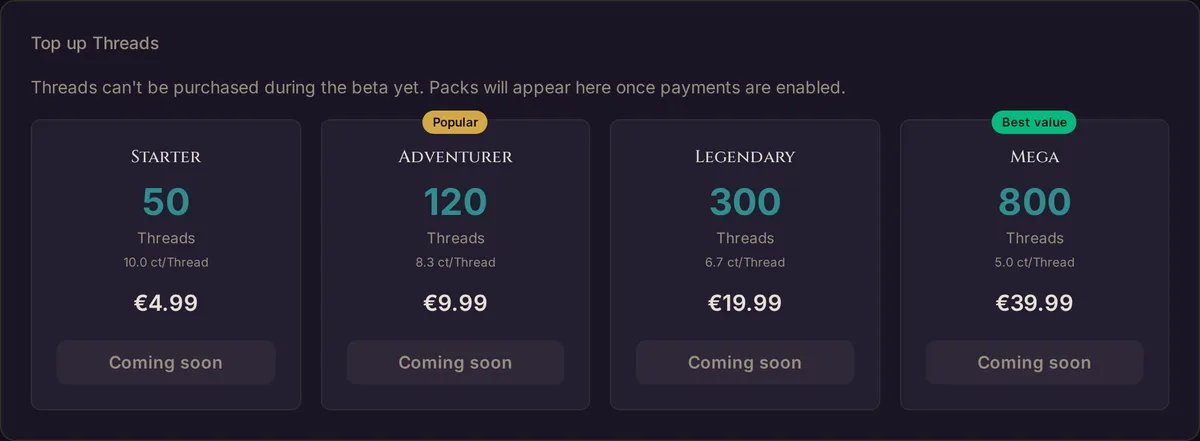
Bought Threads never expire. Buy them on app.wovenkeep.com with Top up Threads on the dashboard (not yet during the beta); they appear in your balance within seconds and the GM tool picks the new total up on its own.
| Bundle | Threads | Price |
|---|---|---|
| Starter | 50 | €4.99 |
| Adventurer | 120 | €9.99 |
| Legendary | 300 | €19.99 |
| Mega | 800 | €39.99 |
2. Earn free Threads
Wovenkeep hands out Threads for milestones — no payment needed:
| Milestone | Threads |
|---|---|
| Complete signup | 100 (once) |
| Create your first campaign | +10 (once) |
| Play 10 sessions | +20 (once) |
| Bug report verified | +10 (critical +25, duplicate +5) |
| Feature suggestion adopted | +15 |
| Beta feedback | +5 |
Bug reports, feature suggestions, and beta feedback are repeatable and reviewed by the team.
3. Monthly allowance from a plan
A subscription tops up your balance with fresh Threads every month, on top of more campaigns, storage, and player seats. Plans are optional — you can run entirely on bought and earned Threads. Monthly Threads never expire.
| Plan | Monthly Threads | Storage | Player cap |
|---|---|---|---|
| Adventurer (free) | — (earn / buy) | 100 MB | 6 |
| Game Master (€4.99/mo) | 60 | 1 GB | 8 |
| Storyteller (€9.99/mo) | 130 | 5 GB | 8 |
| Guild Master (€19.99/mo) | 300 | 20 GB | 12 |
Full comparison on the Pricing page.
Bring your own AI key — text actions at 0 Threads
If you already have an AI provider account, plug in your own key and AI text actions cost 0 Threads — they go to your provider first, before Wovenkeep's AI, and run on your provider's billing instead of ours.
- Add keys in the GM tool under ⚙️ Tantu Settings → Your own API keys (optional): Anthropic, OpenAI, Google Gemini, or OpenAI-compatible — your own endpoint (e.g. Mistral, DeepSeek, OpenRouter, IONOS, self-hosted). OpenAI-compatible needs an endpoint address and model name; the key is optional, and only
https://addresses are accepted. - Text suggestions (Story Coach, NPC dialogue, recaps, item & monster suggestions) cost 0 Threads when your own provider handles them — the button badges switch to "0 🧵". With Provider preference: Auto, the try order is OpenAI-compatible, Anthropic, OpenAI, Gemini.
- If your own provider doesn't answer, Wovenkeep's AI takes over for that request (spending Threads as normal) and shows a one-time notice; your own provider is then skipped for 5 minutes. A request your own provider rejects is not retried against Wovenkeep's AI.
- Image suggestions cost 0 Threads only with your own Google Gemini key — Wovenkeep then creates the image with your key. With keys from other providers they cost 5 Threads as usual. Sound suggestions always cost Threads, own key or not.
- Text actions without a configured provider run through the platform and spend Threads as normal.
This is the power-user path. Most GMs find bundled Threads simpler; bring-your-own wins for heavy text users who already hold provider credits. See API keys.
Letting players spend your Threads
Players can create their own character portraits — but only if you let them, and the cost comes out of your balance.
- In the GM tool, open ⚙️ Tantu Settings (sidebar, Admin group).
- Find Player Tantu access.
- Toggle Players may use paid Tantu functions (charged to my Thread credit) on.
While it's off, players can still play normally — they just can't trigger paid AI help. While it's on, a player portrait debits 5 Threads from your wallet, same as if you'd generated it.
Where you see your balance
The fastest view is the Threads chip in the GM tool's topbar — it's always current. For the full picture, open Thread History on your dashboard at app.wovenkeep.com. It shows your current balance and a full transaction history:
Threads — balance: 147

Jun 15   Portrait generated     −5    Captain Morr
Jun 15   NPC dialog             −1    Berta — "the usual?"
Jun 14   Bundle purchase      +120    Adventurer bundle (€9.99)
Jun 14   Monthly allowance     +60    Game Master plan
Jun 12   Story Coach (long)     −4    Next-session plan
...
This history is also included in your GDPR data export.
Running out
If you trigger an AI help action with too few Threads, the action stops cleanly — no partial result, no debt. Wovenkeep tells you where you clicked and at the bottom of the screen:
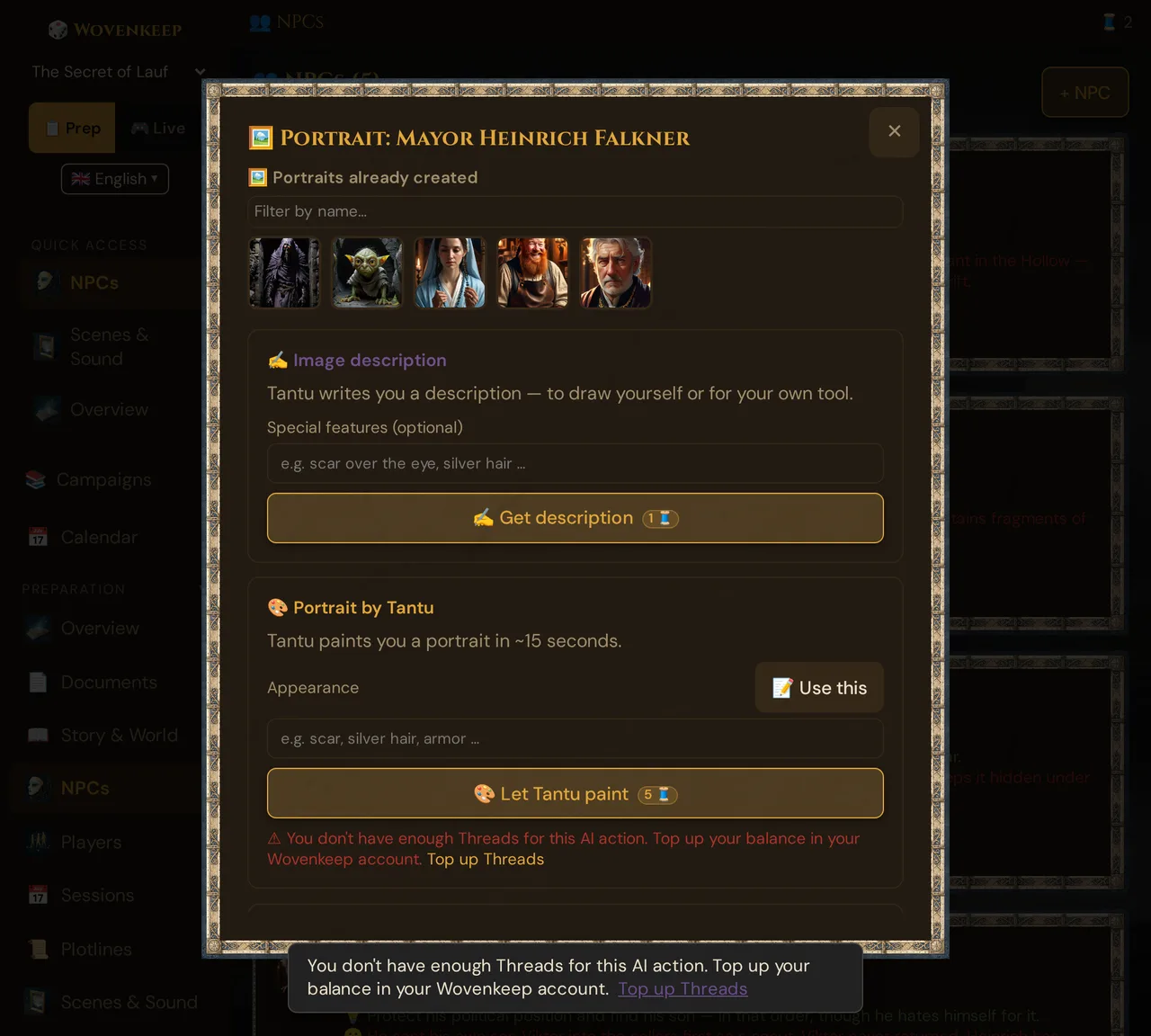
Click Top up Threads in the notice, or top up at app.wovenkeep.com. The moment the bundle clears, the GM tool picks up your new balance within seconds and you can try again.
A realistic budget
Because most actions cost just 1 Thread, a normal campaign goes a long way:
| Activity | Frequency | Threads |
|---|---|---|
| 5 NPC portraits (new campaign) | once | 25 |
| Weekly session recap | 4× | 4 |
| Weekly next-session plan (long text) | 4× | 16 |
| ~15 NPC dialog replies during play | 4 sessions | ~15 |
| Occasional item / monster generation | ~5× | ~20 |
| Total | ~80 |
A 120-Thread Adventurer bundle (€9.99) covers several weeks of steady play; the free signup grant alone (100 Threads) gets a new GM well into their first campaign.
Troubleshooting
| Symptom | Cause | Fix |
|---|---|---|
| "Not enough Threads" when generating | Balance below the action cost | Top up with Top up Threads on the dashboard at app.wovenkeep.com (during the beta: earn Threads or use your own AI key); balance refreshes in the tool within seconds |
| Bought a bundle but the GM tool still shows the old balance | Tool hasn't polled yet | Wait a few seconds, or reload the GM tool — the new balance is applied automatically |
| A player can't generate a portrait | Player Tantu access is off | GM tool → ⚙️ Tantu Settings → enable Players may use paid Tantu functions |
| A feature looks locked | Stale UI from an older version — every feature works on every plan | Hard-refresh (Ctrl + Shift + R) or log out and back in; AI help buttons show a Thread cost badge, not a lock |
| A suggestion still spends Threads despite your own key | Own keys make text actions free, images only with a Google Gemini key — sound always costs Threads; or the key doesn't match the provider used | Check ⚙️ Tantu Settings → Your own API keys (optional). The badge and the confirm dialog show what an action will cost: "0 🧵" only where your key makes it free |
| Image created but won't push to players | Creating and pushing are separate — the image exists, the push failed | Re-push from the scene; see Scene push troubleshooting |
Related articles
- 💰 Plans, Threads, and what they cost — plan + Threads orientation
- 💳 Pricing — full plan comparison
- 🔑 API keys — bring your own key for 0-Thread text actions
- 📖 Story Coach — the highest-value Thread spend
- ⚒️ Suggestions: items, monsters, images, sound — portraits, monsters, items, scenes