🔒 GDPR & Data Export
👤 For: Everyone · 💳 Plan: All plans · 🔄 Updated 2026-10-17
Wovenkeep gives you self-service control over your data: export everything (GDPR Art. 15 & 20) and delete everything (GDPR Art. 17), with no support ticket. Because your data lives in two places — your Realm (the campaign content) and your account (email, billing) — there are two of each tool.
What it does
- Realm export — downloads a ZIP of your Realm's campaign and world data: a structured
export.jsonplus the actual uploaded files (images, sounds). - Account export — downloads a JSON of your platform-side data: profile, instances, subscriptions, invoices, payments and account activity.
- Realm deletion — after a 30-day grace period, during which you can cancel it, wipes the data in your Realm; the platform then removes the Realm and closes your Wovenkeep account.
- Account deletion — closes and anonymizes your whole Wovenkeep account.
- Privacy opt-outs — limit analytics and AI-training use without deleting anything.
When to use it
- You want a backup you control, independent of Wovenkeep.
- You're migrating to another tool and want your campaign data in a parseable form.
- You're exercising your GDPR right of access (Art. 15) or portability (Art. 20).
- A player asks you to remove their data, or you want to close your account.
Realm data export (Art. 15 & 20)
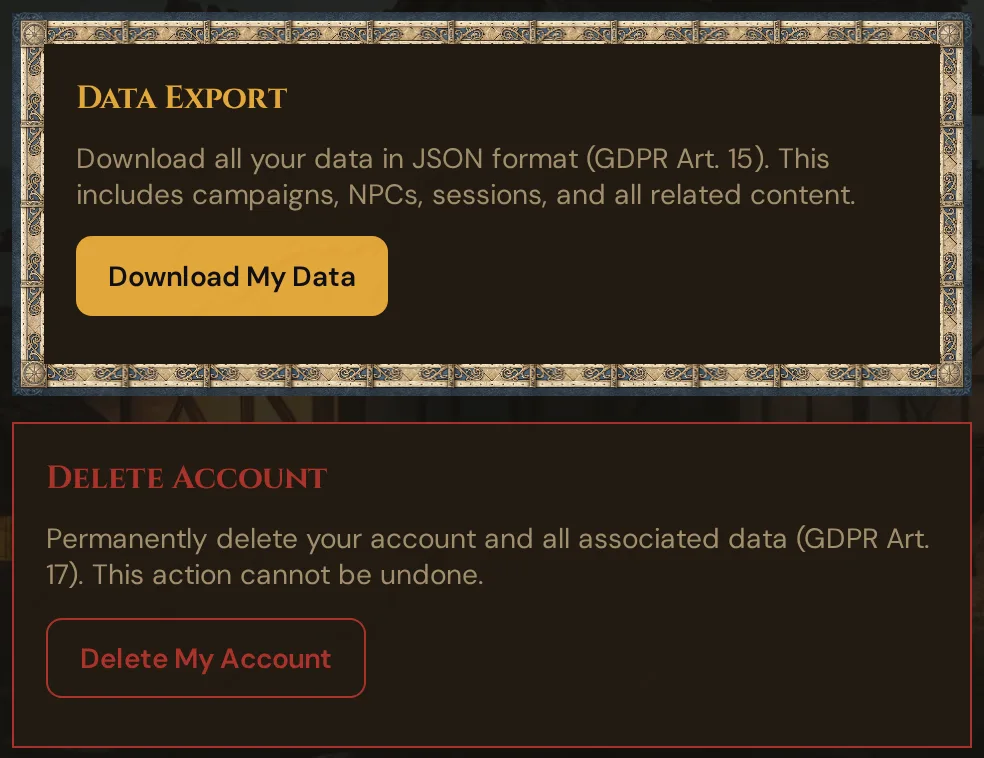
Your Realm holds the campaign content. In your Realm (yourname.wovenkeep.com/gm → ⚙ Settings), click Download My Data in the Data Export card. Wovenkeep builds a single ZIP file named wovenkeep-data-export-<date>.zip containing:
| Inside the ZIP | What it is |
|---|---|
export.json |
All data of your Realm as structured JSON, one section per kind of data: every campaign with everything in it — also the campaigns in the trash, with the date they were deleted — your worlds, pantheons and rules of your own, the session log, RSVP answers and date polls, items and handouts given to players, the trash, the login log, the privacy consent log and more. New kinds of data are included automatically |
export.json → settings |
Your Realm settings (secret keys such as API keys/passwords are stripped out) |
export.json → uploaded_files |
Metadata for every uploaded file (name, path, size) |
export.json → meta.excluded |
Everything left out on purpose, each with a short reason (see below) |
| the upload folders | The actual files you uploaded — images and sounds |
💡 Tip: Export before you delete a campaign. The ZIP is a self-contained copy of your campaign content and media —
export.jsonis human-readable and the media files sit right alongside it. Wovenkeep has no import for it.
What is not in the Realm export
- Billing and account data — that lives on the platform. Use the Account export below.
- Other people's data — your Realm is isolated; you only ever get your own.
- Stored secrets — API keys, passwords and tokens in settings are filtered out on purpose.
- Your own AI keys and Discord webhook addresses — not included at all, not even encrypted (see Your AI keys & Discord webhooks below).
- Player links and join codes — the personal links of player characters, the codes of live sessions, invite links, TV pairing codes and character share links are left out on purpose.
- Built-in reference data — the SRD library and other data that comes with Wovenkeep. Your own pantheons, deities and recipes are included; the built-in ones are not.
- Reports from other people — reports about content under the Digital Services Act contain the data of the person who reported, so they stay out.
- Technical data — such as the search index of imported documents.
Account data export (platform side)
Your account lives on app.wovenkeep.com and holds the billing/identity side. On your account dashboard, card Manage Account, click Download my data — the JSON file wovenkeep-data-export-<date>.json downloads right away. It contains:
| Included | Notes |
|---|---|
| Profile | Name, email, address, phone, language, plan — never your password hash, verification token, 2FA secret or recovery codes |
| Instances | Your Realm(s): subdomain, status, storage, timestamps |
| Subscriptions | Current and past plans |
| Invoices | All invoices, newest first |
| Transactions | All payments |
| Threads | Your balance and the full Thread history (top-ups, rewards, AI actions, storage packs) |
| Feature purchases | Features you unlocked with Threads or money |
| Account activity | The last 1,000 account events (logins, changes, purchases) |
| Customer notes | Any notes and tags on your account |
| Character Vault | Your vault characters and when you shared them |
| Feedback | Bug reports and feedback you sent |
| Linked accounts | Social logins (provider, name, email, avatar) — never their access tokens |
| Loom | Seller profile, listings, purchases, reviews, favorites, reports, payouts |
Run both exports if you want a complete picture — the Realm ZIP for campaign content, the account JSON for billing and identity.
Account & data deletion (Art. 17)
There are three deletion scopes, smallest to largest.
1. Delete a single campaign
Not account deletion — just removing one campaign from your Realm. From the Campaigns hub → ⋯ → Delete. The campaign goes to the trash for 30 days, where you can restore it; after that — or right away with ✕ Delete permanently in the trash — it is deleted for good, with all its content (see Deleted campaigns). The 💾 Save as file first button in the delete window saves the whole campaign as a JSON file, without player links, join codes and the media files themselves; it can't be imported again. For a copy with all files, use Download My Data above first.
2. Delete your Realm data (Art. 17)
In your Realm, ⚙ Settings → card Delete Account → Delete My Account (confirm, then type DELETE) requests the deletion of that Realm — and, in the end, of your Wovenkeep account. The flow:
- You request deletion. The confirmation dialog names the day your data will be deleted — in 30 days. Until then nothing is deleted: you can still export, and you can cancel.
- The Delete Account card then shows the status — "Deletion requested on … From … the data of this realm will be deleted …" — and the Cancel deletion button instead of Delete My Account.
- When the 30 days are up, the deletion can no longer be cancelled: the Realm permanently wipes the data listed below (at its next start or within the hour — a paused Realm is started briefly at night for this) and writes an audit entry. The card then shows the date of the wipe.
- In the following night the platform removes the Realm and anonymizes your Wovenkeep account, as described under 3. for an account with a Realm.
What the wipe removes: campaigns, NPCs, scenes, locations, plotlines, handouts, encounters, characters and player characters, sessions and session logs, voice interviews, login log, privacy consent log, your AI keys, all Realm settings (theme and favicon, too) and all uploaded files — everything you created in the Realm. Only built-in reference data such as the SRD library remains; it goes when the platform removes the Realm.
Cancelling: within the 30 days, click Cancel deletion in the same card — your Realm and your data stay as they are. Once the deadline has passed, the deletion can no longer be cancelled; once the wipe has run, it is irreversible.
3. Delete your whole Wovenkeep account
The nuclear option, on app.wovenkeep.com → Dashboard → card Manage Account → Delete Account. One confirmation dialog — with a Realm: "Are you sure? Your account and all data will be deleted in 7 days."; without a Realm: "Are you sure? Your account and your data will be deleted immediately. This cannot be undone." Open subscriptions are cancelled at the end of the paid period. Then:
- Account with a Realm: the Realm is marked for removal. In the first night after the 7 days the platform removes it and anonymizes your account: name and email are replaced, the password, address and phone are cleared; linked social logins, 2FA secrets, Character Vault, feedback and notes are deleted. The dashboard has no button to undo the deletion.
- Account without a Realm (e.g. a player account): anonymized immediately — name, email, password, address and phone — and your vault characters are deleted.
- When the platform removes a Realm, it keeps a compressed copy of the Realm's data on the server for 21 days, then deletes it automatically.
- Account activity events are kept for 30 days, then purged.
- Financial records (invoices, transactions) are retained for 10 years as German tax law requires — but stripped of any campaign content.
Strongly recommended: run both exports first and download them. Once deletion completes there is no recovery — not via support, not via backups.
Two-factor authentication & your data
If your account uses two-factor authentication (TOTP authenticator app or email code), the relevant GDPR fact is that your TOTP secret is encrypted at rest (AES-256-GCM) — it is never stored in plain text. Recovery codes are shown once at enrollment and stored only as hashes. Today 2FA is set up only for accounts that require it, and there is no setting to switch it on or off yourself — see Two-factor authentication.
Your AI keys & Discord webhooks
Your own AI keys (Anthropic, OpenAI, Google Gemini) and your Discord webhook addresses are secrets: whoever has a key can spend your credit with that AI provider, whoever has a webhook address can post into your Discord channel. Wovenkeep handles them like this:
- Encrypted at rest — both are stored in your Realm's database encrypted with AES-256-GCM. The encryption key is derived from a secret the platform creates for each Realm and keeps outside the Realm's data storage, so a leaked copy of the database or of a backup doesn't reveal them. AI keys and webhook addresses each use their own derived key.
- Shown masked only — once saved, an AI key appears only as
***plus its last four characters (e.g.***AbCd), a webhook address only with its token cut to the last four characters (…/webhooks/<id>/••••wxyz). The full value is never sent back to the browser. - Not in any export — neither the Realm export nor the account export contains them, not even encrypted. Keep your own copy (e.g. in a password manager) if you'll need them again.
- Deleted with your Realm data — the Realm deletion described above also wipes your AI keys and your Discord webhooks.
- Saved before encryption existed? Keys and addresses that were stored in plain text are encrypted automatically the next time your Realm starts. Nothing to do for you.
If a stored value can no longer be decrypted (for example because it was damaged or the Realm's secret changed), Wovenkeep treats it as not set: your own AI key isn't used, and nothing is sent to that Discord slot. To fix it:
- Open the place where you entered it: the card Your own API keys (optional) for AI keys (see Instance Settings), or sidebar → 🎮 Discord for webhooks.
- Look for the warning ⚠ Stored key can no longer be read, please enter it again (AI key) or Address can no longer be read — please enter it again (Discord slot).
- Enter the key or the webhook URL again (for Discord, click Edit first) and click Save.
Privacy opt-outs (lighter controls)
Short of deletion, you can limit data use without losing anything. In your Realm under Settings → Privacy:
- Analytics opt-out — Wovenkeep stops collecting usage analytics for your Realm.
- AI-training opt-out — your content and prompts aren't used to train models.
- Extended beta telemetry (click statistics) — an opt-in (default off): share anonymous click paths to help improve the beta. Nothing extra is collected unless you enable it.
Every change is written to the privacy consent log (timestamped, with the old→new value, IP and browser) — a provable record of your consent state. Admins can review the last 200 consent changes under the privacy log. This log is part of the Realm export (export.json).
What Wovenkeep measures — and what it never measures — is documented openly on What we measure.
What data Wovenkeep holds about you
For transparency, the full picture:
| Data | Where | Retention |
|---|---|---|
| Email, password hash | Account (platform) | Until account deletion (then anonymized) |
| Subscription, invoices, transactions | Account (platform) | 10 years (tax law), content-stripped after deletion |
| Account activity events | Account (platform) | 30 days after deletion, then purged |
| 2FA TOTP secret | Account (platform) | Encrypted at rest; cleared when 2FA is turned off or the account is deleted |
| Campaigns, NPCs, scenes, sessions, characters | Your Realm | Until you delete them (deleted campaigns wait 30 days in the trash) or the Realm |
| Uploaded files (images, sounds) | Your Realm | Same |
| Login log | Your Realm | Dashboard shows the last 100 events |
| Privacy consent log | Your Realm | Until Realm deletion |
| Your own AI keys | Your Realm | Encrypted at rest, shown masked, not exported; until you remove them (×) or Realm deletion |
| Discord webhook addresses | Your Realm | Encrypted at rest, shown masked, not exported; until you remove the slot or Realm deletion |
| Voice audio | Nowhere | Discarded immediately after transcription |
| AI prompts/responses | Not kept as a conversation log | The generated content you save lives in your campaign; the raw exchange isn't retained |
| Anonymous beta telemetry (usage events, optional click statistics) | Aggregated analytics — no campaign content, no free text | Respects the analytics opt-out and your browser's Do-Not-Track/Global Privacy Control; extended click statistics only with the opt-in toggle. Details: What we measure |
Voice audio is never stored — only the resulting text. AI exchanges aren't kept as logs: the output you save to a campaign is, the raw request/response isn't.
Players' data — you're the controller
Your players' data (their character sheets, their Session Zero answers, their inventory) lives in your Realm. Under GDPR, you are the data controller for it. Wovenkeep gives you the tools; the controller responsibility is yours (standard for any GM tool).
If a player asks you to delete their data:
- Delete their PC — Player characters → Delete.
- Delete their Session Zero response.
- Their dice and poll entries in session logs are removed when you delete the session, or when a deleted campaign leaves the trash for good.
If you let players use your AI Threads (the Players may use paid Tantu functions Realm toggle), note that their prompts are processed through your account's AI — the same privacy and consent considerations apply.
Troubleshooting
| Symptom | Cause | Fix |
|---|---|---|
| Realm export ZIP is missing some images | A file was unreadable on disk and skipped | Re-upload the affected media, then export again; check export.json → uploaded_files for the list |
| Account export has no campaigns or NPCs | Expected — the account JSON is platform data only | Use the Realm export (Download My Data inside your Realm) for campaign content |
| Deletion didn't happen right after I requested it | A 30-day grace period applies by design | The Delete Account card shows the date. To cancel, click Cancel deletion before that date |
| I confirmed account deletion but my Realm is still up | The Realm is removed in the first night after the 7 days | Nothing to do — your account is anonymized at the same time |
| Privacy toggle didn't seem to save | The setting only logs a new entry when the value actually changes | Re-open Settings → Privacy — the current state is shown there; unchanged toggles don't create duplicate log rows |
Related articles
- 🔧 Instance Settings → Privacy — analytics & AI-training opt-outs, beta-telemetry opt-in
- 📋 Login Log — recent logins
- 🏛️ The Realm concept — what's Realm vs. account data
- 🎲 Player characters — deleting a player's data