📕 SRD Rulebook
👤 For: Game Masters · 💳 Plan: All plans · 🔄 Updated 2026-10-16
The Rulebook puts 3,761 openly licensed D&D 5e entries — monsters, spells, items, races, classes, feats, and conditions — one click away during both prep and live play. No tab-switching, no PDF, no separate app.
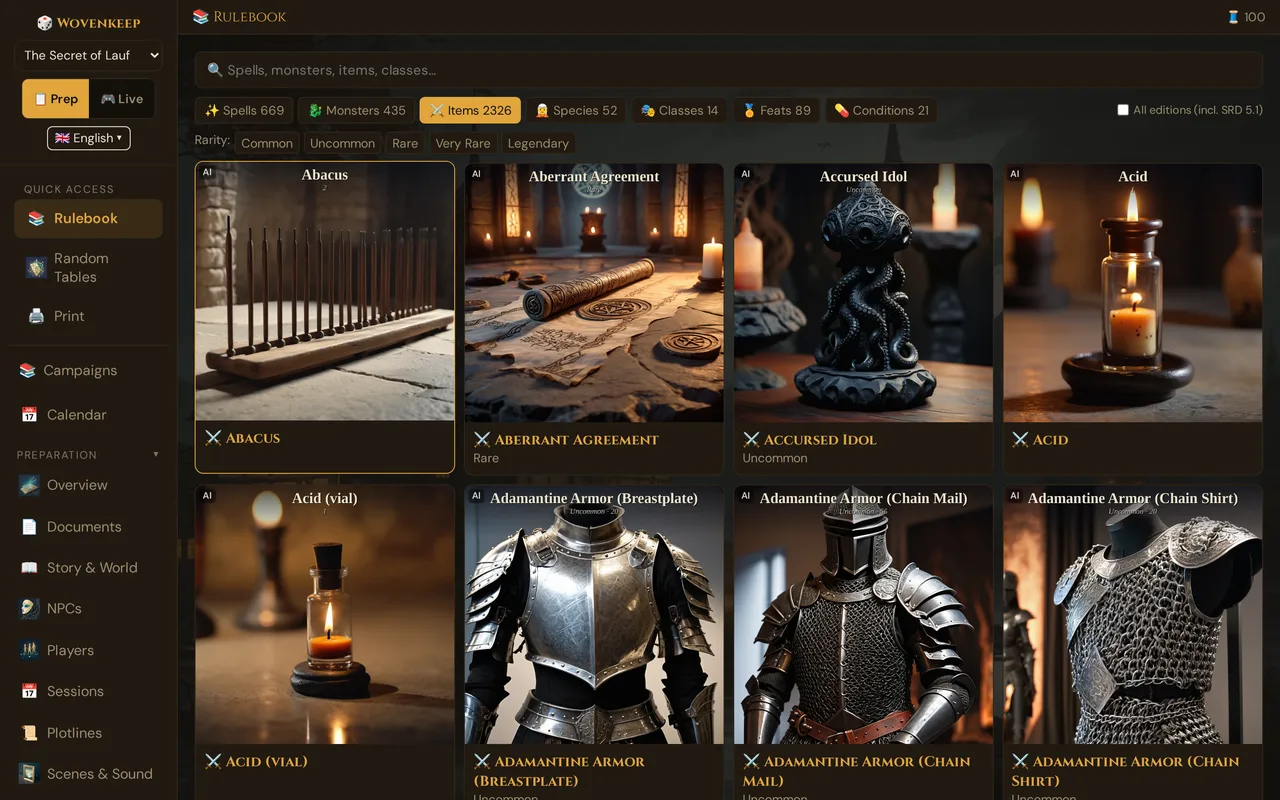
What it does
Seven category tabs each hold a searchable list. Every entry has a full detail card — statblocks rendered like a Monster Manual page, spell descriptions, item mechanics. Where art is available the card shows an illustration (made with AI). You can swap image variants per entry; to start homebrew from an SRD monster, copy it under Create → 🐉 Monsters with the search 🔍 Search & add SRD monster…. An eighth tab, 🎒 My Items with the custom items of your campaign, exists only on the standalone page.
When to use it
- Prep: research monsters before a fight, look up a spell wording, check item rarity
- Mid-session: pull a statblock the moment players attack something unplanned, verify a condition's exact rules, check what a spell does before the player finishes casting
Step by step
- Open the 📚 Rulebook link in the sidebar — it appears in both prep and live navigation.
- The page opens on the Spells tab by default. Click any tab to switch category: Spells · Monsters · Items · Species · Classes · Feats · Conditions
- Type in the search bar to filter the active tab by name (results update as you type).
- Use the filter buttons below the tabs to narrow further: Spells → Level: (Cantrip, Lvl 1–9), Monsters → CR: (0 to 5 one by one, then 6-10, 11-15, 16-20, 21+), Items → Rarity:. Click an active button again to clear it.
- Click any result card to open its full detail modal.
- To switch the image for an entry, click the 🖼 Pick image button inside the detail modal — the Choose image window opens and the change takes effect immediately.
💡 Tip: The quick preview when you hover a result card — AC, HP, key stats without opening the full modal (long-press ~500 ms on touch devices) — exists only on the standalone page.
Core rules & DC table
The 📜 Core rules & DCs button at the top of the rulebook opens a cheat sheet with the rules you need most at the table: the D20 Test (ability check, saving throw, attack roll), saving throws, Advantage and Disadvantage, Initiative, “Your turn” with every action, attacks and Critical Hits, Death Saving Throws, and Short and Long Rests. Below it is the table of typical Difficulty Classes — Very easy 5, Easy 10, Medium 15, Hard 20, Very hard 25, Nearly impossible 30 — for when you need a DC for a trap, a lock or a climb.
The search finds the cheat sheet too: type initiative, saving throw, DC or advantage, and it appears as the first card above the results. In the GM tool you can also open it from the help menu (📜 Core rules & DC table). The texts are a shortened version of the SRD 5.2.1 (CC-BY-4.0); when in doubt, you decide as the GM.
Standalone page /gm/rules.html
Besides the Rulebook in the sidebar there is a standalone rulebook page at yourname.wovenkeep.com/gm/rules.html. It shows the same SRD lists and adds:
- an eighth tab 🎒 My Items — the custom items of the campaign selected in the GM tool, searchable and filterable by rarity (without a selected campaign it only shows a notice);
- dropdown filters: Spells → level + school, Monsters → CR, Items → rarity plus Magic only;
- the ℹ source icon on every card;
- the quick preview when you hover a card (long-press ~500 ms on touch devices).
It has no All editions (incl. SRD 5.1) switch — it always lists the SRD 5.1 entries, too.
What's included
| Category | Count | Contents |
|---|---|---|
| Items | 2,326 | Equipment, weapons, armor, and SRD magic items with rarity and mechanics |
| Spells | 671 | Every SRD spell — level, school, casting time, range, components, full description |
| Monsters | 471 | Full statblocks — abilities, actions, CR, legendary actions, traits |
| Classes | 14 (+113 subclasses) | The 12 SRD classes plus Marshal (A5E) and Mechanist (Black Flag), with progression tables and subclasses |
| Species | 56 | Playable races with ability bonuses, traits, speed, size |
| Feats | 89 | Feats with prerequisites and benefits |
| Conditions | 21 | The 15 SRD conditions (Blinded, Charmed, Frightened, Poisoned…) plus 6 from A5E — see Example: conditions from A5E |
Total: 3,761 entries (classes counted together with their subclasses). The exact count reflects the data bundled at build time — the counters in the tool show the live database numbers, and by default they leave out SRD 5.1 duplicates (see Editions).
Besides the Wizards of the Coast SRD (5.2 and 5.1), the counts include openly licensed material from other publishers: Kobold Press (Tome of Heroes, Vault of Magic, Black Flag Reference Document), EN Publishing (Adventurer's Guide, A5E), Somanyrobots (Spells That Don't Suck) and Open5e. The ℹ icon on each card of the standalone page shows where an entry comes from.
The 🎒 My Items tab of the standalone page is separate from these counts.
Editions — SRD 5.2 and SRD 5.1
The Rulebook holds the current SRD 5.2 (2024 rules) and older SRD 5.1 (2014) entries. Some SRD 5.1 entries have a renamed successor in the 2024 rules (e.g. Goblin → Goblin Warrior). So you don't see both, the Rulebook hides these older duplicates by default: 36 monsters, 2 spells (Feeblemind, Branding Smite), 4 races (High Elf, Hill Dwarf, Lightfoot, Rock Gnome) and 4 subclasses (Way of the Open Hand, Draconic Bloodline, The Fiend, School of Evocation).
To show them again:
- Open 📚 Rulebook in the sidebar.
- Tick All editions (incl. SRD 5.1) at the end of the tab row.
- Lists and tab counters now include the SRD 5.1 duplicates — with the bundled data Spells 671 instead of 669, Monsters 471 instead of 435, Species 56 instead of 52; the Classes tab then lists 113 instead of 109 subclasses. Untick to hide them again.
Wovenkeep remembers the setting in this browser.
The SRD 5.1 badge: entries from SRD 5.1 show a small SRD 5.1 badge right after their name on the result cards in Spells, Monsters, Species and Classes. SRD 5.1 entries without a 2024 successor stay visible even with the switch off — they carry the badge, too.
Search — per-tab, not cross-tab
Search runs within the active tab only. If you switch to Monsters and type "dragon", you get dragons — not spells or items that mention dragons.
Active tab: Monsters
[ 🔍 dragon                                ]

Adult Black Dragon      CR 14  Huge dragon
Adult Blue Dragon       CR 16  Huge dragon
Adult Brass Dragon      CR 13  Huge dragon
…
To search across multiple categories, run your term in each tab separately.
The search box matches on the name only. To narrow by CR, spell level or rarity, use the filter buttons below the tabs (a school filter exists only on the standalone page) — typing cr 5 into the search looks for a monster whose name contains "cr 5", not for CR-5 monsters.
Detail cards
Clicking a result opens the full detail modal. Monster cards show the statblock — CR, size and type, AC, HP, speed, ability scores, skills, senses, languages, traits, actions and (where present) legendary actions:
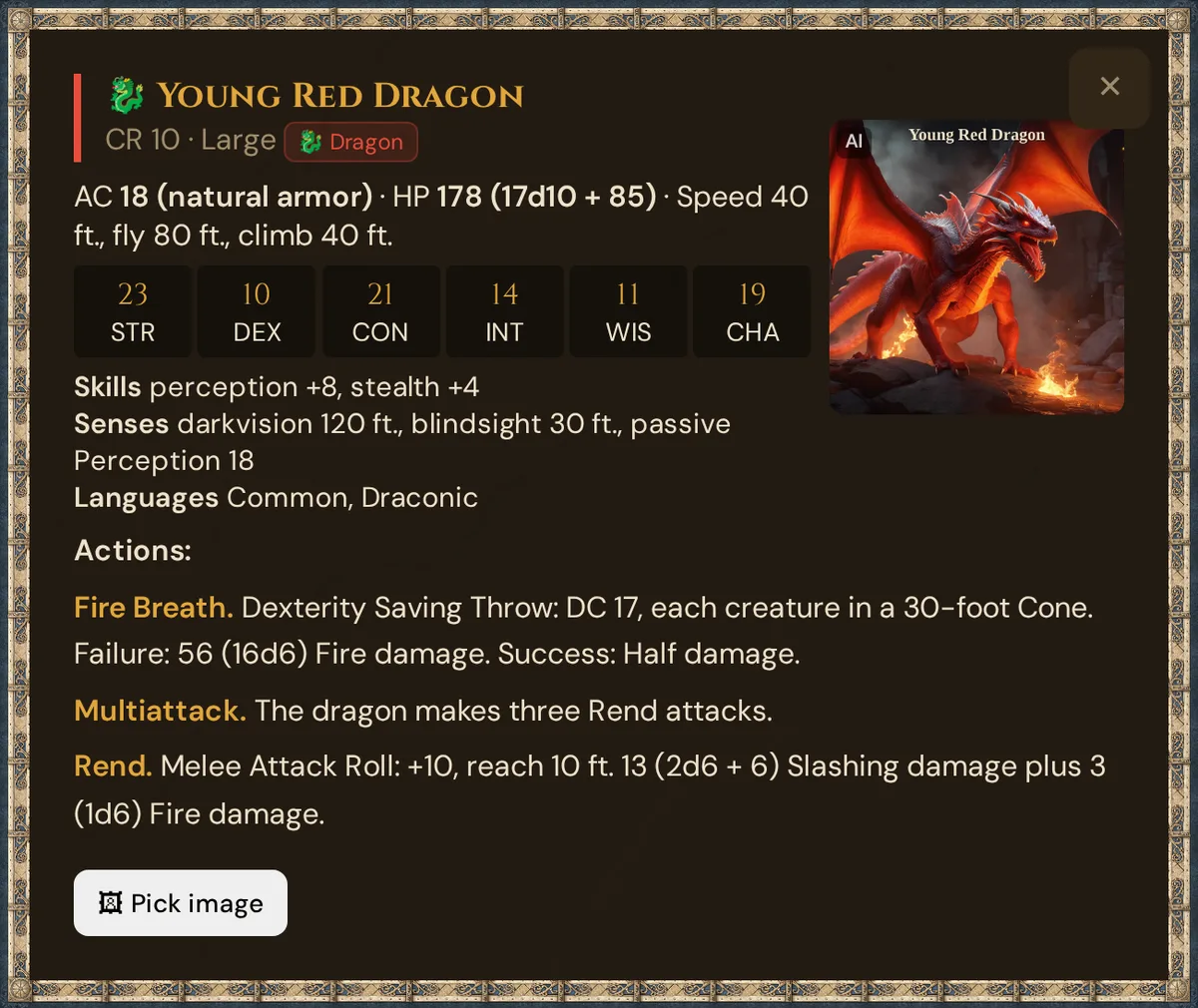
The 🖼 Pick image button opens the Choose image window with the default picture and the available variants (made with AI); there Tantu can also create a new image. Your selection persists per Realm.
There is no clone button in the Rulebook. To use an SRD monster as the starting point for your own, open Create → 🐉 Monsters, search for it in 🔍 Search & add SRD monster… and click it — Wovenkeep adds your own copy, which you edit with ✏️.
Source and license icons
On the standalone page, each result card shows a small ℹ icon next to the entry name; the Rulebook in the sidebar doesn't have it. Hover or focus it to see the source publication, publisher, and license (CC-BY-4.0, OGL-1.0a, CC0, or ORC). For a full attribution list with license texts, open Credits & Licenses in the GM footer — or go directly to yourname.wovenkeep.com/credits.html in your Realm.
Example: conditions from A5E
The Conditions tab holds 21 entries: the 15 conditions of the SRD 5.2 and 6 conditions from the Adventurer's Guide (A5E) by EN Publishing — Bloodied, Confused, Doomed, Encumbered, Rattled and Slowed. These six are not part of the official SRD.
- Open the standalone page
yourname.wovenkeep.com/gm/rules.htmland its Conditions tab. - Hover or focus the ℹ icon on a card.
- The tooltip shows source, publisher and license: Adventurer's Guide (A5E) · EN Publishing · CC-BY-4.0 for the six A5E conditions, System Reference Document 5.2 · Wizards of the Coast LLC · CC-BY-4.0 for the SRD ones.
Earlier the six A5E conditions were wrongly labelled as SRD 5.2 — that is fixed. In Credits & Licenses, Adventurer's Guide (A5E) appears as a source of its own, with its entry counts.
Only the SRD 5.2 texts are translated: if you use Wovenkeep in German, French or Spanish, the A5E conditions stay in English, and their detail view says so.
Credits & Licenses — content and software
Credits & Licenses collects every attribution on one page.
- Click Credits & Licenses in the GM footer — or open
yourname.wovenkeep.com/credits.htmlin your Realm. - At the top you find every content source with publisher, license, source link, the number of entries per category and the required attribution text — for OGL sources also the full text of the Open Game License v1.0a.
- At the bottom, the Software section lists the open-source libraries Wovenkeep ships to your browser: dice-box, Babylon.js and ammo.js (both bundled in dice-box), d3, html2canvas and ALTCHA — each with version, license (MIT, Apache-2.0, zlib or ISC) and copyright line.
- Click License text ↗ next to a library to read its original license text. Babylon.js also links its NOTICE ↗ file.
Licensing — what's bundled and why
Wovenkeep only bundles openly-licensed rules content.
The default load is the D&D 5e SRD (System Reference Document) — the subset of 5e that Wizards of the Coast released under the Open Gaming License and Creative Commons. This is legal to redistribute.
Wovenkeep does not bundle:
- Non-SRD content from Wizards of the Coast (Hexblade warlock, Tasha's subclasses, setting books)
- Copyrighted monsters or spells from non-SRD sourcebooks
- Any data scraped from third-party aggregators
If a class, subclass, or monster you expect isn't there, it's almost certainly non-SRD (not openly licensed). Wovenkeep won't ship it.
To use non-SRD or homebrew content you have two paths:
- Create it manually — add a custom class, subclass, item, or monster in the relevant section of the campaign prep tools
- Community content via Loom — the Loom Marketplace (coming soon) will host CC-BY-4.0 / CC0 content
This is a firm policy, not an oversight. It protects your Realm from copyright liability and keeps Wovenkeep on clean legal footing.
Game systems beyond 5e
Wovenkeep currently ships the D&D 5e SRD as the only ruleset. The campaign has a System field plumbed for other SRDs (Pathfinder 2e, 13th Age) but only 5e content is loaded today. Other-system SRDs are on the roadmap.
Troubleshooting
| Symptom | Cause | Fix |
|---|---|---|
| A class or subclass is missing | It's non-SRD (copyrighted, not openly licensed) | Create it as custom content |
| A monster, spell or race from the 2014 rules is missing (e.g. Goblin) | It's an SRD 5.1 duplicate, hidden by default | Tick All editions (incl. SRD 5.1) — see Editions |
| Search returns nothing | Search runs in the active tab only | Switch to the correct tab and search again |
| Detail modal shows no image | Not all entries have art yet | Normal — the image slot is empty until art is available |
| 🖼 Pick image shows no variants | Variant store hasn't been generated for this entry yet | Will resolve with SRD image updates |
| You can't find a clone button in the Rulebook | Copying lives in the Monsters section | Create → 🐉 Monsters → 🔍 Search & add SRD monster… |
Related articles
- ✨ Suggestions: items, monsters, images, sound — suggestions for custom content and images beyond the SRD
- ⚔️ Initiative & combat — look up SRD monsters mid-fight
- 👤 Characters & NPCs — uses the SRD race and class data
- 🔄 Threads & costs — how image suggestions are billed (pay-per-use)