👤 NPCs
👤 For: Game Masters · 💳 Plan: All plans · 🔄 Updated 2026-10-17
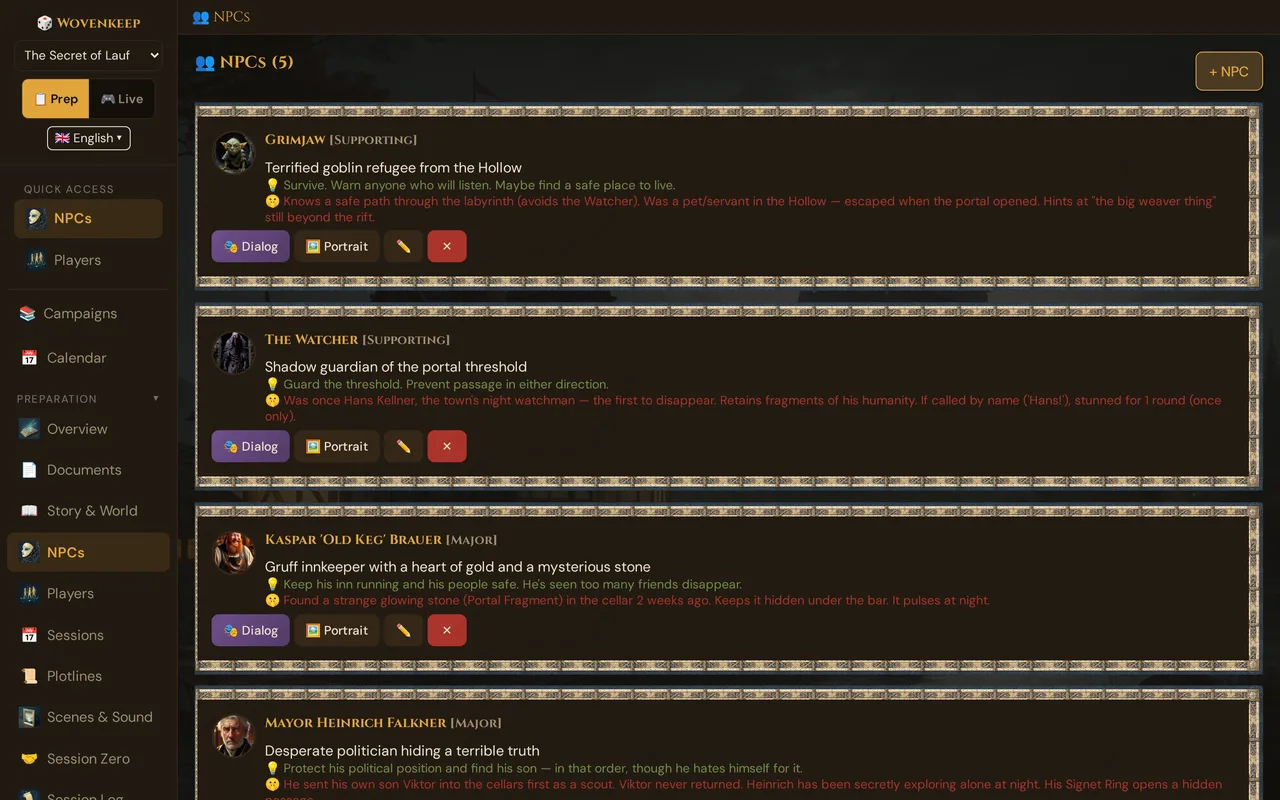
NPCs — non-player characters — are the people your players talk to, fight, trust, and betray. This is the most-used prep section in Wovenkeep: create a character in seconds, give them a portrait, and speak in their voice live at the table.
What it does
The NPC panel is your character roster: a list of every named person in your campaign, each with fields for personality, motivation, secret, and voice. These fields are your cheat sheet at the table; Tantu also uses them for suggestions. You can push an NPC's speech bubble directly to player phones during a session.
When to use it
Use it whenever you want a character who matters beyond a single line. Even one sentence of motivation and one sentence of secret is enough to bring the NPC to life at the table. Build your key NPCs before the session; let the minor ones stay thin.
Where to find it
Sidebar → 👤 NPCs (under Preparation).
The NPC list
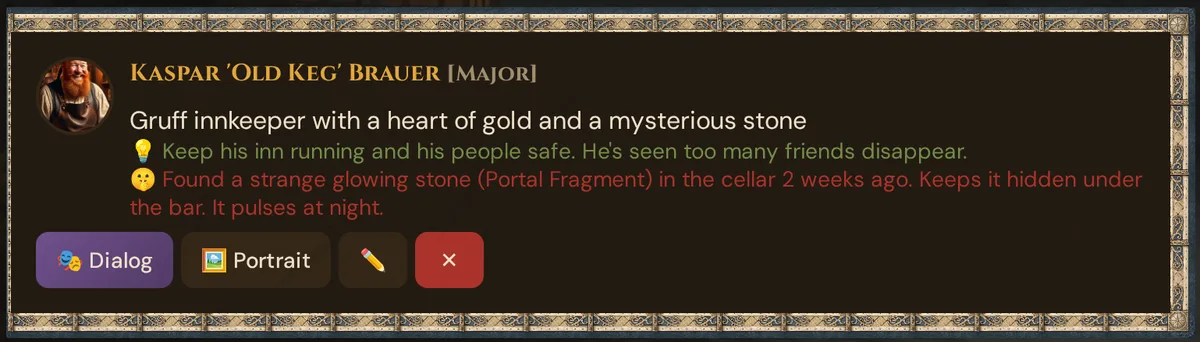
The card's left border color reflects importance (major vs. minor). The portrait is a 50×50 circular thumbnail (hidden if no portrait has been set yet).
Creating an NPC
Click + NPC. The creation panel has two parts: the fields you fill in yourself, and above them an optional box where Tantu makes you a suggestion.
Create it yourself
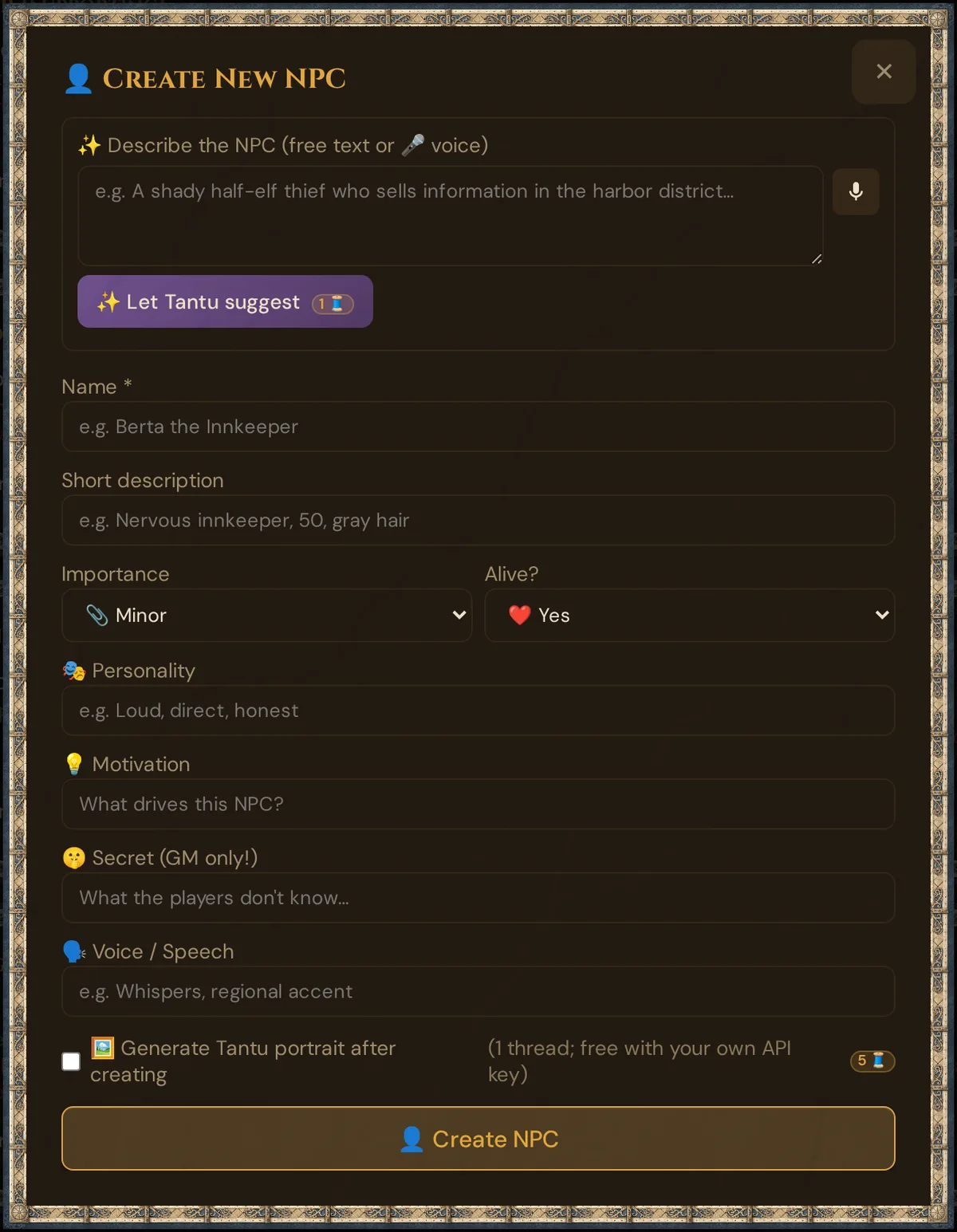
Fill the fields directly:
| Field | Required | What for |
|---|---|---|
| Name | Yes | Display name everywhere |
| Short description | Recommended | Look and role in one sentence (also serves as the template for portrait suggestions) |
| Importance | Default minor |
major (recurring, plot-critical) or minor (one-scene flavor) — changes the card border color so you spot the key NPCs at a glance (Tantu also weights them accordingly in suggestions) |
| Alive? | Default Yes |
No marks the NPC dead (💀 indicator); dead NPCs are excluded from the live dialog dropdown |
| Personality | Recommended | How they act — your cheat sheet for playing them (Tantu also uses it for dialogue suggestions) |
| Motivation | Recommended | What drives them — so you know in every scene what the NPC wants (Tantu also uses it for dialogue suggestions) |
| Secret | Optional | What players don't know — the subtext you play. GM-only; never sent to phones (Tantu also uses it for dialogue suggestions) |
| Voice / Speech | Optional | How they talk (accent, cadence, catchphrase) — so you hit the right tone at the table instantly (Tantu also picks it up in dialogue suggestions) |
| 🖼️ Generate Tantu portrait after creating | Optional checkbox | Tantu makes a portrait suggestion (AI) right after the NPC is created. A confirm dialog shows the cost first — 5 Threads. |
Click 👤 Create NPC. The NPC is saved and appears in the list; open it with ✏️ for the full editor, where every field autosaves (see Autosave).
Optional: suggestion from Tantu (AI)
If you'd like a suggestion, describe the NPC in plain language at the top of the form:
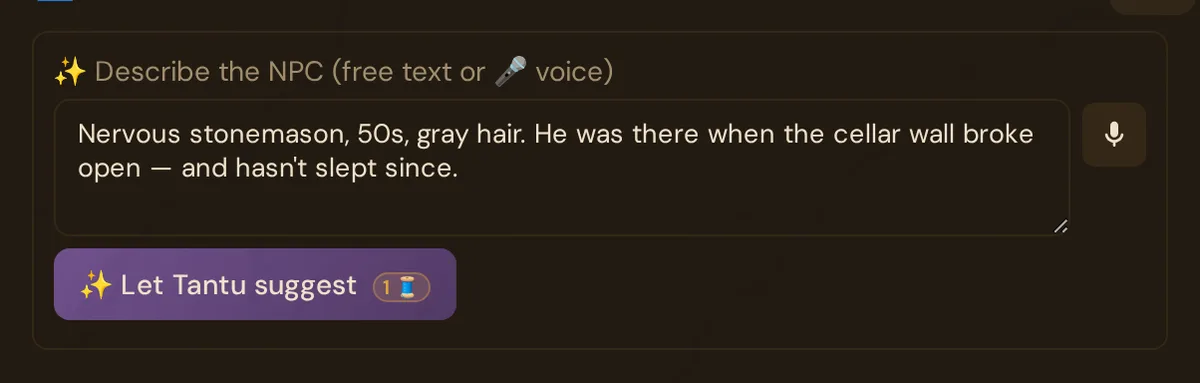
- Type a free-text description of the NPC (or speak it — the 🎤 microphone button uses your browser's built-in speech recognition; free, no key, no Threads).
- Click ✨ Let Tantu suggest.
- Tantu fills the name, short description, personality, motivation, secret, and voice fields for you. Review and edit any field.
💡 Tip: The more concrete your description, the better the suggestion. "Nervous innkeeper who owes money to the thieves' guild" beats "an innkeeper" every time.
This costs 1 Thread. With a BYO AI key, text actions like this are free — the button badge shows 0 🧵.
Field-writing tips
Short description — write it vividly enough that you can see the NPC right away; it also serves as the template for portrait suggestions. "Grizzled dwarven blacksmith, missing left eye, soot-stained leather apron, forearms like tree roots" carries far more at the table than "a blacksmith" — and makes the better portrait, too.
Personality — three adjectives + a behavior. "Gruff, secretly kind, protective of children — never says what he means directly."
Motivation — a concrete want, not an abstract trait. Not "justice" but "find the person who killed his apprentice and make them confess publicly."
Secret — the thing that recontextualizes everything. "He's the one who killed the apprentice. He doesn't remember because he was charmed."
Voice — speech mannerisms you can call up instantly at the table (Tantu picks them up too). "Short sentences. Calls everyone 'lad' regardless of age. Trails off when lying."
Portrait: upload, link, or get a suggestion (AI)
Click 🖼️ Portrait on any NPC card. There you can upload your own image, paste an image URL, choose a picture from your media, or let Tantu suggest one. The portrait window shows the current portrait with 🗂️ Choose from media below it, and four boxes:
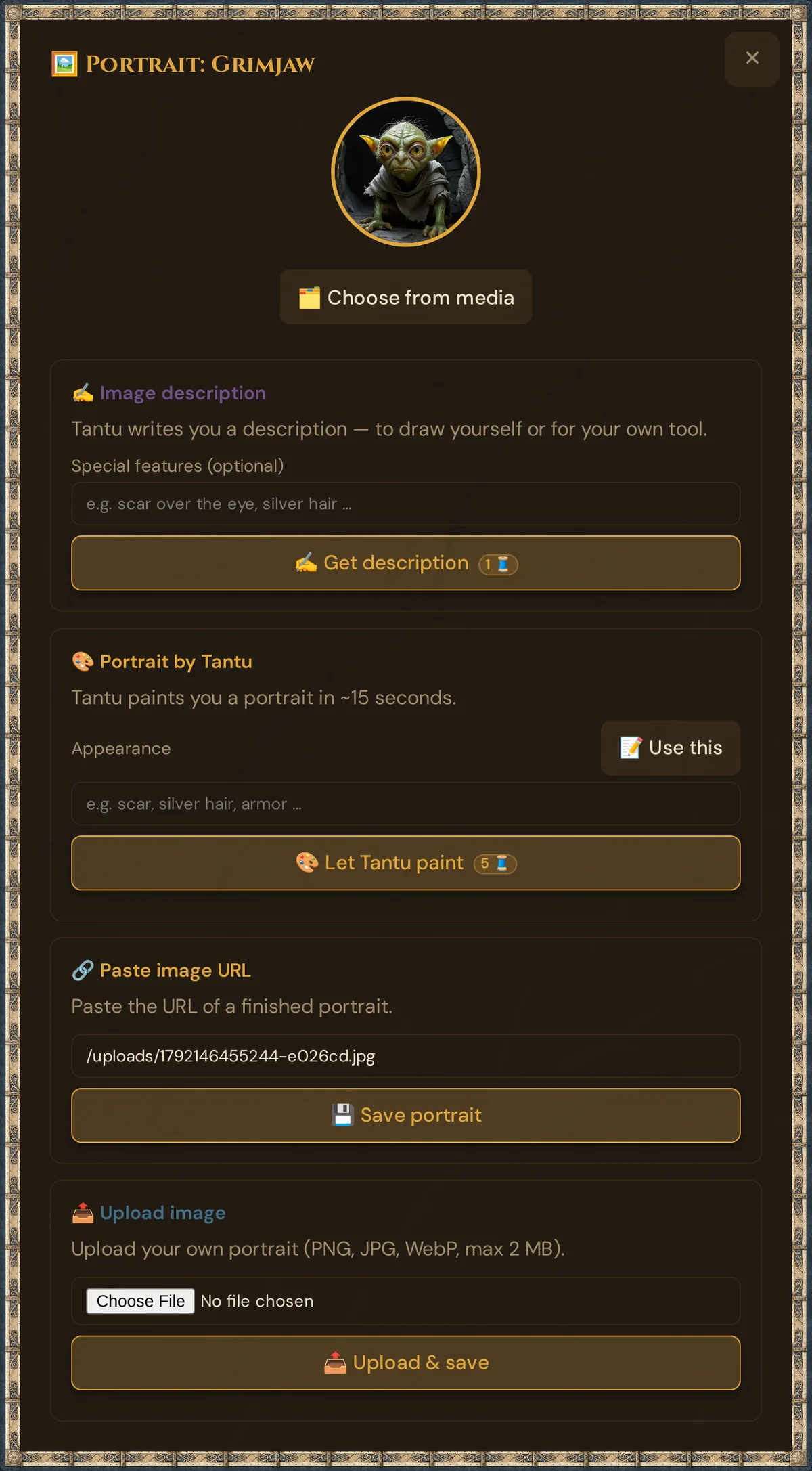
Every Tantu button carries a cost badge ("1 🧵", "5 🧵" — "0 🧵" for text actions with your own AI key), and a confirm dialog with the cost and your current balance appears before anything is charged.
🗂️ Choose from media — reuse your pictures
🗂️ Choose from media opens 🗂️ Choose a portrait from media with the portraits and pictures of this campaign — portraits first; All campaigns shows the others too, and Search by name… filters them.
- Click a picture to make it this NPC's portrait. It is saved at once (✓ Portrait saved) — no re-generation, no Threads spent. The same picture can be the portrait of several NPCs.
- ⬆️ Upload in the dialog adds a new picture (JPG, PNG, WebP or GIF, up to 5 MB) — also by dragging it onto the dialog — and assigns it right away.
- ✕ Remove takes the portrait off the NPC; the picture stays in your media.
- The dialog has no Create with Tantu — for a new portrait use 🎨 Portrait by Tantu below.
More about the dialog: Choose from media.
🎨 Portrait by Tantu — generate a real portrait
This creates an image suggestion (AI) directly in Wovenkeep.
Step by step:
- Click 🖼️ Portrait on the NPC card.
- Find the amber 🎨 Portrait by Tantu box.
- Click 📝 Use this — this reads the NPC's short description and fills the Appearance input automatically. No typing needed if your description is good.
- You can edit the filled-in text to add detail, e.g. "battle scar over the left eye, silver hair".
- Click 🎨 Let Tantu paint (badge: 5 🧵) and confirm.
- A working indicator appears. Behind the scenes Tantu creates a fantasy portrait with the help of AI from the NPC's name, description, and appearance — head-and-shoulders, dark moody background, painterly style, no text or watermarks.
- ~15 seconds later the portrait appears and is saved to the NPC automatically. It also appears in 🗂️ Choose from media, with the badge Created by Tantu.
- Don't like it? Tweak the Appearance field and click 🎨 Let Tantu paint again (costs another 5 Threads).
This is the exact flow for "I want a portrait from the description I already wrote": click 🖼️ Portrait → 📝 Use this → 🎨 Let Tantu paint. Three clicks, ~15 seconds, done.
✍️ Image description — for external image tools
If you prefer another image tool — or want to draw it yourself — the ✍️ Image description box (purple) writes a high-quality image description for you:
- Optionally type Special features (e.g. "scar over the eye, silver hair")
- Click ✍️ Get description (1 Thread — free with your own AI key)
- Tantu writes a detailed image prompt from the NPC's name, description, and features
- The description is auto-copied to your clipboard and shown in the box
🔗 Paste image URL
If you already have a portrait (commissioned art, a stock image, an image of your own):
- Paste the HTTPS URL into the input
- Click 💾 Save portrait
The URL is stored on the NPC (portrait_path). Wovenkeep links to the URL directly — make sure it stays live.
📤 Upload image
To use a local file:
- Click Choose file, pick a PNG/JPG/WebP (max 2 MB)
- Click 📤 Upload & save
The file uploads to your Realm's storage and is attached to the NPC. Counts against your storage quota.
Mood portraits
A single portrait is good. Multiple expressions are great — push the angry version when the NPC is furious, the sad version after a loss.
Wovenkeep stores up to three mood portraits per NPC:
portrait_neutral(the default)portrait_angryportrait_sad
To set them, open the NPC editor and find the Mood portraits section. Each mood has its own URL/upload field. Set them the same way as the main portrait (upload, paste URL, or get a suggestion).
During a live session, when you push NPC dialog, you can pick which mood portrait accompanies the speech bubble — so the captain looks angry when he's threatening the party and sad when he confesses.
Generating mood variants efficiently: generate the neutral portrait first. Then generate angry and sad versions (tweak the Appearance field each time) and set each one in its mood slot — no need to generate twice.
NPC speaks: lines without AI
You voice the NPC; Wovenkeep shows the line as a speech bubble on your players' phones. This works without AI and costs no Threads.
Prep: store quick lines
- Sidebar → 👤 NPCs, open the NPC with ✏️.
- In 💬 Quick lines (one sentence per line), type up to 20 sentences, one per line (e.g. "Who goes there?"). Each line holds up to 300 characters; empty lines are dropped. The field saves automatically.
Live: send a line
- Start the live session, switch to 🎮 Live and open 🎭 NPC Dialog.
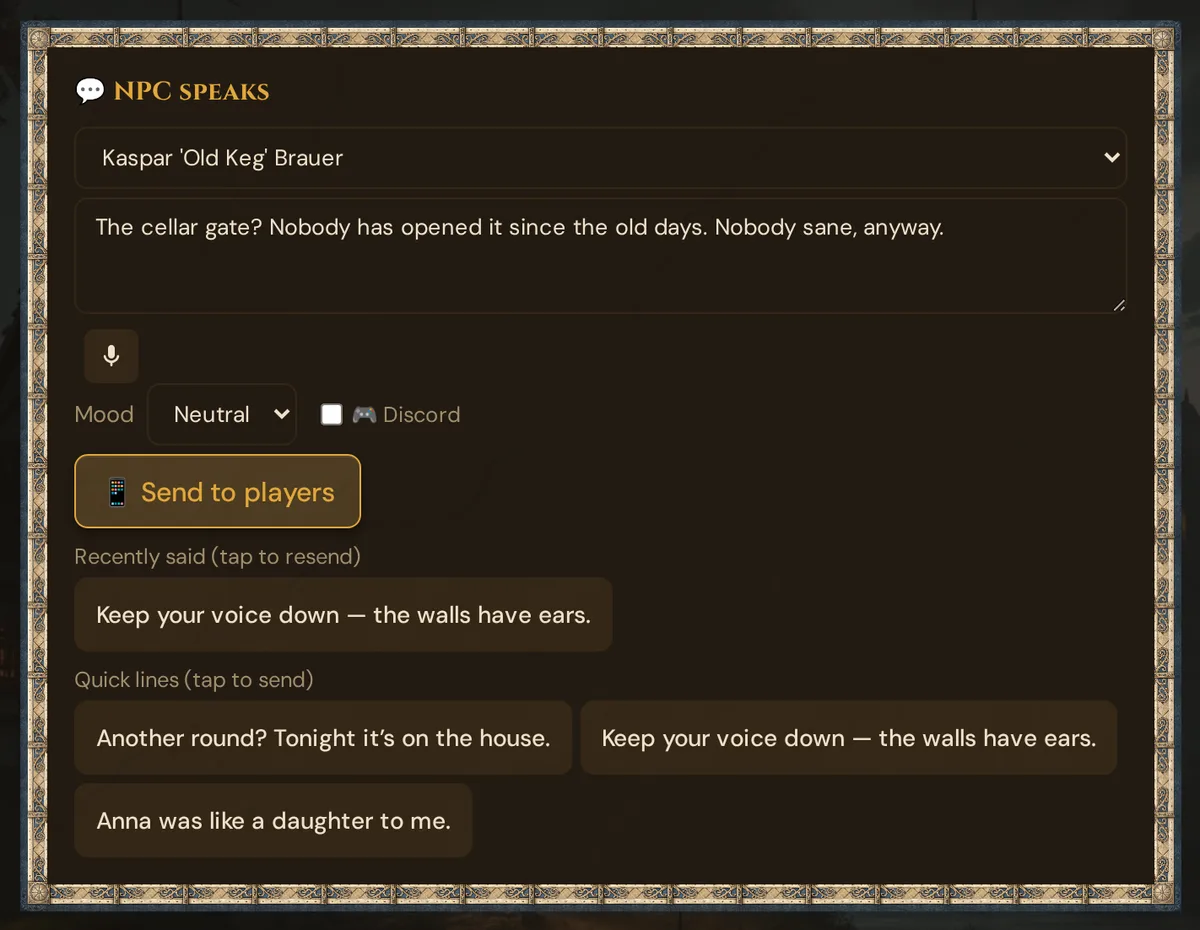
- In the card 💬 NPC speaks (above the dialogue suggestions), pick the NPC. Only living NPCs are listed.
- Type the line (up to 500 characters) or dictate it with the microphone button, if your browser supports speech recognition.
- Pick a Mood: Neutral, Angry or Sad. Angry and Sad only appear if the NPC has an angry or sad mood portrait; the mood decides which portrait the bubble shows.
- Click 📱 Send to players.
- Quick lines (tap to send): one tap sends a stored line with the selected mood. If the NPC has none, the card says "Set up quick lines in Prep > NPCs."
- Recently said (tap to resend): the last 5 lines of this NPC; one tap sends a line again with its mood. The list only lives in the open live view and is empty after a reload.
- 🎮 Discord: also posts the line to Discord if the Scenes & NPCs slot is set up (Instance settings → Discord).
What players see: the NPC's name and portrait (the mood portrait, otherwise the main portrait). The text appears letter by letter, the phone vibrates briefly, and the bubble closes by itself after the reading time (at least 4 seconds).
Without AI: the card works without an AI key and without Threads. The optional 🎭 Suggest dialogue card below it (1 Thread) sends its result with 📱 Send to phones the same way. A worked example from prep to table: AI helpers in practice.
Dialogue suggestions (AI)
You voice your NPCs yourself. When the words won't come: Tantu suggests lines, drawn from the NPC's personality, motivation, secret, and situation.
From the NPC editor (prep)
Click 🎭 Dialog on the NPC card. Type a situation:
The party accuses Morr of lying about the ambush.
Click 🎭 Generate Dialog (badge: 1 🧵; a confirm dialog with your balance appears first). Tantu suggests lines in Morr's voice, informed by his personality ("gruff, defensive"), motivation ("protect the Order"), and secret ("he staged the ambush"):
"You think I'd risk my own neck on a staged attack? [He doesn't quite meet your eyes.] I've bled for this road longer than you've held a sword, boy. Watch your tongue."
Every suggestion is saved as a version. A version dropdown appears above the result — you can revisit any previous suggestion for this NPC without requesting a new one. When you reopen the dialog panel for the same NPC, the last result is restored automatically.
This is a prep tool — it lets you preview how an NPC sounds before the session.
During a live session
The same engine runs in live mode. Live → NPC Dialog:
- Pick the NPC from the dropdown (dead NPCs are excluded)
- Type the situation, or leave blank for an opening line
- Click 🎭 Suggest dialogue
- Tantu suggests the line; you speak it yourself or Push it to player phones as a visual-novel speech bubble with the NPC's portrait
See NPC dialogue suggestions for all the details including context handling and cost.
NPC stats (stat block)
If an NPC might end up in a fight, give them 5e stats. This is optional; NPCs without stats work as before.
Where: NPC card → ✏️ → section ⚔️ Stats in the editor.
Add stats
- Open the NPC with ✏️. Under ⚔️ Stats you see "No stats for this NPC yet."
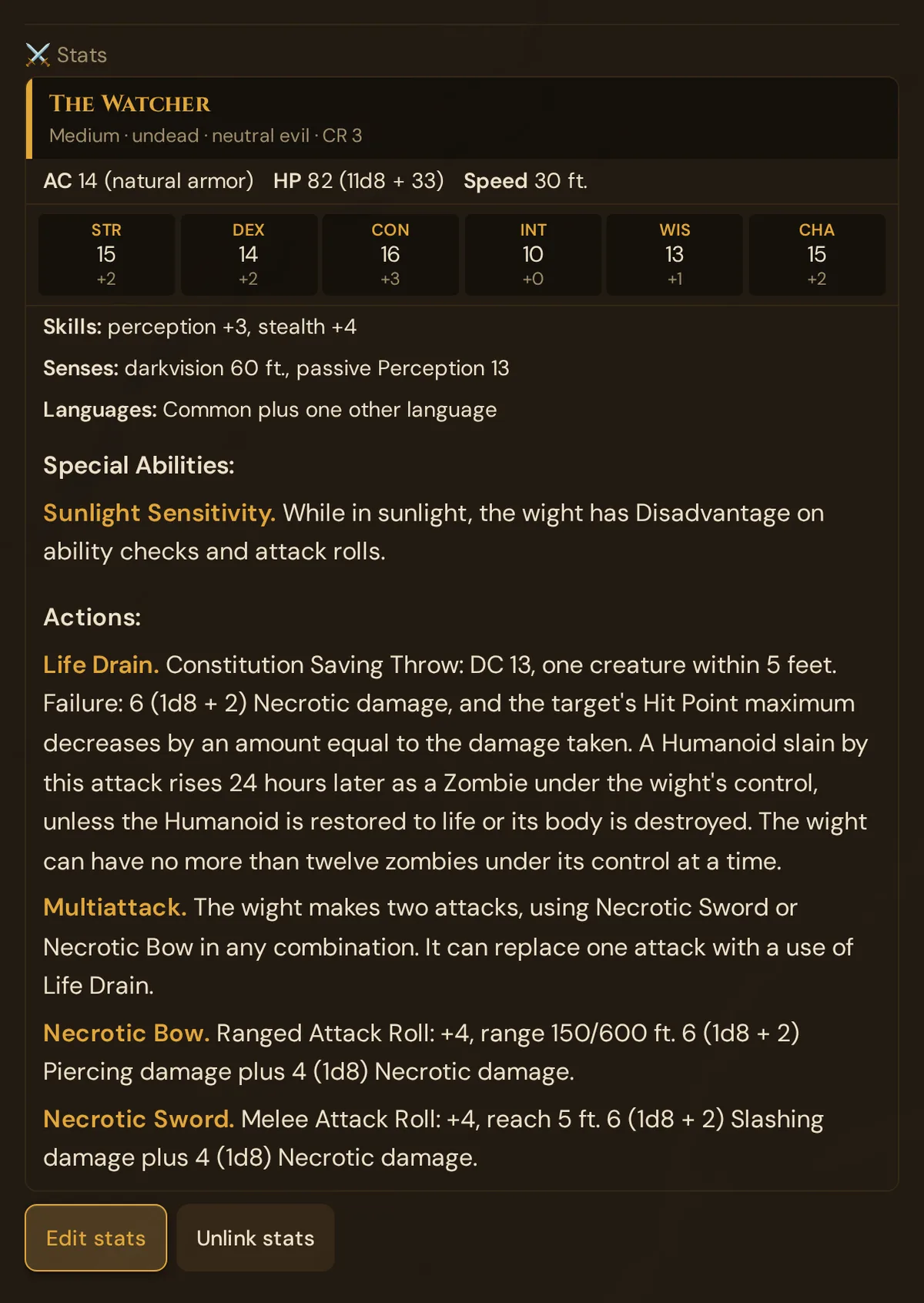
- Either click Add stats: you get a blank stat block (AC 10, HP 10, speed 30 ft., CR 1/8, all scores 10, Medium humanoid).
- Or use a template: type at least 2 letters into the search field "Or search a compendium template, e.g. Bandit Captain, Knight, Mage" and click a result (shown with its CR). Wovenkeep copies that SRD monster's values and gives the stat block your NPC's name.
The stat block shows AC, HP, speed, the six scores with modifiers and the filled rows (Saving Throws, Skills, damage and condition rows, Senses, Languages) and lists (Special Abilities, Actions, Bonus Actions, Reactions, Legendary Actions). Empty rows and lists are hidden.
Edit stats
- Click Edit stats.
- Change Armor Class, Armor type, Hit Points, HP formula, Speed, Challenge Rating, Size, Type, Alignment and the six scores (the modifier updates as you type), plus the text rows.
- In each list (Special Abilities, Actions, Bonus Actions, Reactions, Legendary Actions), + Entry adds a row with Name and Description; ✕ removes it.
- Click Save stats, or Cancel. Unlike the other NPC fields, stats don't autosave. If saving fails, "Saving failed." appears and your input stays.
Unlink stats
Click Unlink stats and confirm. The NPC has no stats afterwards; the stat block itself is kept.
The stat block is stored as a monster of your campaign with the NPC's name. You also find it in the sidebar under 🐉 Monsters, and it stays there after unlinking.
NPC Loadout & Loot
Every NPC (and monster) has a Loadout panel in their editor — an inventory of items they carry, linked to the SRD compendium.
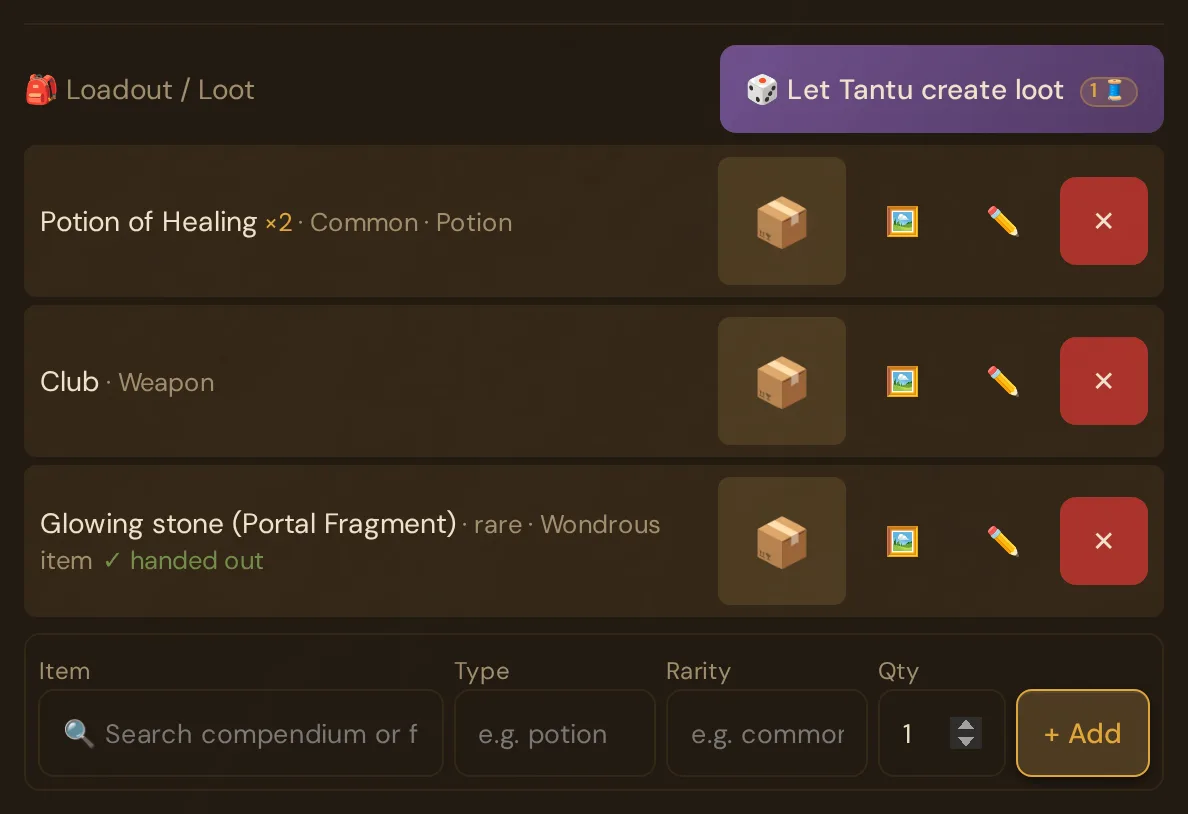
- Search the compendium to add any item by name — the openly licensed D&D 5e content (SRD 5.2 and 5.1 plus open content from other publishers).
- Inline-edit (✏️) each item's name, type, rarity and quantity.
- 🎲 Let Tantu create loot — suggests a balanced 5e-appropriate loadout based on the NPC's class, level, and campaign context. Costs 1 Thread.
- 🔮 Foreshadowing — if Tantu's loot suggestion ties an item to one of the NPC's scenes, the item gets a 🔮 with a note (GM-only). There is no manual toggle.
- ✓ handed out — appears automatically once you've handed the item to a player in the live session.
- 🖼️ lets Tantu suggest a picture of the item (5 Threads); a click on the thumbnail (📦 while there is no picture) shows all values.
Items in the loadout can be transferred to a player character during a session using the loot-transfer flow (see Loot & Inventory).
NPC mood tracking
Beyond mood portraits, there is a lightweight mood you can set on an NPC — a single value such as friendly / neutral / hostile / afraid — that:
- Shows as a small badge on the NPC card
- Also feeds into Tantu's dialogue suggestions (a hostile NPC sounds different from a friendly one)
Set it from the NPC card's context menu (three-dot or right-click). Mood is updated manually; there is no automatic setting.
NPC relationships
NPCs can be connected to each other (ally, enemy, family, etc.). This is most usefully managed in the Story Web visual editor — import your NPCs as nodes and draw the relationships. Tantu also takes the relationships into account in dialogue suggestions (an NPC will then reference their allies and enemies).
A related feature — Scene Conversations — lets you run a multi-NPC back-and-forth dialog inside a scene's cast, rather than one character at a time. See Scenes for details.
Killing an NPC
Set Alive? to No in the editor — or record it as a world event 👤 NPC fate → dead, which also notes it in the chronicle and the world state. Dead NPCs:
- Show a 💀 indicator on the card
- Are excluded from the live-session dialog dropdown (the dead don't talk — unless you revive them)
- Still appear in the Story Web (for historical record)
To revive (resurrection spell, faked death), set Alive back to Yes — or create an 👤 NPC fate event with back again. The fates missing and captured show only in the world state, not on the NPC card.
Deleting an NPC
The × Delete button on the card, confirmed with a prompt. This is permanent — the NPC, its portraits, its dialog history, and its Story Web node are removed. Linked sessions and plotlines lose the reference but are not otherwise affected.
If you might want the NPC back, set them to dead instead of deleting.
Best practices
Build 3–5 NPCs, not 30. Players remember the vivid few, not the forgettable many.
Write the description vividly. Vivid descriptions stick at the table — and make for more vivid portrait suggestions, too.
Write one line each major NPC always says. A signature line makes the NPC instantly recognizable — your players know who it is before you say the name.
Decide what each NPC wants from the party. Then you know how they react in every scene — even when the players do something unexpected.
Make mood variants once. Generate three slightly different versions of your BBEG (neutral / angry / sad expression in the Appearance field), then set each in its mood slot.
Give every major NPC a secret. It gives your game depth — and makes Tantu's dialogue suggestions more interesting, too.
Plan limits
| What | Limit |
|---|---|
| NPCs per campaign (Adventurer / free) | Up to 5 per the plan sheet |
| NPCs per campaign (any paid plan) | Unlimited |
| Portrait suggestion (AI) | 5 Threads per image — pay-per-use on all plans |
| NPC suggestion (✨ Let Tantu suggest) | 1 Thread per suggestion — pay-per-use on all plans |
| Dialogue suggestions (prep + live) | 1 Thread per reply — costs nothing until you request a suggestion |
| Loot generation (🎲 Let Tantu create loot) | 1 Thread per generation |
| Image description (✍️ Get description) | 1 Thread per description |
| Portrait upload / paste URL / choose from media | Free on all plans |
| NPC speaks (typed lines, quick lines) | Free — no AI, no Threads |
With a BYO AI key, text actions (NPC suggestion, dialog, loot, image description) cost 0 Threads — portrait suggestions still cost 5 Threads per image. Every Tantu button shows its price as a badge, and a confirm dialog with your balance appears before each charge.
See Threads & costs and Pricing.
Troubleshooting
| Symptom | Cause | Fix |
|---|---|---|
| Suggestion fills nothing / shows error | Description field was empty, or AI key issue | Enter at least a short description before clicking ✨ Let Tantu suggest; check ⚙️ Tantu Settings in the sidebar |
| Portrait generation spins forever | Network timeout or AI service slow | Wait 30 s and try again; if persistent, check your Thread balance |
| Portrait saved but card still shows the old image | Browser cache | Hard-refresh (Ctrl+Shift+R / Cmd+Shift+R) |
| 🗂️ Choose from media shows no portraits | No portraits in this campaign yet | Switch to All campaigns, upload one in the dialog, or let Tantu paint one |
| Dialog dropdown missing an NPC | The NPC is marked dead | Set Alive? → Yes in the editor to include them again |
| NPC suggestion looks wrong / generic | Short description was too vague | Rewrite the description with specifics (job, trait, secret in one sentence) and suggest again |
| Mood badge not visible | Mood is set to neutral (default — no badge shown) |
Set a non-neutral mood from the context menu |
| NPC speaks sends nothing, the log shows "No active session" | No live session is running | Start the live session first, then send the line |
| Add stats reports "This NPC already has stats." | A stat block is already linked | Close and reopen the editor; use Edit stats |
Related articles
- 💬 NPC dialogue suggestions — dialogue suggestions in depth, context and cost
- ⚒️ Suggestions: items, monsters, images, sound — portrait suggestions and more optional AI help
- 🕸️ Story Web — visualize NPC relationships
- 🎭 Live Session — pushing NPC dialog to player phones
- 🧵 Threads & costs — Thread costs and BYO key
- 🗺️ Scenes — Scene Conversations (multi-NPC dialog)